Picture Menu • The Dynamic Noise Reduction Control
ecause oJ)9oor cable reception or
other difficulties, the picture can
sometimes appear slightly "_peckled"
(an indication of signal noise in the
picture). The DNR (Dynamic Noise
Reduction) control can help eliminate
this t37_e of interference and improve
the qualiO' of the picture.
cffg-ar_
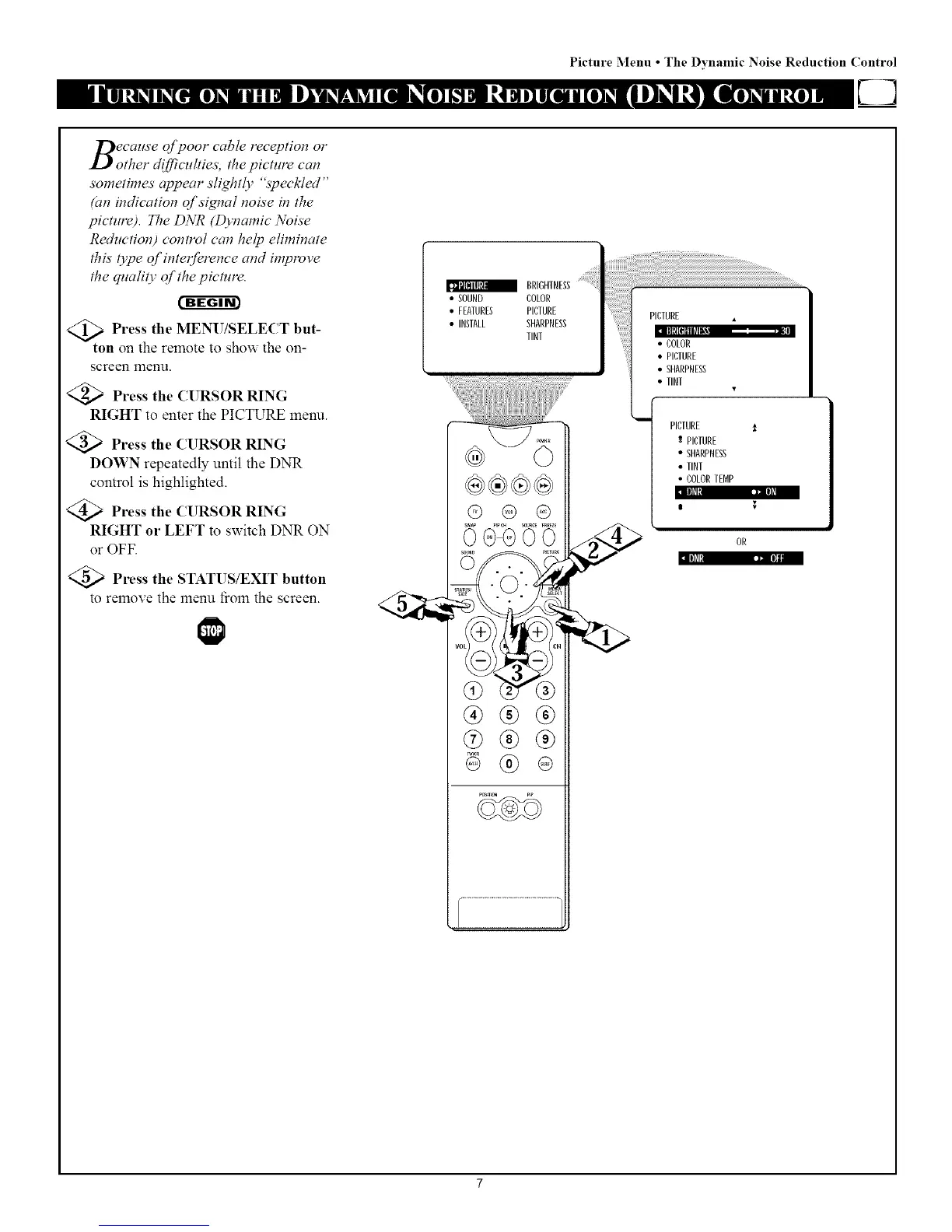
<_ Press the MENU/SELECT but-
ton on the remote to show the on-
screen menu.
<_ Press the CURSOR RING
RIGHT to enter the PICTURE menu.
Press the CURSOR RING
DOWN repeatedly until the DNR
control is highlighted.
Press the (l RSOR RING
RIGHT or LEFT to switch DNR ON
or OFF.
Press the STATUS/EXIT button
to remove the menu fiom the screen.
ll]fl:] l"rJIl]_l
lflN_I r_ll]ll
BRIGHTNESS
• SOUND COLOR
• FEATURES PICTURE
• INSTALL SHARPNESS
TINT
@ @ @
@
®®®
@®®
® ®
PICTURE
• COLOR
• PICTURE
• SHARPNESS
• TINT
PICTURE i
PICTURE
" SHARPNESS
• TINT
• COLORTEMP
i



 To Next Page