Picture Menu • The ImageMax Control
ageMax hellas' you sharpen the
icture quality by making dark por-
tions of the picture darker and light
portions of the picture brightel_
Follow these steps to turn Ima,_eMax
Ofl.
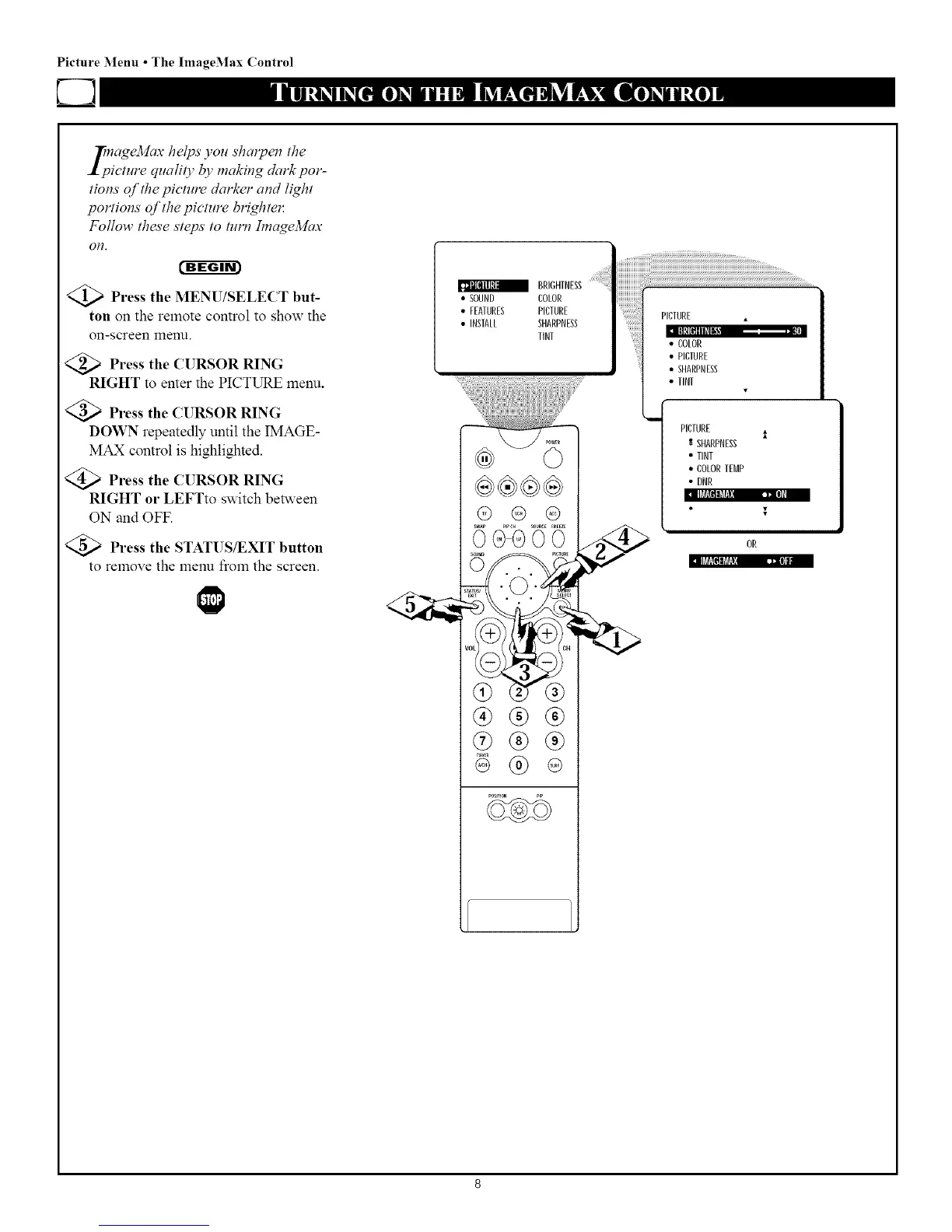
Press the MENU/SELECT but-
ton on the remote control to show the
on-screen menu.
<_ Press the CURSOR RING
RIGHT to enter the PICTURE menu.
Press the CURSOR RING
DOWN repeatedly until the IMAGE-
MAX control is highlighted.
Press the CURSOR RING
RIGHT or LEFTto switch be_veen
ON and OFF.
Press the STATUS/EXIT button
to remove the menu from the screen.
II_RRII_[_IIt 113_I]|1
BRIGHTNESS:
• SOUND COLOR
• FEATURES PICTURE
• INSTALL SHARPNESS
TINT
@ @ @
@(g-®
®®®
®®®
®
• TINT
PICTURE
:" SHARPNESS
• TINT
• COLORTEMP
• DNR



 To Next Page