Picture Menu • The Convergence Control
le inJluence of magnetic fieI&'
nd changes in the position of the
TV mco, cause screen colors not to
line up ptw_erly. The result on your
TV screen will be red or blue colors
appearing around the e_es' of
images.
If various images on the entire picture
have red outlines', adjust the CON-
VERGE RED control. Then iJ'al_T' red
outlines remain, adjust the MULTI-
POINT RED control.
If various images on the entire picture
have blue outlines, adjust the CON-
VERGE BL UE control. Then iJal_v
blue outlines' remain, adjust the MUL-
TIPOINT BLUE control.
Use the UNDO MULTIPOINT control
if you want to restore the picmre
screen to the wcO, it was beJbre you
made Multipoint adjustments.
NOTE: After turning the TV set on,
allow it to warm up for 15 minutes
before adjusting the Convergence
controls.
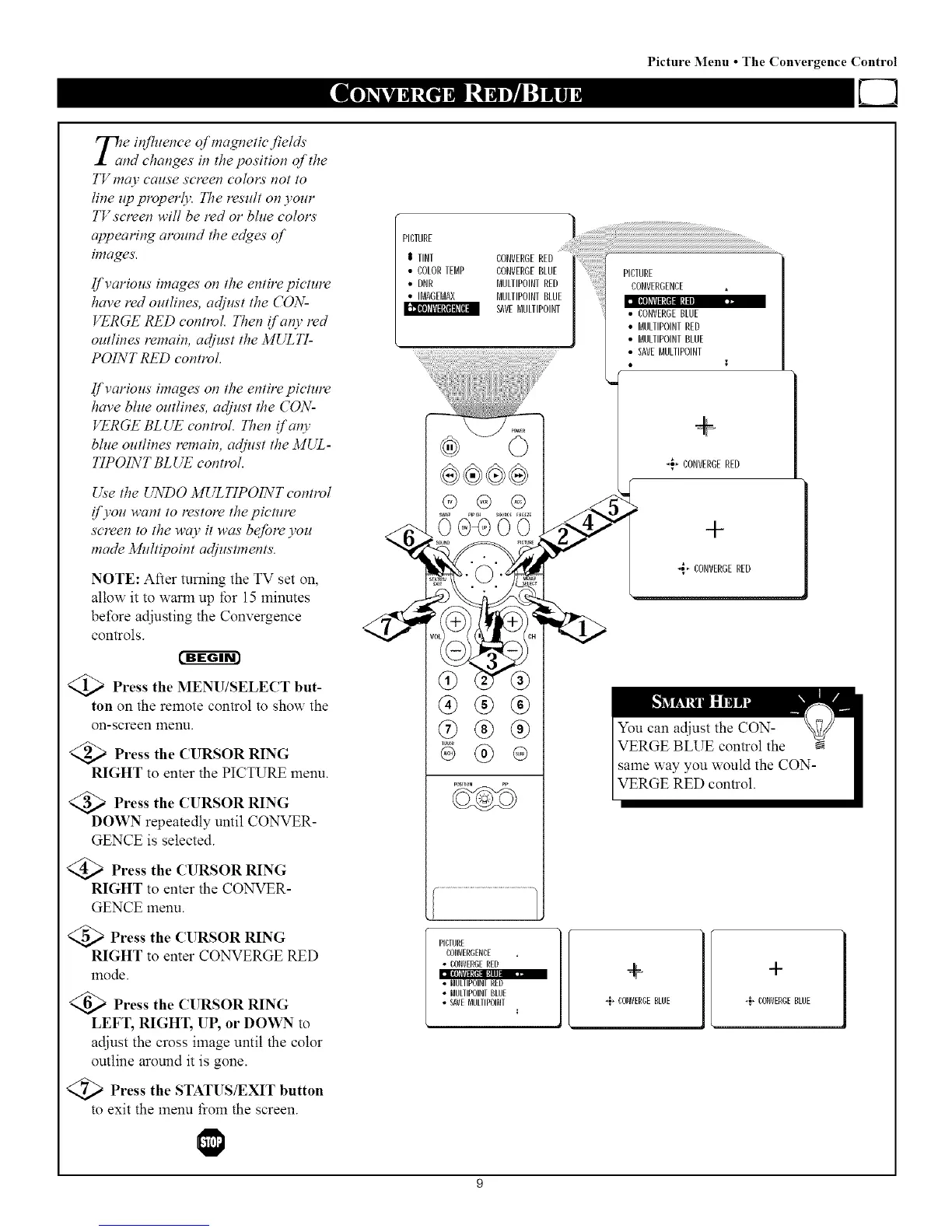
Press the MENU/SELECT but-
ton on the remote control to show the
on-screen menu.
Press the CURSOR RING
RIGHT to enter the PICTURE menu.
Press the CURSOR RING
DOWN repeatedly until CONVER-
GENCE is selected.
Press the CURSOR RING
RIGHT to enter the CONVER-
GENCE menu.
Press the CURSOR RING
RIGHT to enter CONVERGE RED
mode.
Press the CURSOR RING
LEFT, RIGHT, UP, or DOWN to
adjust the cross image until the color
outline around it is gone.
)Press the STATUS/EXIT button
to exit the menu fiom the screen.
PICTURE
$ TINT
• COLORTEMP
• DNR
• NAGEMAX
CONVERGERED
CONVERGEBLUE
MULTIPOINTRED
MULTIPOINTBLUE
SAVEBULTIPOINT
PICTURE
CONVERGENCE _,
II!(llklBtl[llffm[_'.,
• CONVERGEBLUE
• BULTIPOINTRED
• BULTIPOINTBLUE
• SAVEBULTIPOINT
,
-_, CONVERGERED
+
,_, CONVERGERED
®®®
® ®
PICTURE
CONVERGENCE
• CONVERGERED
m(3_ll_kTIt_l_l_lm_,ml
• NULIIPOINVRED
• MULIIP01NVBLUE
• SAVENULTIPOINT
+
,,;, CONVERGEBLUE -_, CONVERGEBLUE



 To Next Page