9
2. Setting up the display
2
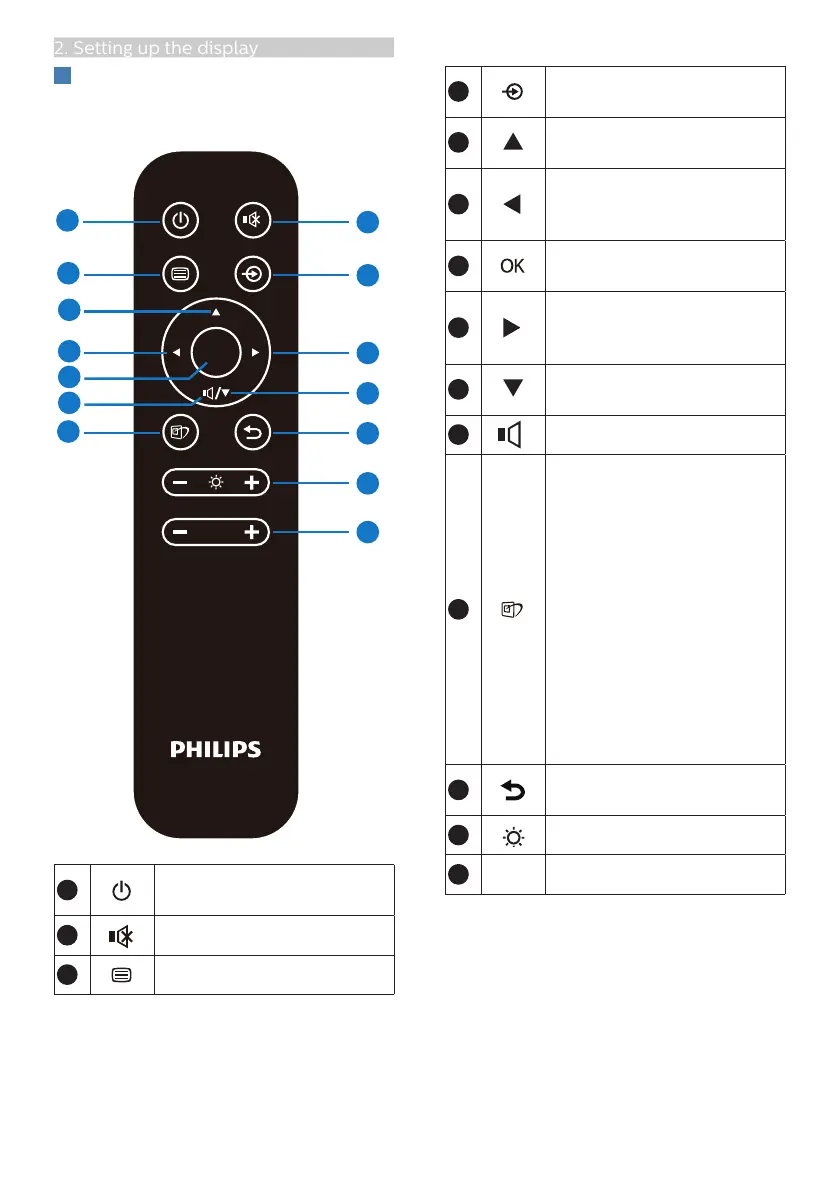
Description of the remote control
buttons
OK
VOL
1
6
7
10
5
3
11
13
12
9
8
4
2
14
1
Press to switch power on
and off.
2
Mute
3
Access the OSD menu.
4
Change the signal input
source.
5
Adjust the OSD menu/ Turn
up the values.
6
Adjust the OSD menu /
Return to previous OSD
level.
7
Confirm the OSD
adjustment.
8
Access the OSD menu.
Confirm the OSD
adjustment.
9
Adjust the OSD menu / Turn
down the values.
10
Access Sound Mode menu.
11
SmartImage Game menu.
There are multiple
selections: Xbox, FPS,
Racing, RTS, Gamer
1, Gamer 2, Movie,
Economy, LowBlue Mode,
SmartUniformity, Off.
When the monitor receives
HDR signal, SmartImage will
show HDR menu. There are
multiple selections: Xbox,
HDR Game, HDR Movie,
HDR Photo, DisplayHDR
1000, Personal
,
Off.
12
Return to previous OSD
level
13
Adjust brightness value
14
Adjust volume.







 To Next Page