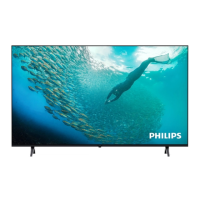
This document is a user manual for a Philips 7009 Series Television, covering models 43PUS7009, 50PUS7009, 55PUS7009, 65PUS7009, and 75PUS7009. It provides comprehensive information on setup, features, troubleshooting, and specifications.
Function Description
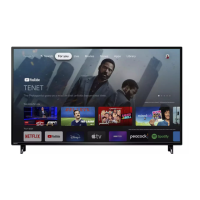
The Philips 7009 Series Television is a Smart TV designed for home entertainment, offering a wide range of features for viewing, listening, and interacting with content. It provides access to various entertainment options from apps, online services, and traditional broadcast channels. The TV's Home screen serves as a central hub, organizing content into rows such as "Home," "Free channels," "Apps," and "Search," allowing users to discover movies, shows, news, and more. It supports popular streaming services like YouTube and Netflix, with dedicated rows for recommended or trending content. The TV also includes a "TV Guide" for installed channels and offers Google Assistant integration for voice control.
Important Technical Specifications
Power
- Mains power: AC 220-240V
- Ambient temperature: 5°C to 35°C
Reception
- Aerial input: 75 ohm coaxial (IEC75)
- Tuner bands: Hyperband, S-Channel, UHF, VHF
- DVB: DVB-T/T2, DVB-C (cable) QAM
- Analogue video playback: SECAM, PAL
- Digital video playback: MPEG2 SD/HD (ISO/IEC 13818-2), MPEG4 SD/HD (ISO/IEC 14496-10), HEVC*
- Digital audio playback: (ISO/IEC 13818-3)
- Satellite aerial input: 75 ohm F-type
- Input frequency range: 950 to 2150MHz
- Input level range: 25 to 65 dBm
- DVB-S/S2 QPSK, symbol rate: 2 to 45M symbols, SCPC and MCPC
- LNB: DiSEqC 1.0, 1 to 4 LNBs supported, Polarity selection 14/18V, Band selection 22kHz, Tone burst mode, LNB current 300mA max
*Only for DVB-T2, DVB-S2
Display Resolution
- Diagonal screen size: 108 cm / 43 inch, 126 cm / 50 inch, 139 cm / 55 inch, 164 cm / 65 inch, 189 cm / 75 inch
- Display resolution: 3840 x 2160
- Supported Computer/Video resolution (Refresh rate):
- 640 x 480 - 60Hz
- 576p - 50Hz
- 720p - 50Hz, 60Hz
- 1920 x 1080p - 24Hz, 25Hz, 30Hz, 50Hz, 60Hz
- 2560 x 1440 - 60Hz
- 3840 x 2160p - 24Hz, 25Hz, 30Hz, 50Hz, 60Hz
- Supported Video only resolution (Refresh rate):
- 480i - 60Hz (when HDMI Ultra HD is set to Standard)
- 576i - 50Hz (when HDMI Ultra HD is set to Standard)
- 1080i - 50Hz, 60Hz
- Variable refresh rate video 1080p, 1440p, 2160p with frame rate up to 48-60Hz when HDMI Ultra HD is set to Optimal (Auto Game)
*Note: Some resolution and frame rate may not be supported in all input sources.
Sound
- Output power (RMS): 20W
- Dolby MS12 V2.6.2
- Dolby Atmos
- DTS:X
- Surround Virtualiser + Height Virtualiser
- Dolby Volume Leveler / Night mode
- Dolby Bass Enhancement
- Dolby Dialogue Enhancement
- Clear Dialogue
- AI Sound
- AI EQ
- Connections: USB 2.0, Ethernet LAN RJ-45
- Wi-Fi: 802.11n, Single Band
- Supported USB file systems: FAT, NTFS
- Playback formats:
- Video Codec: AVI, MKV, HEVC, H.264/MPEG-4 AVC, MPEG1, MPEG2, MPEG4, VP9, HEVC (H.265), AV1
- Audio Codec: MP3, WAV, AAC, FLAC
- Subtitles: Format: SRT, SMI, SSA, SUB, ASS, TXT; Character encodings: Western Europe, Turkish, Central Europe, Cyrillic, Greek, UTF-8 (Unicode), Hebrew, Arabic, Baltic
- Maximum Supported Data Rate: MPEG-4 AVC (H.264) up to High Profile @ L5.1. 30Mbps; H.265 (HEVC) up to Main / Main 10 Profile up to Level 5.1 40Mbps
- Image Codec: JPEG, GIF, PNG, BMP, HEIF
- Wi-Fi Certified: This TV is a Wi-Fi Certified device.
Connectivity
- TV Side: USB 1 - USB 2.0, USB 2 - USB 2.0, Common Interface slot: CI+/CAM
- TV Back: HDMI 3 in - UHD - HDR, HDMI 2 in - UHD - HDR, HDMI 1 in - ARC/eARC - UHD - HDR, Audio out - Optical Toslink, Network LAN - RJ45, Satellite tuner, Antenna (75 ohm)
Usage Features
Remote Control
The remote control features standard navigation, volume, and channel controls. It includes "hidden keys" that appear with backlight when the "123" key is pressed, offering additional functions like number keys and media playback controls. Dedicated quick keys for NETFLIX, prime video, Disney+, and Channels are available.
TV Placement
The manual provides recommendations for TV placement, including optimal viewing distance (2 to 5 times diagonal screen size), positioning relative to light sources, and distance from the wall for both wall-mounted and stand-mounted setups. It also specifies VESA wall mount dimensions for each TV size.
Turning On/Off
The TV can be switched on or to standby using the remote control or a small joystick key on the bottom of the TV. A long press on the standby button reboots the TV. The TV consumes very little energy in standby mode.
Connections
The TV supports various connections:
- Antenna: For DVB-T and DVB-C input signals.
- Satellite: For satellite signals.
- HDMI: For video devices, supporting HDMI ARC/eARC on HDMI 1 for high-quality audio and video, including HDR content.
- Digital Audio Out - Optical: For high-quality 5.1 audio channels to a Home Theatre System.
- USB: For viewing photos, playing music, and videos from USB flash drives or hard drives.
- Network (Ethernet/Wi-Fi): For internet connectivity and Smart TV features.
Channels
- Switching Channels: Users can switch channels using the remote, channel list, or by typing the channel number.
- Installation: Supports automatic and manual installation for Antenna and Cable channels, as well as Satellite channels.
- Channel List: Allows users to open, filter, rename, lock/unlock, and search channels.
- Favourite Channels: Users can create and manage a list of favourite channels.
- Text/Teletext: Access to Text/Teletext pages, with options for page navigation, sub-pages, and text settings.
TV Guide
The TV Guide displays current and scheduled TV programmes. Users can tune to programmes, view details, and search by genre.
Freeview Play (UK models)
For UK models, Freeview Play offers access to catch-up TV from the last seven days, live TV, on-demand services (BBC iPlayer, ITV Hub, All 4, Demand 5, BBC NEWS, BBC SPORT), and over 70 standard and 15 HD channels. It integrates with the TV Guide for seamless content discovery.
Videos, Photos, and Music
Users can play multimedia files from USB connections or a home network (computer or NAS). Features include slideshows for photos, playback controls for videos and music, shuffle, repeat, and subtitle settings.
Smart TV and Apps
The Smart TV platform provides access to a store of apps, including YouTube, Netflix, and Amazon Prime Video. Users can browse apps by categories like New, Video, Entertainment, News, or Lifestyle.
The TV offers "Quick Menu," "Frequent Settings," and "All Settings" for comprehensive control over TV functions.
- Picture Settings: Includes preset picture styles (Personal, Crystal Clear, Home Cinema, ECO, Movie, Game, Monitor), HDR modes (HDR Personal, HDR Crystal Clear, HDR Home Cinema), contrast, brightness, colour, sharpness, and picture clean options.
- Sound Settings: Offers preset sound styles (AI mode, Original, Entertainment, Music, Spatial Music, Dialogue, Personal), speaker virtualiser (Dolby Atmos), clear dialogue, AI Equaliser, bass/treble adjustment, and EasyLink 2.0 for HDMI sound systems.
- Advanced Sound Settings: Volume control (Auto volume, Delta volume), Audio Out settings (TV Speakers, Optical, HDMI sound system), and eARC settings.
- Wireless and Networks: Manages home network connections (Wi-Fi and wired), network configuration (Static IP), Digital Media Renderer (DMR), and Screen Mirroring settings.
- General Settings: USB keyboard settings, mouse settings, power and energy options (Power-on behaviour, Screen off, Sleep timer, Switch off timer, No signal timer), HDMI-CEC (EasyLink), Screensaver settings, and location (Home or Shop mode).
- HDMI Ultra HD: Allows adjustment of signal quality for HDMI connectors (Optimal or Standard) to ensure compatibility with various devices and support for Variable Refresh Rate (VRR).
- Auto Movie Mode: Automatically sets Picture style to Movie when informed by the HDMI device.
- Manage Demos: For shop mode, allows managing demo videos.
- Universal Access: Settings for hearing-impaired (special audio and subtitles) and blind/partially sighted people (audio description, mixed volume, audio effects, speech preference, text magnification).
- Lock Settings: Child lock, parental rating, and app lock with PIN code.
- Region and Language Settings: Language for TV menu and messages, audio preference language, subtitle preference language, teletext preference language, and clock settings.
- Eco Settings: Energy saving options, screen off, sleep timer, and switch off timer.
Google Assistant
The TV supports Google Assistant for voice control, allowing users to change volume, channels, and more. Requires a Google Home device, internet connection, and Google account.
Maintenance Features
Get Support
The manual provides instructions on how to identify and register the TV, access the TV Help and User Manual, run TV diagnostics and self-diagnostics, and contact Consumer Care for support or repair.
Software Updates
The TV supports software updates via the internet or USB. Automatic software updates can be enabled, with updates downloaded in standby mode. Users can also view the current software version and update history.
Screen Care
Recommendations for screen care include avoiding touching or striking the screen, unplugging before cleaning, using a soft damp cloth for cleaning, and avoiding stationary images to prevent screen damage.
Batteries
Instructions for replacing remote control batteries are provided, along with warnings about battery safety and proper disposal.
The manual includes information on the European Energy Label, energy efficiency class, and power consumption. It also provides guidelines for the proper disposal of the product and batteries according to environmental directives.

 Need help?


 To Next Page
 General