This document is a user manual for Philips 8507 Series Televisions, covering models 50PUT8507, 55PUT8507, 65PUT8507, 70PUT8507, and 75PUT8507. It provides comprehensive instructions on setting up, operating, and maintaining the TV, highlighting its smart features and connectivity options.
Function Description
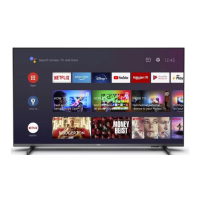
The Philips 8507 Series Television is an Android TV designed for home entertainment, offering a wide range of functionalities beyond traditional broadcasting. It allows users to watch TV channels, stream videos, play music, view photos, browse the internet, and interact with various applications. The TV integrates with a home network for internet access, supports voice control via Amazon Alexa, and offers advanced picture and sound settings for a personalized viewing experience. It also includes recording and pause TV capabilities, as well as features for connecting smartphones, tablets, and other external devices.
Important Technical Specifications
- Display: The TV supports various display input resolutions, including 1920 x 1080p (24Hz, 25Hz, 30Hz, 50Hz, 60Hz), 2560 x 1440 (60Hz), and 3840 x 2160p (24Hz, 25Hz, 30Hz, 50Hz, 60Hz). It also supports supported video-only resolutions like 480i (60Hz) and 576i (50Hz) when HDMI Ultra HD is set to Standard, and 1080i (50Hz, 60Hz). Variable Refresh Rate (VRR) video is supported for 1080p, 1440p, and 2160p with frame rates up to 48-60Hz when HDMI Ultra HD is set to Optimal (Auto Game).
- Connectivity:
- USB: Two USB ports (USB 2.0 / USB 3.0) are available for connecting USB hard drives, flash drives, keyboards, and photo cameras.
- HDMI: Multiple HDMI inputs (HDMI 1, HDMI 2, HDMI 3, HDMI 4) are provided, supporting ARC (Audio Return Channel) and eARC (Enhanced Audio Return Channel) on specific ports. All HDMI inputs support Ultra HD and HDR.
- Audio: A 3.5mm stereo mini-jack for headphones and a digital audio out (optical Toslink) port are included.
- Network: Ethernet LAN (RJ-45) and Wi-Fi (802.11a/b/g/n/ac, Dual Band) for network connectivity.
- Bluetooth®: Bluetooth® 5.0 for connecting wireless devices like speakers and headphones.
- Antenna: 75 ohm antenna input.
- Sound: Output power (RMS) of 20W. Supports Dolby MS12 V2.5, Dolby Atmos, DTS-HD (M6), DTS Play-Fi, Surround Virtualizer + Height Virtualizer, Dolby Bass Enhancement, Dolby Dialogue Enhancement, Dolby Volume (AVL/Night Mode), AI Sound, AI EQ, and Mimi Health Hearing.
- Multimedia Playback:
- USB File Systems: FAT 16, FAT 32, NTFS.
- Containers: PS, TS, M2TS, TTS, AVCHD, MP4, M4V, MKV, ASF, AVI, 3GP, Quicktime.
- Video Codecs: AVI, MKV, H.264/MPEG-4 AVC, MPEG1, MPEG2, MPEG4, VP9, HEVC (H.265), AV1. H.264 is supported up to High Profile @L5.2 80Mbps. H.265 (HEVC) is supported up to main 10 high profile L5.1 with 100Mbps. AV1 is supported up to main profile L5.1 with 80Mbps.
- Audio Codecs: MP3, WAV, AAC, WMA (v2 up to v9.2), WMA-PRO (v9 and v10).
- Subtitles: SRT, SUB, TXT, SMI formats with various character encodings (UTF-8, Central Europe, Cyrillic, Greek, Turkish, Western Europe, Hebrew, Arabic, Baltic, Korean).
- Image Codecs: JPEG, GIF, PNG, BMP, HEIF, 360 Photo.
- Operating System: Android 11.
- Power: Main power AC 220-240V +/- 10%. Ambient temperature 5°C to 35°C. Power saving features include Eco mode and Picture mute.
Usage Features
- Home Screen: A customizable interface for quick access to channels, apps, and connected devices.
- Remote Control: A Bluetooth® and IR remote with voice search capabilities and dedicated keys for popular apps like Netflix. It requires pairing for advanced functions.
- Channel Management: Automatic and manual channel installation, channel list sorting, creation of favorite channel lists, and parental rating controls.
- Interactive TV: Support for HbbTV and other interactive TV systems, allowing access to information and entertainment pages.
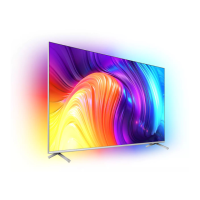
- Ambilight: Customizable Ambilight settings with various styles (Follow Video, Follow Audio, Lounge Light Mode, Sunrise Alarm, Ambisleep) and color controls to enhance the viewing experience.
- Smart TV Collection & Google Play: Access to a wide range of apps for streaming, gaming, and browsing. Requires a Google Account for Google Play services.
- Recording & Pause TV: Requires a connected and formatted USB hard drive (less than 2TB) to record TV programs and pause live TV.
- Media Playback: Play videos, view photos (including 360 photos), and listen to music from USB drives or a home network (computer/NAS).
- Picture & Sound Settings: Extensive options to adjust picture (contrast, color, sharpness, motion, HDR, Dolby Vision) and sound (sound style, bass, treble, equalizer, auto volume, room calibration) for optimal performance.
- Universal Access: Settings for hearing and visually impaired users, including audio description and adapted subtitles.
- Clock & Region: Automatic and manual clock settings, time zone configuration.
Maintenance Features
- Software Update: The TV supports software updates via the internet or USB, ensuring the latest features and bug fixes. Automatic software updates can be enabled.
- Troubleshooting: The manual provides detailed troubleshooting steps for common issues related to power, remote control, channels, picture, sound, and network connectivity.
- Screen Care: Instructions for cleaning the TV screen and frame using a soft, damp cloth, emphasizing not to use alcohol or harsh chemicals. It also advises against stationary images to prevent screen damage.
- USB Hard Drive Formatting: Instructions for formatting a USB hard drive for recording and storing apps, with warnings about data loss and exclusive formatting for the TV.
- Safety Information: Comprehensive safety guidelines covering installation, power, batteries, overheating, lightning storms, low temperatures, and humidity.
- Help and Support: Information on registering the TV, using the built-in help function, TV diagnostics, online help, and contacting Philips support for repairs.

 Need help?


 To Next Page
 General