5. Use the number keys on the remote control transmitter to enter a new value for the
selected option byte. The value must be entered as a three-digit value (for example,
"4" would be entered as "0-0-4").
6. The selected value must be between 0 and 255.
7. When all desired changes to the option bytes are made, press the MENU button to
return to the top level SDAM menu. This will save changes to the option byte settings.
8. To ensure the option byte changes take effect: Turn the television set OFF by using
the POWER button on the remote control transmitter or the local keyboard. Disconnect
the television set from AC power for at least ten seconds. Reconnect the television set
to AC power. Turn the television set ON by using the POWER button on the remote
control transmitter or the local keyboard.
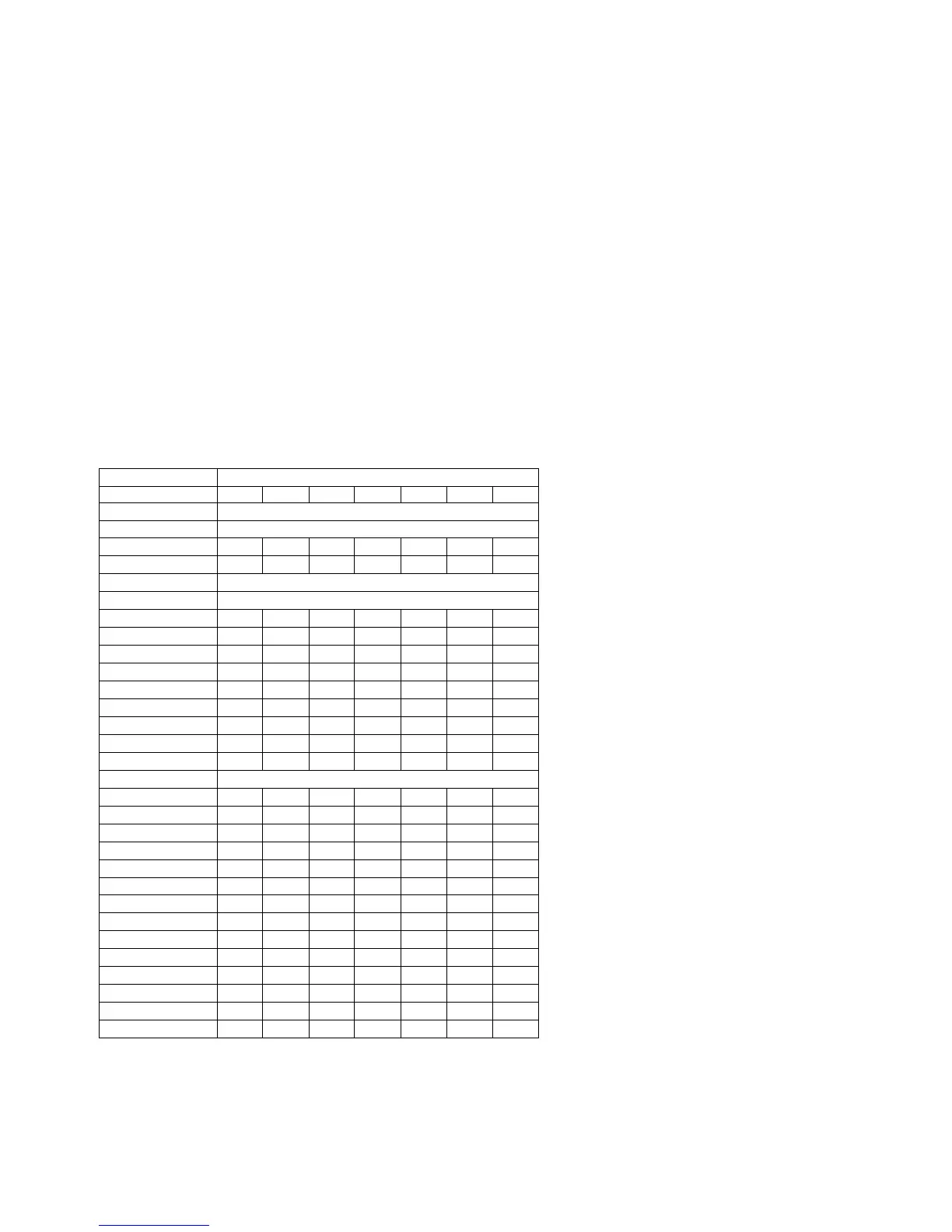
T8 Option Byte Codes
MODEL OPTION BYTES
OP1 OP2 OP3 OP4 OP5 OP6 OP7
20RF40 S321 * NOT AVAILABLE
20RF40 S325 * NOT AVAILABLE
20RF50 S321 0 23 129 162 252 152 0
20RF50 S325 0 23 129 162 252 152 0
21PT63 9A85 * NOT AVAILABLE
21PT83 9B85 * NOT AVAILABLE
25PS40 S321 0 23 1 1 144 153 0
25PS40 S325 0 23 1 1 144 153 0
25PS50 S321 0 23 1 162 252 152 0
26LL50 0131 16 23 1 1 144 153 0
26LW50 2231 16 23 1 162 252 152 0
27PS50 B321 0 23 1 162 252 152 0
27PS55 S321 0 23 1 162 252 152 0
27PS60 S321 0 23 1 162 253 152 0
27RF50 S325 0 23 129 162 252 152 0
27RF72 S325 * NOT AVAILABLE
29LL60 0131 16 23 1 162 252 152 0
29LW60 2231 16 23 1 162 252 152 0
29PV70 2235 16 23 129 162 252 152 0
32PS55 S321 0 23 129 162 252 152 0
32PS60 B321 0 23 129 162 253 152 0
32PS61 S321 0 23 129 162 253 152 0
33LL80 1131 0 23 129 162 253 152 0
CH0119 C322 133 16 2 132 0 - -
CH0127 C321 213 18 2 64 0 - -
MS2530 C321 0 5 0 10 192 9 0
HC0113 C321 1 16 148 148 0 - -
HC0119 C322 1 16 148 148 0 - -
MS2530 C325 0 5 0 10 192 9 0
MS2730 C321 0 5 0 1 192 9 0









 To Next Page