•
Selecting
brightness,
language and
set time
functions
•
Checking
PhotoFrame™
status
•
Taking care
of your
PhotoFrame™
Optimizing PhotoFrame™
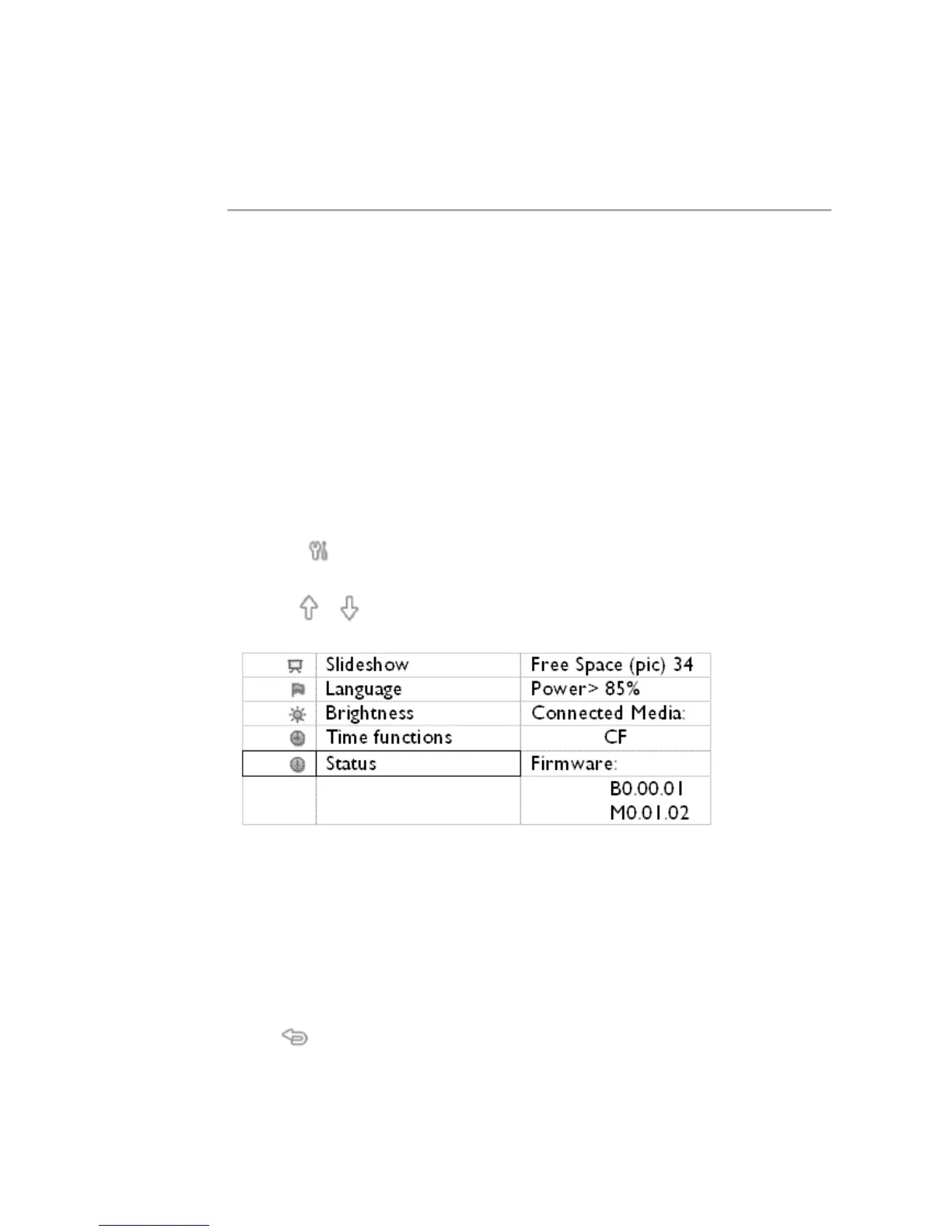
Checking PhotoFrame™ status
You may check the status of your PhotoFrame™— whether the system is ON, if the batte
is charging, how many more photos can be stored, how much battery power remains, whi
media are currently connected, or the PhotoFrame™ software version.
From the LED light indicator in the back, you can determine whether the system is ON or
the battery is charging:
Below is an easy way to look up other information.
Power LED Green: System ON
Off: System OFF
Battery LED Orange: Battery is charging
Off: Battery is not charging
•
Press the key (the 3rd key from the left on the rear of PhotoFrame™).
A menu with general settings for PhotoFrame™ will appear.
•
Use the or key to highlight Status.
Current PhotoFrame™ status will appear on the right column.
Free space (pic):
(Estimates of how many additional photos can be stored
PhotoFrame™)
Power:
DC (when main is supplying power)
XX% (estimates of battery power remaining,
when internal battery is supplying power.)
Connected media:
Connected media: (Lists all memory cards actively connected
to PhotoFrame™)
Firmware:
(PhotoFrame™ software version)
•
Press again to leave this menu.
RETURN TO TOP OF THE PAGE



 To Next Page