EasyManua.ls Logo

Philips AC 914 - Page 20

Philips AC 914
42 pages
Print Icon
To Next Page IconTo Next Page
To Previous Page IconTo Previous Page
Loading...
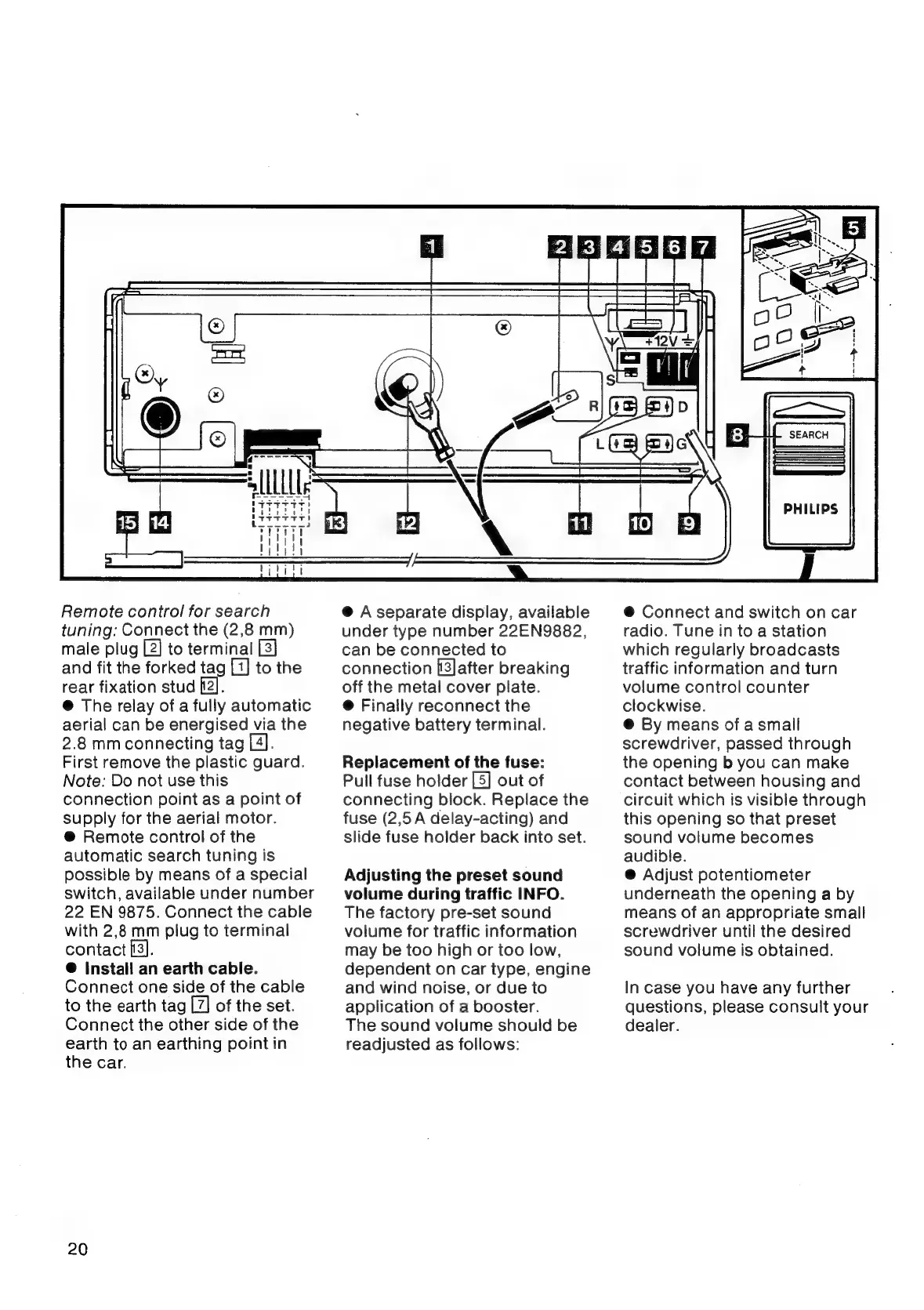
Remote
control
for
search
tuning:
Connect
the
(2,8
mm)
male
plug
[2]
to
terminal
and
fit
the
forked
tag
[1]
to
the
rear
fixation
stud
[2].
@
The
relay
of
a
fully
automatic
aerial
can
be
energised
via
the
2.8
mmconnecting
tag
[4].
First
remove
the
plastic
guard.
Note:
Do
not
use
this
connection
point
as
a
point
of
supply
for
the
aerial
motor.
@
Remote
control
of
the
automatic
search
tuning
is
possible
by
means
of a
special
switch,
available
under
number
22
EN
9875.
Connect
the
cable
with
2,8
mm
plug
to
terminal
contact
[3].
®
Install
an
earth
cable.
Connect
one
side
of
the
cable
to
the
earth
tag
[7]
of
the
set.
Connect
the
other
side
of
the
earth
to
an
earthing
point
in
the
car.
20
@
A
separate
display,
available
under
type
number
22EN9882,
can
be
connected
to
connection
[3]after
breaking
off
the
metal
cover
plate.
@
Finally
reconnect
the
negative
battery
terminal.
Replacement
of
the
fuse:
Pull
fuse
holder
[5]
out
of
connecting
block.
Replace
the
fuse
(2,5
A
delay-acting)
and
slide
fuse
holder
back
into
set.
Adjusting
the
preset
sound
volume
during
traffic
INFO.
The
factory
pre-set
sound
volume
for
traffic
information
may
be
too
high
or
too
low,
dependent
on
car
type,
engine
and
wind
noise,
or
due
to
application
of
a
booster.
The
sound
volume
should
be
readjusted
as
follows:
PHILIPS
@
Connect
and
switch
on
car
radio.
Tune
in
to
a
station
which
regularly
broadcasts
traffic
information
and
turn
volume
control
counter
clockwise.
@
By
means
of
a
small
screwdriver,
passed
through
the
opening
b
you
can
make
contact
between
housing
and
circuit
which
is
visible
through
this
opening
so
that
preset
sound
volume
becomes
audible.
@
Adjust
potentiometer
underneath
the
opening
a
by
means
of
an
appropriate
small
screwdriver
until
the
desired
sound
volume
is
obtained.
In
case
you
have
any
further
questions,
please
consult
your
dealer.

Related product manuals