6EN
Charge the iPod/iPhone
When the docking speaker is connected to
power, the docked iPod/iPhone begins to
charge automatically.
Play from Bluetooth device
Pair with Bluetooth devices
Note
•
Before you connect a Bluetooth device to this docking
speaker, familiarize yourself with the Bluetooth
capabilities of the device.
• The effective operational range between the docking
system and the paired device is approximately 10
meters.
• Any obstacle between the docking speaker and the
paired device can reduce the operational range.
1 Press to select Bluetooth source.
» The Bluetooth button blinks.
2 Turn on Bluetooth function on your device.
• Different devices may have different
way to activate Bluetooth.
3 Scan Bluetooth devices that can pair with
your device.
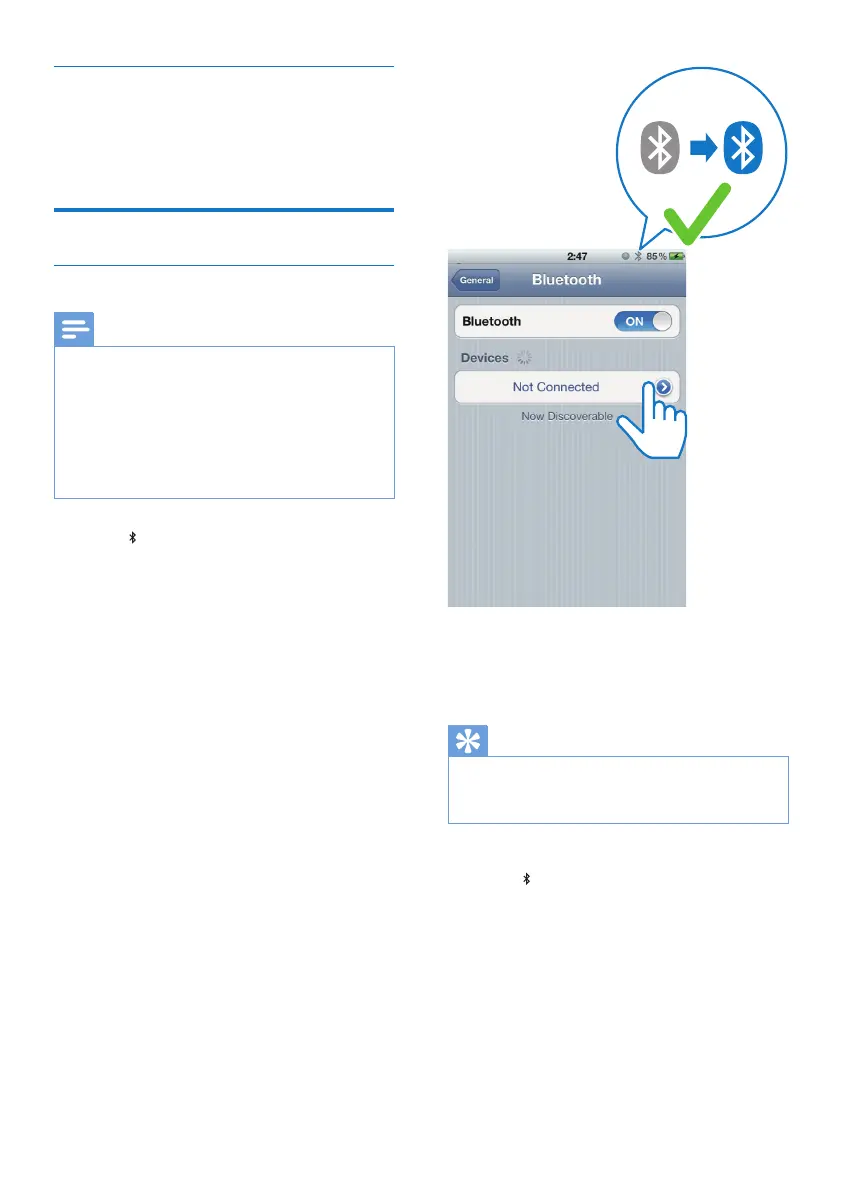
4 When “AD620” is displayed on your
device, select it to start connection.
» If connection is successful, you will hear
doublebeepconrmationtone,and
theBluetoothbuttonstopsashing.
» A different Bluetooth icon is displayed
on your device.
5 Play audio on your device.
» Audio streams from your device to the
docking speaker.
Tip
•
If your Bluetooth device has been paired with this
speakerbefore,youjustneedtondout“AD620”on
yourBluetoothmenu,thenconrmtheconnection.
To disconnect Bluetooth:
• Press
on the docking speaker again.
• Deactivate Bluetooth function on your
device; or
• Move the device beyond the
communication range.
AD620


 To Next Page