7EN
4 Listen to FM
radio
Note
•
Keep the clock radio away from other electronic
devices to avoid radio interference.
• For better reception, fully extend and adjust the
position of the FM antenna.
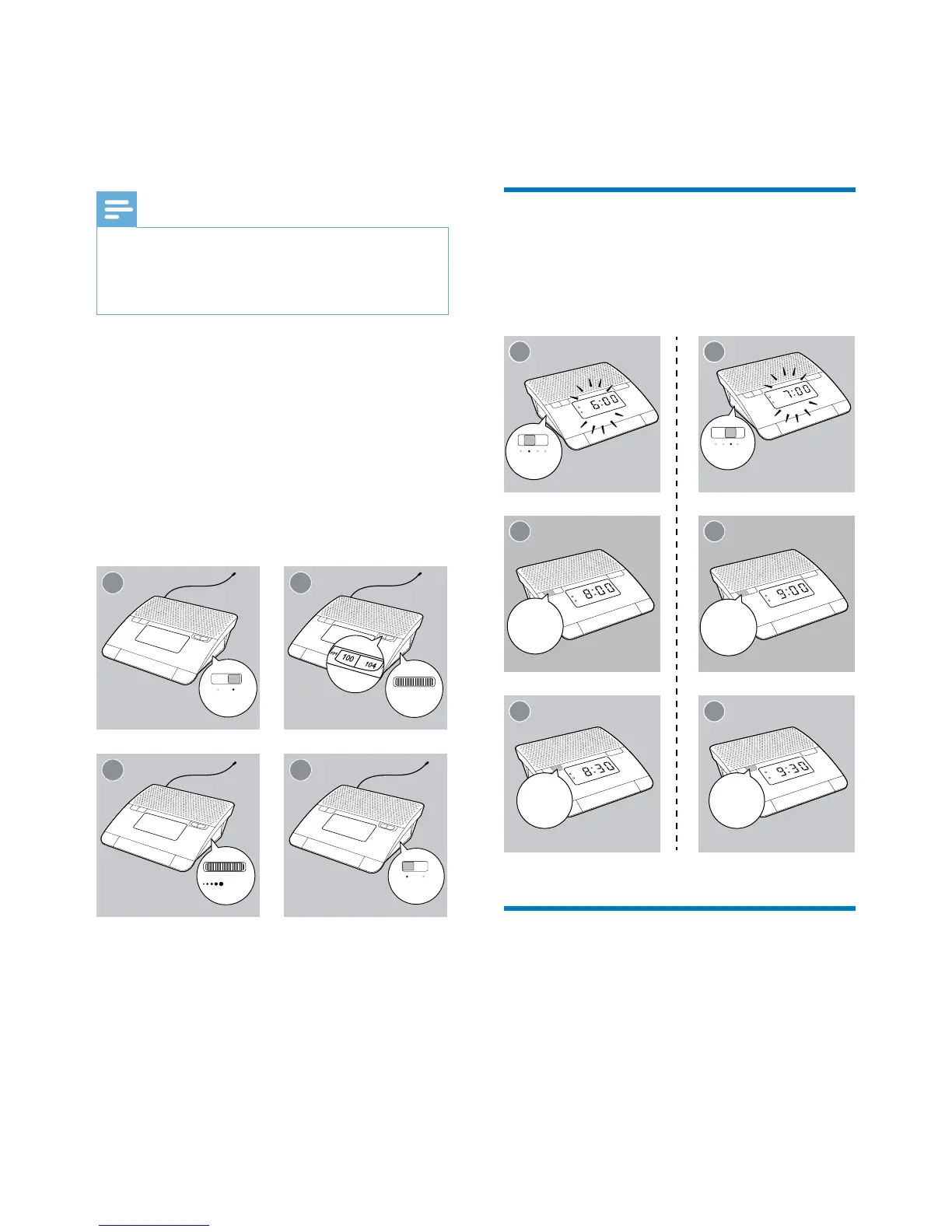
1 Switch the slider to RADIO.
2 Rotate TUNING to select a station.
» The indicator shows the radio
frequencyofthewaveband.
3 While listening, rotate VOL to adjust
volume.
4 To turn off the radio, switch the slider to
OFF.
1 2
2
3
2
4
TUNING
OFF
VOL
RADIO
5 Set alarm timer
Set alarm
Follow the illustration to set the alarm.
• AL1:Settherstalarm.
• AL2: Set the second alarm.
Select an alarm source
To select the last heard channel or buzzer as
the alarm sound:
• AL1: Switch the slider to RADIO or BUZ .
• AL2: Switch the slider to RADIO or BUZ.
» The corresponding alarm icon lights up.
33
MIN
2
21
2
21
SET AL 1
SET AL 2
2
22
HR
2
22
HR
33
MIN


 To Next Page