EasyManua.ls Logo

Philips AK640 - Page 6

Philips AK640
16 pages
Print Icon
To Next Page IconTo Next Page
To Previous Page IconTo Previous Page
Loading...
English
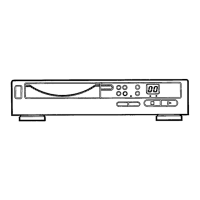
CONTROLS
controls
_
ON
THE
UNIT
(Fig.
1)
1
POWER
To
switch
the
CD
player
on
and
off.
2
COMPACT
DISC
tray
.For
8cm
and
12
cm
compact
discs.
3
OPEN/CLOSE
To
open
and
close
the
CD
tray
4
DISPLAY
To
indicate
what
function
the
unit
is
performing:
TRACK,
the
total
number
of
tracks
in
the
disc.
TIME,
the
total
playing
time
of
the
disc
and
during
playback,
the
elapsed
play¬
ing
time
of
the
current
track.
.
SCAN,
when
the
INTROSCAN
is
acti¬
vated.
PAUSE,
indicating
that
playback
is
interrupted.
PROGR,
indicating
a
program
is
played
REPEAT,
indicating
that
the
REPEAT
function
is
activated.
SHUFFLE,
indicating
that
the
SHUF¬
FLE
function
is
activated.
(«o
,
when
using
the
remote
control.
E,
indicating
that
there
is
an
error.
P,
indicating
that
the
track
number
has
been
programmed
in
the
memory.
F,
indicating
that
the
memory
is
full.
C,
indicating
thatthe
memory
has
been
cleared
5
REVIEW:
To
review
the
program
steps.
6
PROGRAM
To
program
the
track
numbers
displayed
into
the
memory.
7
CLEAR
To
erase
a
program.
8
SELECT+
For
selecting
a
different
track
during
playback
or
programming.
9
SELECT-
For
selecting
a
different
track
during
playback
or
programming.
10
PLAY/PAUSE
HI
To
start
and
interrupt
playback
11
INTROSCAN
To
start
programme
"Introductory
Play"
of
a
CD.
12
STOP
To
stop
playback
13
REPEAT
To
repeat
a
track
of
a
CD,
all
the
tracks
in
a
disc
14
SHUFFLE
To
play
all
the
tracks
in
a
disc
in
a
random
order.
15
NEXT/SEARCH
To
select
a
next
track
or
search
for
a
passage
during
playback.
16
PREVIOUS/SEARCH
To
return
to
the
start
of
a
track,
select
a
previous
track
or
search
for
a
passage
during
playback.
6

Related product manuals