EasyManua.ls Logo

Philips AS 9300 - CONTROLS; Control Panel Overview; OPERATION; Basic Operations

Philips AS 9300
18 pages
Print Icon
To Next Page IconTo Next Page
To Previous Page IconTo Previous Page
Loading...
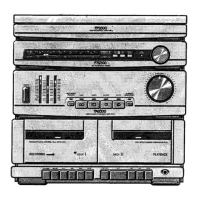
CONTROLS
Fig.
2
G@)
POWER
switch,
for
switching
the
entire
unit
on/off.
(@)
Graphic
equalizer
tone
controls.
@)
Dial
pointer
with
on/off
indicator.
G)
Dust
cover
for
record
player.
G)
(NOT
ON
ALL
VERSIONS)
LW/MW
wave
range
selector
(some
versions
SW/MW).
©)
AM/FM
wave
range
selector
(some
versions
MW/FM).
@
STEREO/MONO
selector.
FREQUENCY
TUNING
control,
for
tuning
into
radio
stations.
@)
FM
STEREO
indicator:
lights
up
when
an
FM
broadcast
in
stereo
is
received
and
selector
@is
in
the
STEREO
position.
(a)
VOLUME
control.
(@)
DYNAMIC
BASS
BOOST
button
with
indicator.
(2
CD.TV
selector
with
indicator.
(3)
PHONO
selector
with
indicator.
(3)
Cassette
holder
deck
IL.
¢3)
PHONES
socket
(6.3
mm)
for
connecting
stereo
headphones
(impedance
8-1000
ohms).
The
loudspeakers
are
automatically
switched
off
when
using
headphones.
PAUSE
button:
for
stopping
the
tape
transport
in
deck
I
momentarily.
WIND
button
for
deck
II:
for
fast
forwarding
the
tape.
(2
REW
button
for
deck
I:
for
fast
rewinding
the
tape.
PLAY
button
for
deck
II
for
starting
playback.
STOP/EJECT
button
for
deck
I.
@i)
PAUSE
button:
for
stopping
the
tape
transport
in
deck
I
momentarily.
@2
WIND
button
for
deck
I:
for
fast
forwarding
the
tape.
@)
REW
button
for
deck
I:
for
fast
rewinding
the
tape.
@3)
PLAY
button
for
deck
I:
for
starting
playback.
@)
RECORD
button:
to
make
a
tape
recording.
@)
STOP/EJECT
button
for
deck
I.
@)
Cassette
holder
deck
I.
@)
TUNER
selector
with
indicator.
@)
TAPE
selector
with
indicator.
62)
HIGH
SPEED
DUBBING
selector
with
indicator,
for
selection
of
normal
or
high
tape
speed
when
dubbing.
Record
player,
Fig.
3
(not
on
all
versions)
Z\
Adapter
for
45
rom.
records.
ZX
Transit
screws.
AX
Cue
lever,
for
lifting
and
lowering
the
tone
arm.
Z\
Speed
selector
33-45,
for
selecting
the
speed.
AX
Fixing
clip
for
the
tone
arm.
OPERATION
SWITCHING
ON
AND
OFF
@
Use
POWER
switch
G)
to
switch
on
the
unit.
The
on/off
indicator
@)
will
light
up.
@
To
switch
off,
press
POWER
switch
@)
again.
Indicator
@)
will
fade.
Note:
To
prevent
damage
first
switch
off
the
record
player
or
tape
decks.
The
record
player:
by
moving
lever
A\
to
the
¥
position
and
then
moving
the
tone
arm
outwards.
When
the
arm
reaches
the
support,
the
turntable
will
stop.
The
tape
decks:
by
pressing
the
STOP/EJECT
button
once.
AMPLIFIER
@
Turn
the
volume
control
to.
minimum
(fully
anti-clockwise).
e@
Press
one
of
the
selector
buttons
CD.TV
@,
PHONO
(3),
TUNER
@e),
or
TAPE
@).
The
appropriate
indicator
will
light
up.
@
Turn
the
volume
control
@
to
the
desired
level.
@
Adjust
the
tone
using
the
graphic
equalizer
controls
@).
Press
the
DYNAMIC
BASS
BOOST
button
(1)
for
additional
amplification
of
the
bass
reproduction.
TUNER
@
Select
tuner
mode
(radio)
with
TUNER
button
@é).
@
Select
the
desired
tuning
range:
MW
or
LW
(for
some
versions
SW)
using
selector
()
(with
selector
(©)
to
AM).
For
the
reception
of
FM
broadcasts,
set
selector
()
set
to
FM.
@
Tune
to
the
desired
station
with
FREQUENCY
TUNING
knob
(8).
@
if
there
is
interference
when
receiving
FM
stereo
broadcasts,
put
STEREO/MONO
button
@)
in
the
MONO
position.
STEREO
indicator
@)
will
then
extinguish.
Note:
In
the
MONO
position
any
stereo
noise
resulting
from
weak
stereo
reception
will
disappear.
Under
normal
circumstances,
leave
this
button
in
the
STEREO
position.
RECORD
PLAYER
(not
on
all
versions)
@
Select
the
phono
mode
with
PHONO
Selector
button
(9.
e@
Place
a
record
on
the
turntable.
For
records
witha
large
centre
hole,
use
the
adapter
A\.
@
Remove
the
stylus
protector
by
pulling
it
forwards.
e
Use
selector
A\
to
select
the
appropriate
speed.

Other manuals for Philips AS 9300

Related product manuals