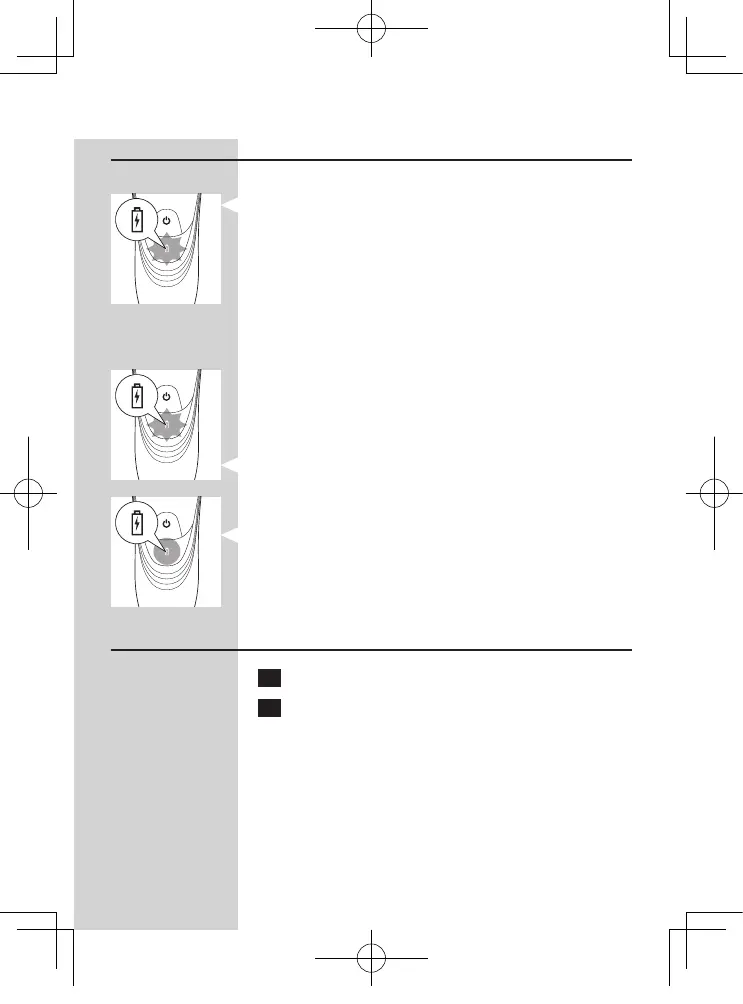
Charge indications
Battery low
- When the battery is almost empty (when there
are only 5 or fewer shaving minutes left), the
charging light starts to ash orange.
When you switch off the shaver, the charging light -
continues to ash orange for a few seconds.
Quick charging
When you start charging the empty battery, the -
charging light alternately ashes orange and green.
After approx. 3 minutes the charging light starts
ashing green only. The shaver now contains
enough energy for a 5-minute shave.
Charging
- When the shaver is charging, the charging light
ashes green.
Battery fully charged
- When the battery is fully charged, the charging
light lights up green continuously.
Note: After approx. 30 minutes, the charging light goes
out to save energy.
Charging
1 Put the small plug in the shaver.
2 Put the adapter in the wall socket.
The charging light shows the charging status of ,
the shaver (see section ‘Charge indications’ in
this chapter).
ENGLISH
22




 To Next Page