EasyManua.ls Logo

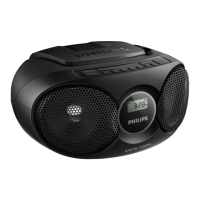
Philips AZ215S - User Manual

Philips AZ215S
16 pages
Print Icon
To Next Page IconTo Next Page
Loading...
www.philips.com/support
User manual
Always there to help you
Register your product and get support at
AZ215
AZ216
Question?
Contact
Philips
Question and Answer IconNeed help?

Do you have a question about the Philips AZ215S and is the answer not in the manual?

Summary

Safety

Notice

Your CD Soundmachine

Introduction

Overview of the CD sound machine's capabilities and functions.

Whats in the box

List of items included in the product package for setup.

Overview of the main unit

Diagram and labels identifying the different parts of the main unit.

Get started

Connect power

Steps to connect the device to AC power or install batteries.

Turn on

Procedure for powering on the CD sound machine and its standby mode.

Turn off

Instructions on how to switch off the CD sound machine.

Battery power

Guide for inserting batteries and powering the unit using batteries.

Play

Play disc

Steps for inserting, playing, pausing, stopping, and navigating CD tracks.

Listen to FM radio

Instructions for tuning into FM radio stations and optimizing reception.

Adjust volume

Method for controlling the audio playback volume level.

Turn Dynamic Bass Boost on;off

How to activate or deactivate the dynamic bass enhancement feature.

Play from an external device

Procedure for connecting and playing audio from external devices via AUDIO-IN.

Play options

Control play

Functions for controlling playback such as repeat, shuffle, and track skipping.

Program tracks

Steps to program and play a sequence of tracks from a CD.

Product information

Specifications

Detailed technical specifications for the amplifier, disc, and tuner.

Supported MP3 disc formats

Information on compatible MP3 disc formats, titles, albums, and bit rates.

Maintenance

Troubleshooting

Overview

This document is a user manual for the Philips AZ215 and AZ216 CD Soundmachines, providing comprehensive instructions on their operation, maintenance, and troubleshooting. The device is a portable audio system designed to offer versatile listening experiences, primarily focusing on disc playback and FM radio reception, with an additional option for connecting external audio devices.

Function Description

The Philips CD Soundmachine serves as a compact and portable audio player. Its primary function is to play audio from compact discs (CDs), including CD-DA, CD-R, and CD-RW formats, with support for MP3 disc formats. This allows users to enjoy their music collections stored on various disc types. Beyond disc playback, the device integrates an FM radio tuner, enabling users to listen to their favorite radio stations. The FM tuner supports a standard frequency range and allows for programming preset stations for quick access. Furthermore, the soundmachine features an AUDIO-IN socket, which expands its functionality by allowing connection to external audio devices such as MP3 players, smartphones, or other portable media players. This enables the device to act as an external speaker for a wider range of audio sources. The unit is designed for both AC power and battery operation, offering flexibility for use at home or on the go.

Usage Features

The CD Soundmachine is designed for straightforward and intuitive use, incorporating several features to enhance the listening experience:

  • Disc Playback:
    • Easy Loading: The device features a top-loading disc compartment, making it simple to insert and remove discs.
    • Basic Playback Controls: Users can start, pause, and stop disc playback using dedicated buttons.
    • Track Navigation: Buttons are provided to skip to the previous or next track, as well as to search within a track (fast-forward/fast-reverse).
    • Repeat Modes: The device supports various repeat modes, including repeating the current track ([REP]) or repeating all tracks ([REP ALL]), allowing users to continuously listen to their favorite music.
    • Shuffle Play: A shuffle mode ([SHUF]) is available to play tracks randomly, adding variety to the listening experience.
    • Program Play: Users can program up to 20 tracks in a desired sequence, creating custom playlists. This feature is particularly useful for organizing music for specific moods or events.
  • FM Radio:
    • Tuning: The device allows for manual tuning to FM radio stations.
    • Automatic Tuning: A feature for automatically tuning to stations with strong reception is included, simplifying the process of finding channels.
    • Preset Stations: Up to 20 FM radio stations can be programmed as presets, enabling quick selection of frequently listened-to channels.
  • External Audio Input:
    • AUDIO-IN Socket: The inclusion of an AUDIO-IN socket allows for easy connection of external audio devices using a standard audio cable (not supplied). This transforms the soundmachine into a versatile speaker for a multitude of audio sources.
  • Volume Control:
    • Dedicated Volume Buttons: Separate VOL - and VOL + buttons are provided for precise adjustment of the audio volume.
  • Dynamic Bass Boost (DBB):
    • Bass Enhancement: The DBB feature can be toggled on or off to enhance the bass response, providing a richer and more powerful sound, especially beneficial for music genres that benefit from strong low frequencies.
  • Power Management:
    • Dual Power Options: The device can be powered by an AC power cord for home use or by 6 C-cell batteries for portability.
    • Standby Mode: The soundmachine automatically switches to standby mode after 15 minutes of no audio detection or when playback is stopped in CD mode for over 15 minutes, helping to conserve energy. It can be woken up from standby by pressing the play/pause button.
  • Display Panel:
    • Informative Display: A display panel provides visual feedback on the current mode, track number, radio frequency, and other relevant information, making it easy to monitor the device's status.
  • Portability:
    • Compact Design: The soundmachine features a compact and lightweight design, making it easy to carry around. A handle is integrated for convenient transport.

Maintenance Features

To ensure the longevity and optimal performance of the Philips CD Soundmachine, the manual outlines several maintenance guidelines:

  • Cleaning the Cabinet:
    • Gentle Cleaning: The cabinet should be cleaned with a soft cloth slightly moistened with a mild detergent solution.
    • Avoid Harsh Chemicals: Users are advised against using solutions containing alcohol, spirits, ammonia, or abrasive cleaners, as these can damage the finish of the unit.
  • Cleaning Discs:
    • Wiping Technique: Dirty discs should be cleaned with a cleaning cloth, wiping from the center outwards to avoid scratching the data surface.
    • Prohibited Cleaners: Solvents such as benzene, thinner, commercially available cleaners, or antistatic sprays intended for analog records should not be used on discs, as they can cause damage.
  • Cleaning the Disc Lens:
    • Importance: Over time, dirt or dust can accumulate on the disc lens, potentially affecting play quality.
    • Recommended Tools: To maintain good play quality, the disc lens should be cleaned using a Philips CD lens cleaner or any other commercially available cleaner specifically designed for this purpose.
    • Following Instructions: Users are instructed to follow the directions provided with the chosen lens cleaner for effective and safe cleaning.
  • Battery Care:
    • Correct Installation: Batteries must be installed correctly with the proper polarity (+/-) as marked to prevent leakage and damage.
    • Heat Protection: Batteries should not be exposed to excessive heat from sources like sunshine or fire.
    • Removal for Storage: If the unit is not going to be used for a long time, batteries should be removed to prevent leakage and potential damage to the device.
    • Proper Disposal: Batteries contain chemical substances and should be disposed of properly according to local regulations.
  • General Safety:
    • Casing Integrity: Users are warned never to remove the casing of the apparatus to avoid electric shock and exposure to the laser beam.
    • Ventilation: Ensure sufficient free space around the product for proper ventilation to prevent overheating.
    • Environmental Protection: Keep the apparatus away from direct sunlight, naked flames, or excessive heat.
    • Power Cord Access: Always ensure easy access to the power cord, plug, or adapter to disconnect the apparatus from the power source when needed.
    • Liquid and Object Avoidance: The device should not be exposed to dripping or splashing liquids, and no liquid-filled objects (like vases) or open flames (like lit candles) should be placed on it.

These features collectively ensure that the Philips CD Soundmachine is a user-friendly, versatile, and durable audio device, suitable for various listening preferences and environments.

Philips AZ215S Specifications

General IconGeneral
Power sourceAC/Battery
AC input voltage220-240 V
AC input frequency50 - 60 Hz
Number of batteries supported6
Tuner type-
Auto digital tuningYes
Supported radio bandsFM
Package depth260 mm
Package width280 mm
Package height160 mm
Package weight1600 g
RMS rated power3 W
Number of built-in speakers2
Product colorSilver
Volume controlRotary
Cables includedAC
Headphone outputs1
Disc types supportedCD-DA, CD-R, CD-RW
Cassette deckNo
Weight and Dimensions IconWeight and Dimensions
Depth232 mm
Width252 mm
Height124 mm
Weight1000 g

Related product manuals