9 EN
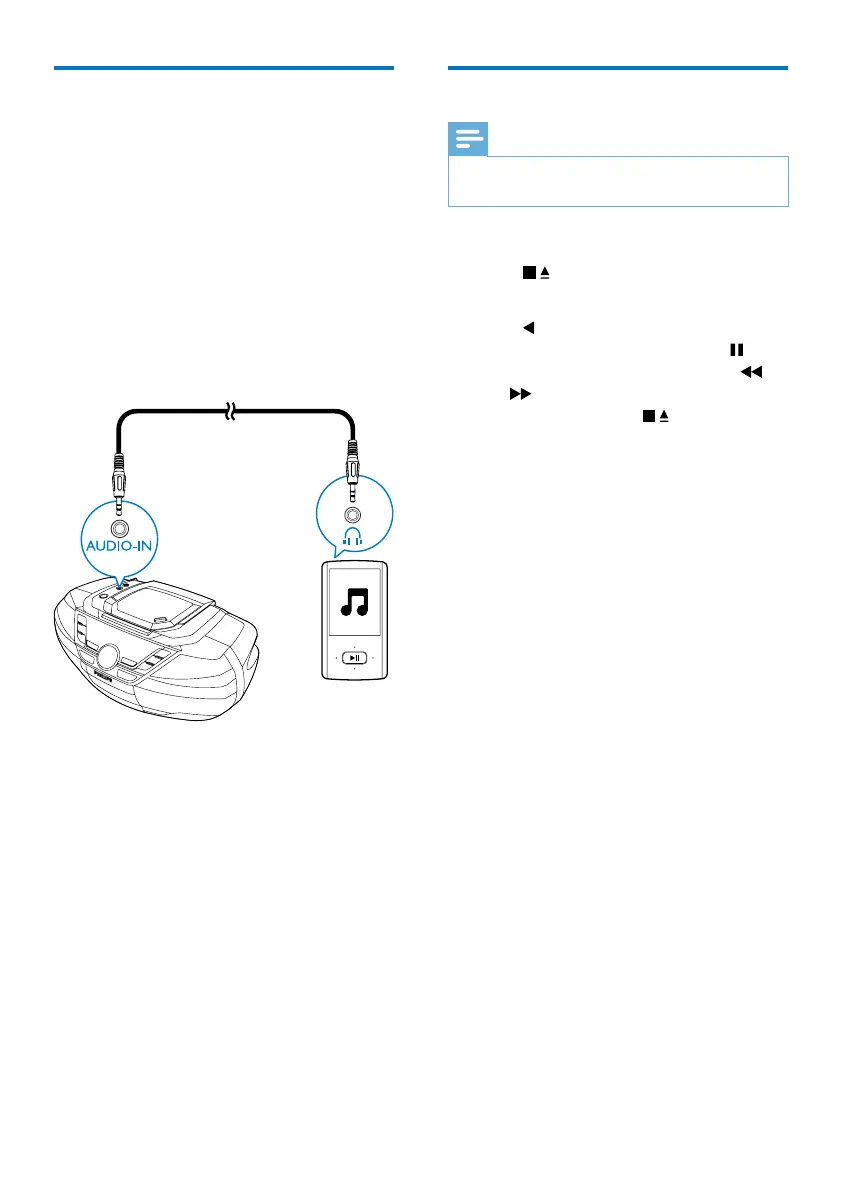
Play from an external device
You can also listen to an external audio device
such as an MP3 player through this unit.
1 Press SOURCE repeatedly to select
[AUDIO-IN] source.
2 Connect an audio cable (3.5mm, not
supplied)to:
• the AUDIO-IN socket on the unit.
• the headphone socket on an external
device.
3 Play the external device (see the device's
usermanual).
Play tape
Note
•
When you play a tape, the sound source cannot be
changed.
1 Press SOURCE to select the tape source.
2 Press to open the tape door.
3 Load a tape with the open side upward.
4 Press to start play.
• To pause or resume play, press
.
• To rewind or fast-forward, press
/
.
• To stop play, press
.


 To Next Page