5 SERVICE SOFTWARE
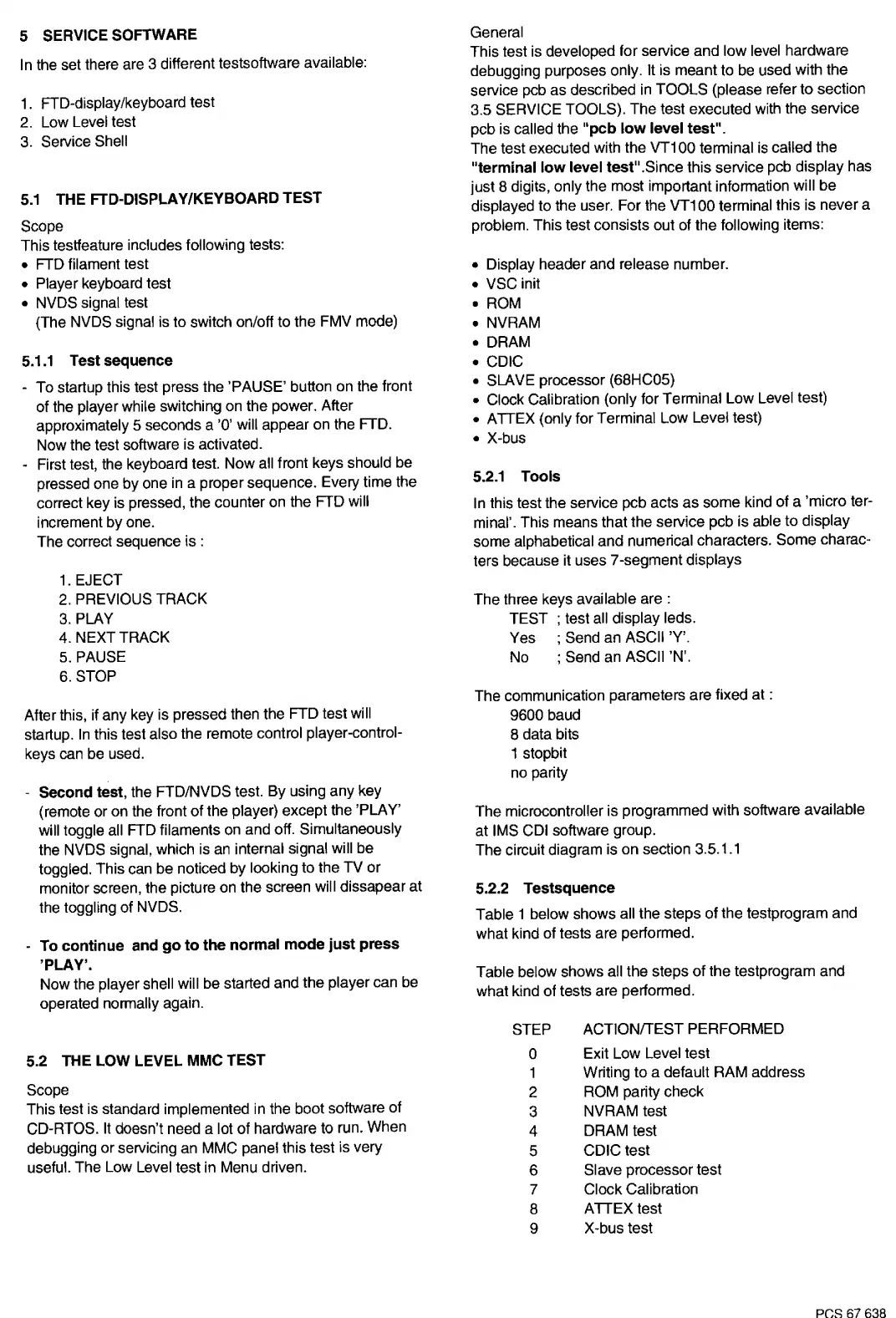
In the set there are 3 different testsoftware available:
1. FTD-display/keyboard test
2. Low Level test
3. Service Shell
5.1
THE FTD-DISPLAY/KEYBOARD TEST
Scope
This testfeature includes
following
tests:
• FTD filament test
• Player keyboard test
• NVDS signal test
(The NVDS signal is to switch on/off to the FMV mode)
5.1.1
Test sequence
- To startup this test press the
'PAUSE'
button on the front
of the player while switching on
the
power. After
approximately 5 seconds a
'O'
will appear on the FTD.
Now
the test software is activated.
- First test, the keyboard test.
Now
all front keys should be
pressed one
by
one in a proper sequence. Every time the
correct key is pressed, the counter on the FTD will
increment by one.
The correct sequence is :
1. EJECT
2. PREVIOUS
TRACK
3.PLAY
4. NEXT
TRACK
5.
PAUSE
6.
STOP
After this, if
any
key is pressed then the FTD test will
startup.
In
this test also
the
remote control player-control-
keys can be used.
Second test,
the FTD/NVDS test.
By
using any key
( remote or on the front
of
the player) except the 'PLAY'
will toggle all FTD filaments
on
and off. Simultaneously
the NVDS signal, which is an internal signal will be
toggled. This can be noticed by looking to the TV
or
monitor screen, the picture on
the
screen will dissapear at
the toggling
of
NVDS.
- To continue and go to the normal mode just press
'PLAY'.
Now
the player shell will be started and the player can be
operated normally again.
5.2 THE LOW LEVEL MMC TEST
Scope
This test is standard implemented in the boot software of
CD-ATOS.
It
doesn't need a lot of hardware to run. When
debugging
or
servicing an MMC panel this test ls very
useful. The Low Level test in Menu driven.
General
This test is developed for service
and
low
level hardware
debugging purposes only.
It
is meant to be used with the
service pcb
as
described in
TOOLS
(please refer
to
section
3.5 SERVICE TOOLS).
The
test executed wlth
the
service
pcb is called the
"pcb low level test".
The
test executed with
the
VT100
terminal
is
called the
"terminal low level test"
.Since this service pcb display has
just 8 digits, only the most important information will
be
displayed to the user.
For
the
VT100
terminal this is never a
problem. This test consists out of the following items:
•
Display header and release number.
• VSC init
• ROM
• NVRAM
• DRAM
• CDIC
• SLAVE processor (68HC05)
• Clock Calibration (only for Terminal
Low
Level test)
• ATTEX (only for Terminal Low Level test)
• X-bus
5.2.1
Tools
In
this test the service pcb acts
as
some kind of a 'micro ter-
minal'. This means that the service pcb is able
to
display
some alphabetical
and
numerical characters.
Some
charac-
ters because it uses 7-segment displays
The
three keys available are :
TEST
; test all display leds.
Yes ; Send
an
ASCII 'Y'.
No
; Send an ASCII 'N'.
The communication parameters are fixed at :
9600 baud
8 data bits
1
stopbit
no parity
The
microcontroller is programmed with software available
at IMS CDI software group.
The
circuit diagram is
on
section 3.5.1.1
5.2.2 Testsquence
Table 1 below shows all
the
steps of the testprogram and
what kind of tests are performed.
Table below shows all
the
steps
of
the testprogram and
what kind of tests are performed.
STEP ACTION/TEST PERFORMED
0
2
3
4
5
6
7
8
Exit Low Level
test
Writing
to
a default
RAM
address
ROM parity check
NVRAM test
DRAM test
CDIC test
Slave processor test
Clock Calibration
ATTEX
test
9 X-bus
test
PCS
67638


 To Next Page
 Loading...