STEP
BB:
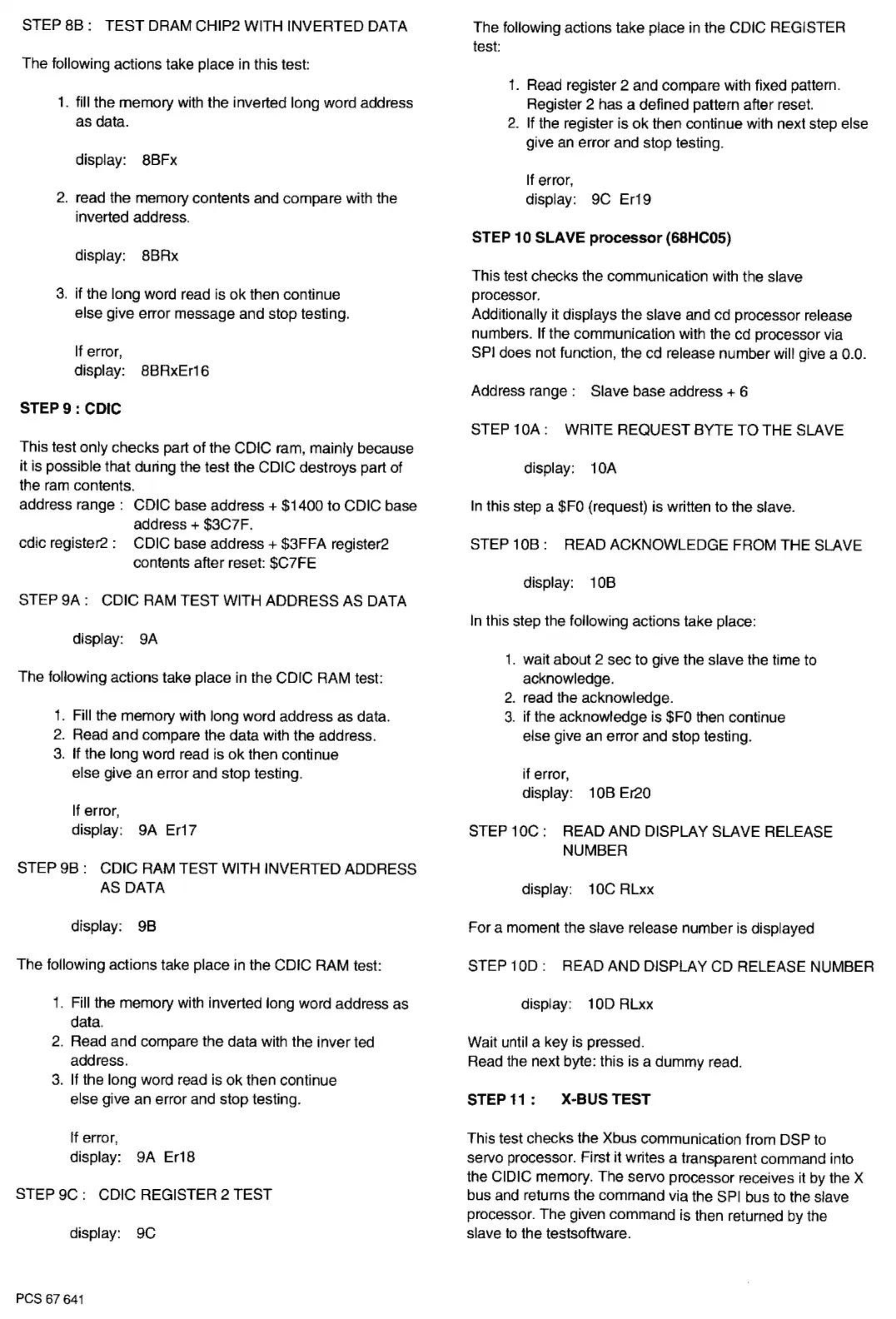
TEST DRAM CHIP2 WITH INVERTED DATA
The following actions take place
in
this
test
1.
fill the memory
with
the inverted long word address
as data.
display: 8BFx
2.
read the memory contents and compare with the
inverted address.
display: 8BRx
3.
if the long word read is ok then continue
else give error message and stop testing.
If error,
display: BBRxEr16
STEP9:
CDIC
This test only checks part of the CDIC ram, mainly because
it is possible that during the test the CDIC destroys part of
the
ram
contents.
address range : CDIC base address + $1400 to CDIC base
address+ $3C7F.
cdic register2 : CDIC base address + $3FFA register2
contents after reset: $C7FE
STEP
9A:
CDIC RAM TEST WITH ADDRESS
AS
DATA
display: 9A
The following actions take place
in
the
core
RAM test:
1.
Fill the memory with long word address as data.
2.
Read and compare the data with the address.
3.
If the long word read is ok then continue
else give an error and stop testing.
If
error,
display: 9A Er17
STEP 9B : CDIC RAM TEST WITH INVERTED ADDRESS
AS DATA
display:
9B
The following actions take place in the CDIC RAM test:
1.
Fill the memory with inverted long word address as
data.
2.
Read and compare the data with the inverted
address.
3.
If
the long word read is ok then continue
else give an error and stop testing.
If error,
display: 9A Er18
STEP 9C : CDIC REGISTER 2 TEST
display: 9C
PCS 67
641
The following actions take place
in
the CDIC REGISTER
test
1.
Read register 2 and compare with fixed pattern.
Register 2 has a defined pattern after reset.
2.
If the register is ok then continue with next step else
give
an
error and stop testing.
If
error,
display: 9C Er19
STEP 10 SLAVE processor (68HC05)
This test checks the communication with the slave
processor.
Additionally it displays the slave and cd processor release
numbers.
If
the communication with the cd processor via
SPI
does not function, the cd release number will give a 0.0.
Address range : Slave base address
+
6
STEP 1
0A:
WRITE REQUEST BYTE TO THE SLAVE
display:
1
0A
In
this step a
$FO
(request) is written to the slave.
STEP
10B:
READ ACKNOWLEDGE FROM THE SLAVE
display:
1
OB
In
this step the following actions take place:
1.
wait about 2 sec to give the slave the time to
acknowledge.
2.
read the acknowledge.
3.
if the acknowledge is
$FO
then continue
else give an error and stop testing.
if error,
display: 1
OB
Er20
STEP
10C:
READ AND DISPLAY SLAVE RELEASE
NUMBER
display: 1
OC
RLxx
For a moment the slave release number is displayed
STEP 1
OD
: READ AND DISPLAY CD RELEASE NUMBER
display: 1
OD
RLxx
Wait until a key is pressed.
Read the next byte: this is a dummy read.
STEP
11
: X•BUS TEST
This test checks the Xbus communication from DSP
to
servo processor. First it writes a transparent command into
the CIDIC memory. The servo processor receives it
by
the X
bus
and
returns the command via the
SPI
bus to the slave
processor. The given command is then returned
by
the
slave
to
the testsoftware.


 To Next Page
 Loading...