EN12
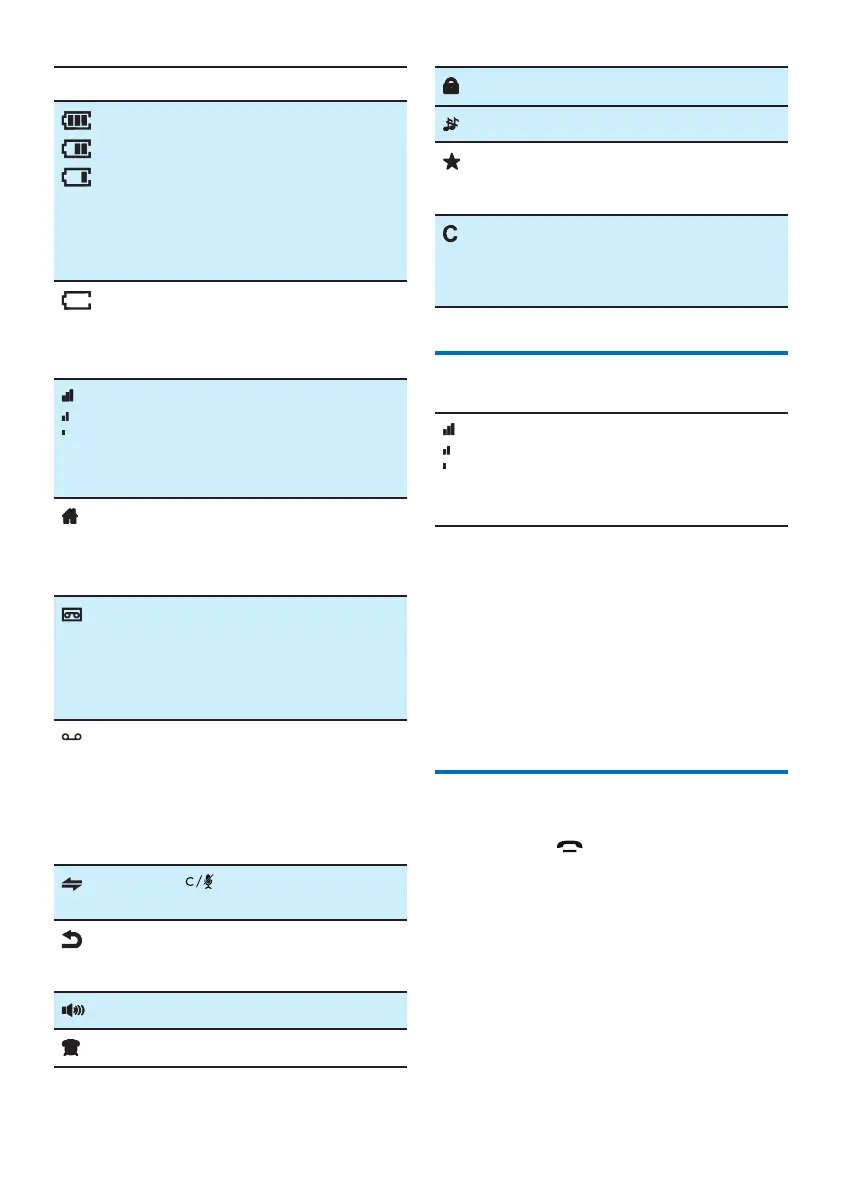
Icon Descriptions
When the handset is o the
base station or charger, the bars
indicate the battery level (from
full to low).
When the handset is on the
base station or charger, the bars
keep scrolling until charging is
complete.
The empty battery icon ashes
and you hear an alert tone.
The battery is low and needs
recharging.
It displays the connection status
between the handset and base
station.
The more bars are shown, the
better the signal strength is.
It remains steadily on when line
is in use.
It ashes when receiving
incoming call.
Answering machine (D275 only):
It displays when the telephone
answering machine is turned on.
It ashes when there is a new
TAM message.
It remains steadily on when there
are unread voice messages from
network.
The icon is not shown when there
is no voice message.
* This is network dependent.
Press for an intercom call
within 2 or up to 4 handsets.
Press to go back to the previous
menu or cancel the current
operation.
The speaker is on.
The alarm is on.
The keypad is locked.
The ringer is o.
It remains steadily on when there
are unread incoming calls in the
incoming call log
Press to clear a character or digit.
Press to stop the alarm.
Press to mute or unmute during
a call.
Check the signal strength
The number of bars indicates the
connection status between the
handset and base station. The
more bars are shown, the better
the connection is.
• Make sure the handset is connected to the
base station before you make or receive
calls and carry out the phone functions and
features.
• If you hear warning tones when you are on
the phone, the handset is almost out of
battery or the handset is out of range.
Charge the battery or move the handset
nearer to the base station.
Switch the handset on or o
Press and hold to switch the handset on
or o.



 To Next Page