EasyManua.ls Logo

Philips DCC 300 - Basic Operation: Power and Cassette Management; Powering On;Off and Standby Mode; Cassette Insertion and Identification

Philips DCC 300
20 pages
Print Icon
To Next Page IconTo Next Page
To Previous Page IconTo Previous Page
Loading...
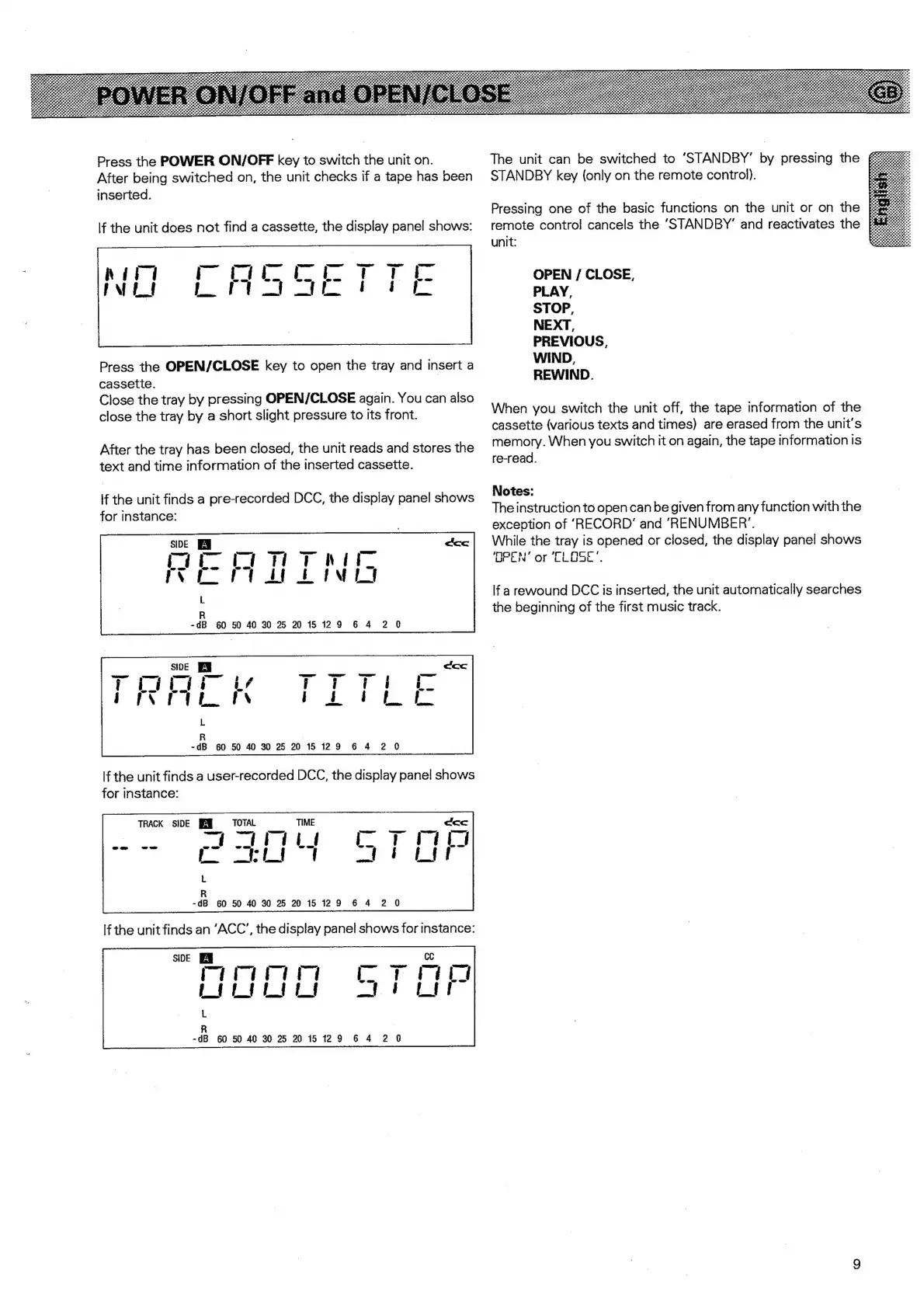
Press
the
POWER
ON/OFF
key
to
switch
the
unit
on.
After
being
switched
on,
the
unit
checks
if
a
tape
has
been
inserted.
lf
the
unit
does
not
find
a
cassette,
the
display
pane!
shows:
Press
the
OPEN/CLOSE
key
to
open
the
tray
and
insert
a
cassette.
Close
the
tray
by
pressing
OPEN/CLOSE
again.
You
can
also
close
the
tray
by
a
short
slight
pressure
to
its
front.
After
the
tray
has
been
closed,
the
unit
reads
and
stores
the
text
and
time
information
of
the
inserted
cassette.
lf
the
unit
finds
a
pre-recorded
DCC,
the
display
panel
shows
for
instance:
lf
the
unit
finds
a
user-recorded
DCC,
the
display
panel
shows
for
instance:
TRACK
SIDE
TOTAL
a
~~}:
L
R
-dB
60
50
40
30
2
2015129
6
4
2
0
R
-dB
60
50
40
30
25
2015129
6
4
2 0
The
unit
can
be
switched
to
‘STANDBY’
by
pressing
the
STANDBY
key
(only
on
the
remote
contro).
Pressing
one
of
the
basic
functions
on
the
unit
or
on
the
remote
contro!
cancels
the
‘STANDBY’
and
reactivates
the
unit:
OPEN
/
CLOSE,
PLAY,
STOP,
NEXT,
PREVIOUS,
WIND,
REWIND.
When
you
switch
the
unit
off,
the
tape
information
of
the
cassette
(various
texts
and
times)
are
erased
from
the
unit's
memory.
When
you
switch
it
on
again,
the
tape
information
is
re-read.
Notes:
The
instruction
to
open
can
be
given
from
any
function
with
the
exception
of
‘RECORD’
and
“RENUMBER’.
While
the
tray
is
opened
or
closed,
the
display
panel
shows
‘OPEN’
or
‘CLOSE’.
lf
a
rewound
DCC
is
inserted,
the
unit
automatically
searches
the
beginning
of
the
first
music
track.

Other manuals for Philips DCC 300

Related product manuals