0
DISPLAY
–
shows clock/alarm times and status of the set
!
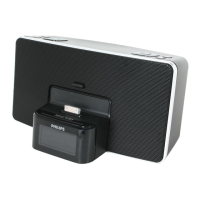
Dock connector (30 pins)
–
connects iPod player
@
ALM 2
–
activates/confirm alarm 2 time setting
– displays alarm 2 time
– switches off alarm 2 time
#
REPEAT
ALARM /
BRIGHTNESS CONTROL
– switches off the alarm for a 9 minute period
– changes the brightness of the display illumination
$
POWER jack
–
socket for AC/DC 18V adapter
%
Pigtail – improves FM reception
^
ALM
1
–
activates/confirm alarm 1 time setting
– displays alarm 1 time
– switches off alarm 1 time
&
TIME SET
– activates/confirm clock time/date setting
*
(Wake-up mode) iPod•BUZZER •RADIO
– selects alarm mode: iPod, buzzer or radio
(
AUX IN jack (3.5 mm)
–
connects to external audio source
)
RESET
– press if the set / display does not react to operation of any button
POWER SUPPLY
Mains adapter
1
Connect the mains adapter to the set's DC 18V socket and to the power socket.
Helpful hints: To avoid damage to the set, use only the adapter supplied!
The type plate is located on the bottom of the set.



 To Next Page