6 EN
3 Get started
Always follow the instructions in this chapter in
sequence.
Connect power
Caution
• Risk of product damage! Make sure that the power
supply voltage corresponds to the voltage printed on
the back of the unit.
• Risk of electric shock! When you unplug the AC
adapter, always pull the plug from the socket. Never
pull the cord.
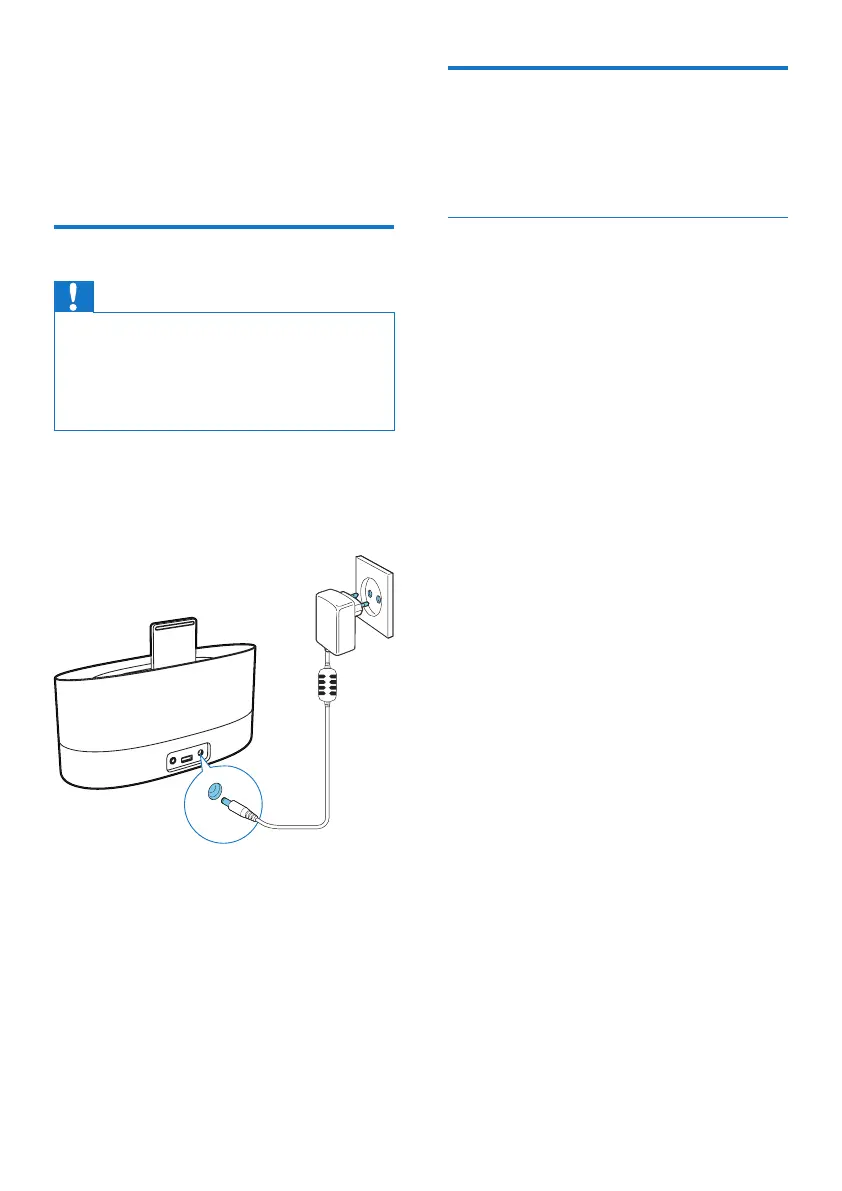
Connect the AC power adapter to:
• the power socket at the back of the
docking speaker.
• the wall power outlet.
Turn on
In standby mode, the docking speaker turns on
automatically when it detects an audio signal
from docked iPod/iPhone/iPad.
Switch to standby mode
The docking speaker switches to standby mode
in the following situations:
• In dock mode: no audio signal from the
docked iPod/iPhone/iPad over 15 minutes.
• In AUDIO IN mode: no audio signal
detected over 15 minutes.



 To Next Page