10
FUNCTIONAL OVERVIEW
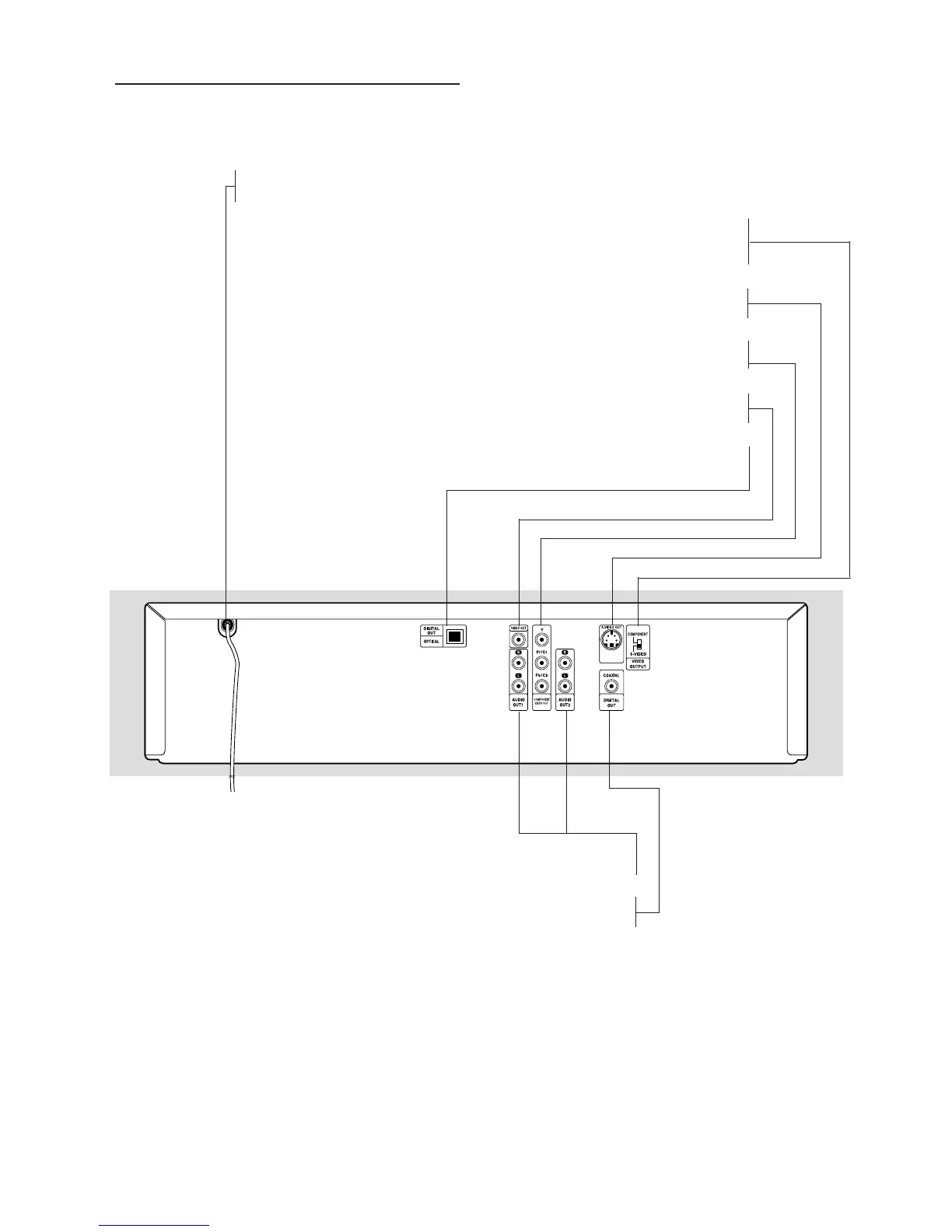
Rear Panel
Caution: Do not touch the inner pins of the jacks
on the rear panel. Electrostatic discharge may
cause permanent damage to the unit.
VIDEO OUTPUT Switch
–
select either S-VIDEO or COMPONENT, depending on how you
connected the DVD Player to the TV
S-VIDEO OUT
– connect to a TV with S-Video inputs
COMPONENT VIDEO OUT Y Pr/Cr Pb/Cb
– connect to a TV with Y Pr/Cr Pb/Cb inputs
VIDEO OUT
– connect to a TV with a yellow VIDEO IN jack (also called CVBS)
OPTICAL DIGITAL OUT
– connect to digital (optical) audio equipment
AUDIO OUT (Left/Right) 1, 2
– connect to an amplifier, receiver, TV, or stereo system
COAXIAL DIGITAL OUT
– connect to digital (coaxial) audio equipment
AC Power Cord
– connect to a power source



 To Next Page