8
Connecting with a scart cable
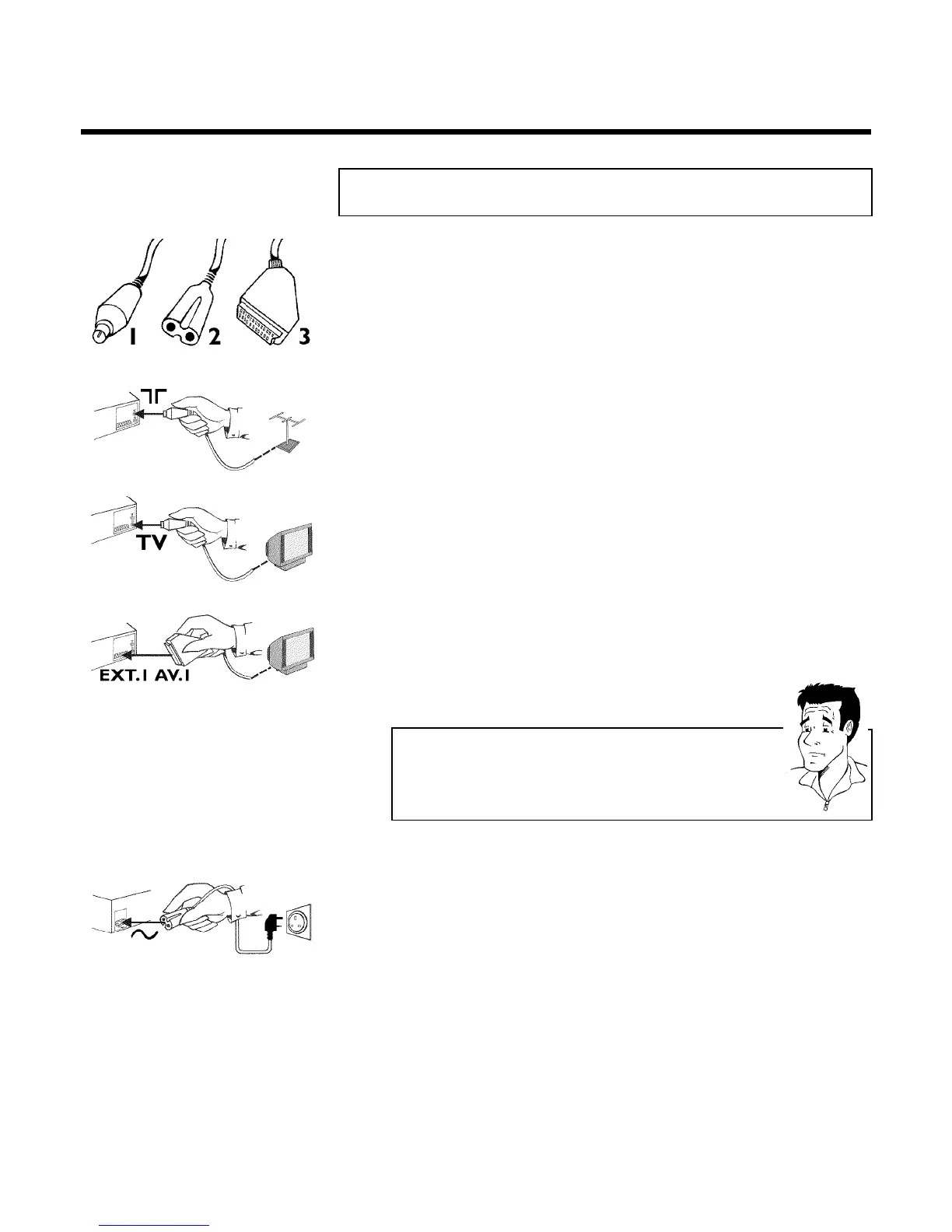
Have the following cables ready:
an aerial cable (1, supplied), a mains cable (2, supplied), a scart cable (3).
1 Remove the aerial cable plug from your TV set. Insert it into the
socket 2 at the back of the video recorder.
2 Insert one end of the supplied aerial cable into the socket TV at the
back of the video recorder and the other end into the aerial input
socket at the back of the TV set.
3 Plug one end of a scart cable into the scart socket EXT.1 AV. 1 at
the back of the video recorder and the other end into the suitable
scart socket on your TV set reserved for the video recorder
operation (see your TV's operating instructions).
My TV set has several scart sockets. Which one should I use?
Select that scart socket which is suited for the video output as well as for the
video input.
My TV offers me a selection menu for the scart socket.
Select 'TV' as a connection source of this scart socket.
4 Switch on the TV set.
5 Insert one end of the supplied mains cable into the mains socket
4 at the back of the video recorder and the other end into the wall
socket.
6 If the connection was properly made and your TV was automatically
switched to the programme number for the scart socket, e.g. 'EXT',
'0', 'AV', you will see the following picture:
Connecting the video recorder



 To Next Page