EasyManua.ls Logo

Philips TYPE VR 175 - User Manual

Philips TYPE VR 175
16 pages
Print Icon
To Next Page IconTo Next Page
Loading...
&
The remote control
RECORD/OTR n
Record
STANDBY m
Standby
SELECT
Function selector
TIMER k
’VIDEOPlus’ or ’TIMER’ programming
CLEAR (CL)
Reset, clear
0-9
Digit buttons 0-9
MONITOR
TV monitor function
OK
Confirm button
P r
Down/Minus, programme number
P q
Up/Plus, programme number
PLAY G
Playback
H
Rewind/Reverse scanning
I
Forward wind/ Forward scanning
STOP h
Pause/Stop, Tuner-mode
INDEX E
Index search
SP/LP
(SP/LP) selection
STILL R
Still picture
SYSTEM
Special function
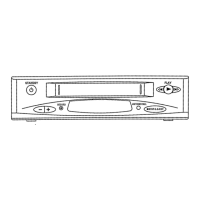
Front of the video recorder
STANDBY m
Standby
r
Down/Minus, programme number
q
Up/Plus, programme number
RECORD 5
Record
AUTOINSTALL
Installation
hSTOP/JEJECT
Stop/Cassette eject
H
Rewind/Reverse scanning
PLAY G
Playback
I
Forward wind/ Forward scanning
OPERATING INSTRUCTIONS IN BRIEF
Question and Answer IconNeed help?

Do you have a question about the Philips TYPE VR 175 and is the answer not in the manual?

Summary

Programming with VIDEOPlus+

How to programme a recording manually

1. INSTALLATION

Connecting cables

Details how to connect the aerial and SCART cables to the video recorder and TV.

Emergency interrupt

Describes how to safely interrupt any function using the STANDBY button.

Automatic Channel Search

Guides through the process of automatically finding and storing TV channels.

2. PLAYBACK

Eliminating picture interference;Cleaning function

Provides steps to adjust tracking and clean the video heads for better picture quality.

3. RECORDING

Programming with VIDEOPlus+

Details how to record programs using the VIDEOPlus+ code system.

Programming recordings manually

Guides users through setting up timed recordings manually via the TIMER block.
4. SPECIAL FEATURES

Summary

Programming with VIDEOPlus+

How to programme a recording manually

1. INSTALLATION

Connecting cables

Details how to connect the aerial and SCART cables to the video recorder and TV.

Emergency interrupt

Describes how to safely interrupt any function using the STANDBY button.

Automatic Channel Search

Guides through the process of automatically finding and storing TV channels.

2. PLAYBACK

Eliminating picture interference;Cleaning function

Provides steps to adjust tracking and clean the video heads for better picture quality.

3. RECORDING

Programming with VIDEOPlus+

Details how to record programs using the VIDEOPlus+ code system.

Programming recordings manually

Guides users through setting up timed recordings manually via the TIMER block.

4. SPECIAL FEATURES

Philips TYPE VR 175 Specifications

General IconGeneral
BrandPhilips
ModelTYPE VR 175
CategoryVCR
LanguageEnglish

Related product manuals