Supply: 230 +/- 14% 50/60Hz Single Phase
Serial Port 1: 1 x 10/100BaseT Ethernet, consisting of 1 x RJ45 socket
Serial Port 2: 1 x RS485 unterminated, consisting of 1 x RJ12 socket & 1 x 5 way terminal block
RS485 Data Formats: DyNet, DyNet II
User Controls: Service Switch, Diagnostic LED
Internal Controls: Programmable Logic Controller, 64 Tasks
Operating Environment: 0º to 50ºC ambient temperature, 0% to 95% RH non condensing
Power Consumption: 450mA from the DyNet network at 12VDC
Compliance: CE, C-Tick
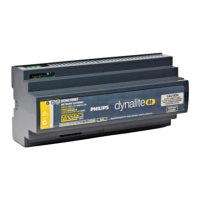
Construction: Polycarbonate DIN Rail enclosure (12 unit)
Dimensions: H 93mm x W 211mm x D 75mm
Weight: 0.86kg
DDNG100BT Installation Manual Rev B.doc Specifications subject to change without notice
Philips Dynalite manufactured by WMGD Pty Ltd (ABN 33 097 246 921) Unit 6, 691 Gardeners Road Mascot NSW 2020 Australia Tel: +61 2 8338 9899 Fax: +61 2 8338 9333
E-Mail: dynalite.info@philips.com Web: Philips.com/dynalite
1. Mount the device on a DIN rail inside an appropriate enclosure
2. Connect supply cables feed from the appropriately rated protection.
3. Connect Ethernet and Dynet data cables to the device as per label on device.
4. Power up device once all termination have been re checked.
5. The unit will need to be configured using Envision commissioning tool


 To Previous Page
