1 Introduction
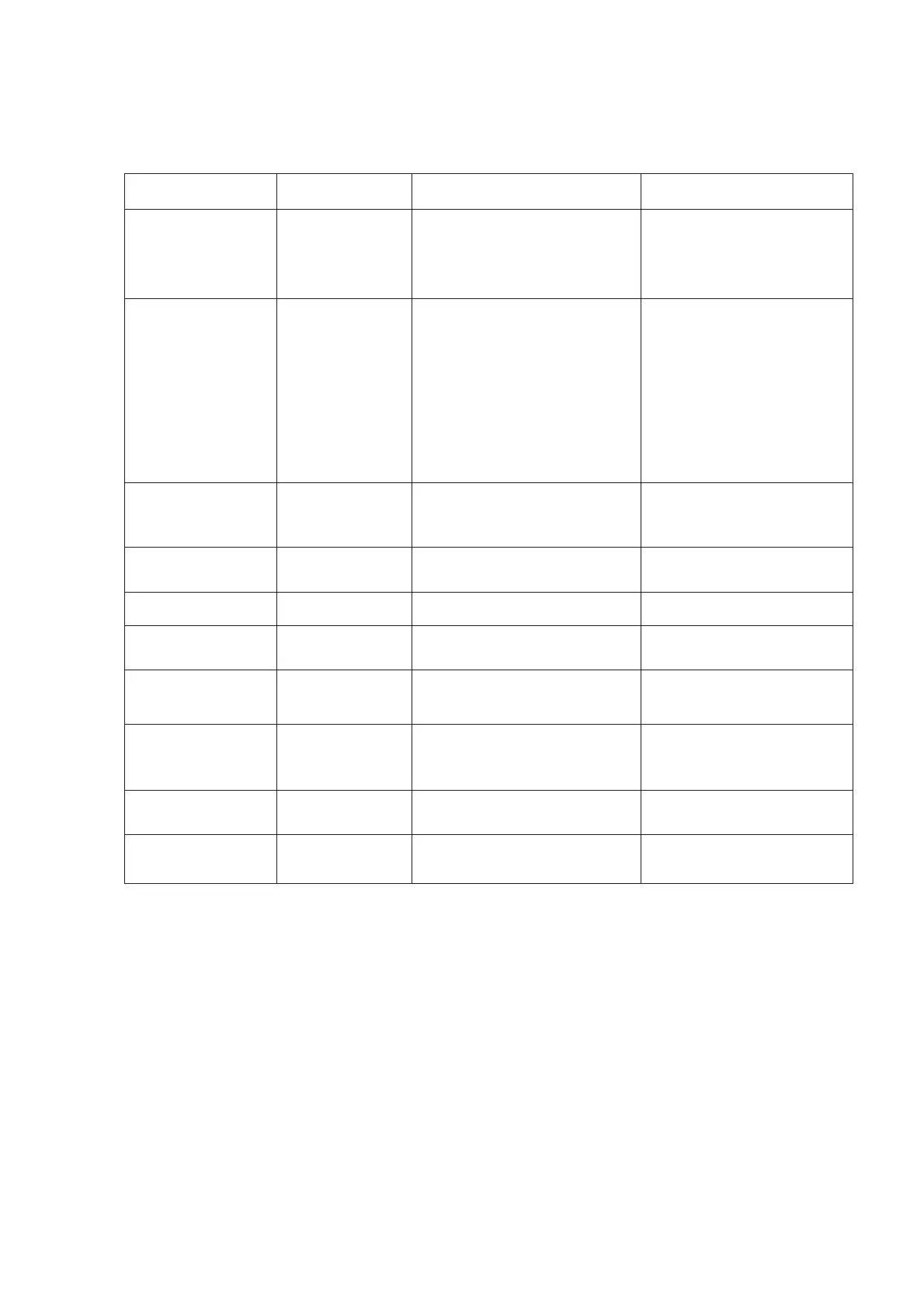
ITEM STATE
COMMENT REMARK
On/Off
when set On, we can enter
factory menu
on remote
control directly.
Factory out :OFF
WARM-
On/Off
Aging mode ON:The
flashingcharacter‘P
W’and
the time of aging display on
the
below-
Only in TV source will
display noise picture
when WARM
-
UP set on
Disable on designer mode
“MENU”
on the
Keyboard can exit
Warm_UP mode.
Reset S
Do
InitiFactory mode data reset
It will be done before
shop initial if needroduct
line, HOTKEY will be di
NVM
Do
Clear NVM values
Channel
Preset TV Channel
Set the TV’s state when AC
on
Update by USB
Do Test the divece ID
2 Open the Factory Menu method
2.1 Follow the below steps to pop-up the Factory menu in case of “Factory Key” is
disabled:
- Press RCU “MENU” key to display main menu
- Selec
t “Setting” and press “OK” key to enter into setting submenu
- Selec
t “Picture” and press “OK” key to enter into picture submenu
- Scroll down to “Contrast” item
- Pre
ss the subsequence RCU keys “9”, “7”, “3” and “5”











 To Next Page