EasyManua.ls Logo

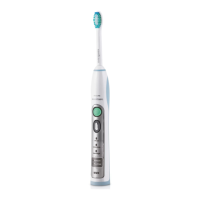
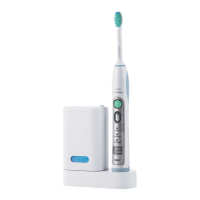
Philips FlexCare Platinum Connected - User Manual

Philips FlexCare Platinum Connected
160 pages
Print Icon
To Next Page IconTo Next Page
Loading...
FlexCare Platinum Connected
4235_021_1357_1_DFU-Luxury_A6_v1.indd 1 18/04/16 16:16

Other manuals for Philips FlexCare Platinum Connected

Question and Answer IconNeed help?

Do you have a question about the Philips FlexCare Platinum Connected and is the answer not in the manual?

Summary

Introduction and Safety

Important Notes

Read and save the user manual for future reference.

Danger Warnings

Keep charger away from water and liquids; ensure it's dry before connecting.

General Warnings

Mains cord is not replaceable. Use only original chargers to avoid hazards.

Cautionary Advice

Usage Cautions

Do not clean parts in dishwasher. Consult dentist for oral surgery or bleeding issues.

Medical Considerations

Consult physician for pacemakers; consult doctor for medical concerns before use.

Technical Specifications

Electromagnetic Fields (EMF)

Product complies with standards regarding exposure to electromagnetic fields.

Radio Equipment Directive

Product operates between 2402-2480 MHz with max RF power of +3 dBm.

General Description

Preparing for Use

Attaching the Brush Head

Align and firmly press the brush head onto the metal shaft until it stops.

Charging the Appliance

Place handle on charger; 24 hours for full charge. Flashing light indicates charging.

Bluetooth Connectivity

Ensure mobile device has Bluetooth 4.0+ for connectivity and app use.

Brushing Instructions

Brushing Modes

Product Features

Intensity Levels & Battery Status

Details on intensity indicators (LEDs) and battery charge levels.

Pressure Sensor

Detects and alerts user to excessive brushing pressure via vibration and sound.

Feature Operations

Pressure Sensor Control

Instructions to activate or deactivate the Pressure Sensor using button combinations.

BrushPacer & Smartimer

Interval timer guides brushing sections; Smartimer indicates cycle completion.

Easy-start Feature

Gradual power increase over initial brushings; deactivated by default.

Sanitizing Process

Easy-start Feature Control

Instructions to activate or deactivate the Easy-start feature using button combinations.

Cleaning

Toothbrush Handle

Wipe the handle with a damp cloth after removing the brush head.

Brush Head

Rinse brush head and bristles after each use; clean connection weekly.

Charger

Unplug before cleaning; wipe the charger surface with a damp cloth.

Sanitizer Cleaning

Clean sanitizer interior, drip tray, screen, and UV bulb weekly.

Storage

Replacement Parts

Brush Head Replacement

Replace brush heads every 3 months or when notified by the Sonicare App.

UV Light Bulb

Replacement UV bulbs available via Philips Sonicare Consumer Service.

Recycling

Removing the Rechargeable Battery

Guarantee and Support

Guarantee Restrictions

International guarantee excludes brush heads, unauthorized parts, misuse, or normal wear.

Summary

Introduction and Safety

Important Notes

Read and save the user manual for future reference.

Danger Warnings

Keep charger away from water and liquids; ensure it's dry before connecting.

General Warnings

Mains cord is not replaceable. Use only original chargers to avoid hazards.

Cautionary Advice

Usage Cautions

Do not clean parts in dishwasher. Consult dentist for oral surgery or bleeding issues.

Medical Considerations

Consult physician for pacemakers; consult doctor for medical concerns before use.

Technical Specifications

Electromagnetic Fields (EMF)

Product complies with standards regarding exposure to electromagnetic fields.

Radio Equipment Directive

Product operates between 2402-2480 MHz with max RF power of +3 dBm.

General Description

Preparing for Use

Attaching the Brush Head

Align and firmly press the brush head onto the metal shaft until it stops.

Charging the Appliance

Place handle on charger; 24 hours for full charge. Flashing light indicates charging.

Bluetooth Connectivity

Ensure mobile device has Bluetooth 4.0+ for connectivity and app use.

Brushing Instructions

Brushing Modes

Product Features

Intensity Levels & Battery Status

Details on intensity indicators (LEDs) and battery charge levels.

Pressure Sensor

Detects and alerts user to excessive brushing pressure via vibration and sound.

Feature Operations

Pressure Sensor Control

Instructions to activate or deactivate the Pressure Sensor using button combinations.

BrushPacer & Smartimer

Interval timer guides brushing sections; Smartimer indicates cycle completion.

Easy-start Feature

Gradual power increase over initial brushings; deactivated by default.

Sanitizing Process

Easy-start Feature Control

Instructions to activate or deactivate the Easy-start feature using button combinations.

Cleaning

Toothbrush Handle

Wipe the handle with a damp cloth after removing the brush head.

Brush Head

Rinse brush head and bristles after each use; clean connection weekly.

Charger

Unplug before cleaning; wipe the charger surface with a damp cloth.

Sanitizer Cleaning

Clean sanitizer interior, drip tray, screen, and UV bulb weekly.

Storage

Replacement Parts

Brush Head Replacement

Replace brush heads every 3 months or when notified by the Sonicare App.

UV Light Bulb

Replacement UV bulbs available via Philips Sonicare Consumer Service.

Recycling

Removing the Rechargeable Battery

Guarantee and Support

Guarantee Restrictions

International guarantee excludes brush heads, unauthorized parts, misuse, or normal wear.

Philips FlexCare Platinum Connected Specifications

General IconGeneral
BrandPhilips
ModelFlexCare Platinum Connected
CategoryElectric Toothbrush
LanguageEnglish

Related product manuals