Note: UV light can be harmful to the human eye and skin. This device
should be kept out of reach of children at all times.
1 After brushing, rinse the brush head and shake off excess water.
Warning: Do not place the travel cap on the brush head
during sanitization.
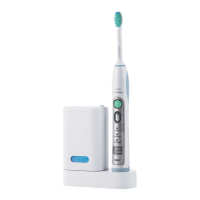
2 Place your finger in the door recess on top of the sanitizer and pull
open the door (Fig. 10).
3 Place the brush head on one of the 2 pegs in the sanitizer with the
bristles facing the light bulb (Fig. 11).
Note: Only clean Philips Sonicare snap-on brush heads in the
sanitizer.
4 Make sure the sanitizer is plugged into a live outlet of appropriate
voltage.
5 Close the door and press the green power on/off button once to
select the UV clean cycle.
Note: You can only turn on the sanitizer if the door is properly
closed.
Note: The sanitizer stops if you open the door during the sanitizing
cycle.
Note: The sanitizer cycle runs for 10 minutes and then
automatically shuts off.
-
The sanitizer is in operation when the light glows through the
window.
Cleaning
Warning: Do not clean the brush head, handle, travel
charger or the UV sanitizer in the dishwasher.
Toothbrush handle
1 Remove the brush head and rinse the metal shaft area with warm
water. Make sure you remove any residual toothpaste (Fig. 12).
Caution: Do not push on the rubber seal on the metal shaft with
sharp objects, as this may cause damage.
2 Wipe the entire surface of the handle with a damp cloth.
18
English





 To Next Page