EasyManua.ls Logo

Philips FR965/00 - Page 8

Philips FR965/00
72 pages
Print Icon
To Next Page IconTo Next Page
To Previous Page IconTo Previous Page
Loading...
INSTRUCTIONS
FOR
USE
REMOTE
CONTROL
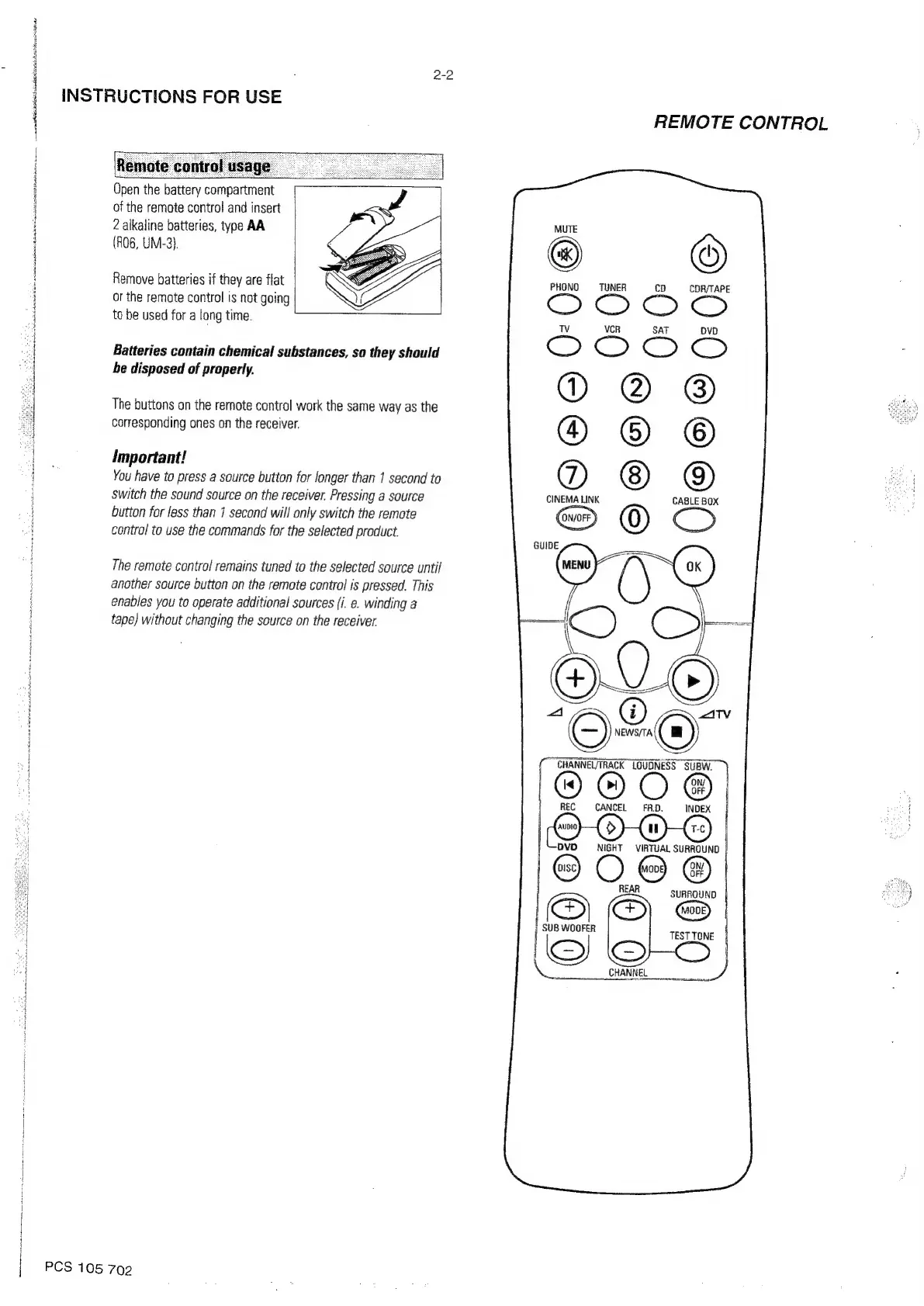
Open
the
battery
compartment
of
the
remote
control
and
insert
2
alkaline
batteries,
tyoe
AA
(R06,
UM-3}.
©
PHONO
TUNER
cD
cD
Remove
batteries
if
they
are
flat
or
the
remote
control
is
not
going
Oise.
2
ectiarantn
Sa
Ko
mnt
teA
DR
ne
mati
Rn
baonboieatloh
nia
renga
=
j
to
be
used
for
a
long
time.
H
:
VCR
SAT
A
Batteries
contain
chemical
substances,
so
they
should
:
be
disposed
of
properly.
The
buttons
on
the
remote
control
work
the
same
way
as
the
corresponding
ones
on
the
receiver.
important!
You
have
to
press
a
source
button
for
longer
than
1
second
to
Switch
the
sound
source
on
the
receiver.
Pressing
a
source
et
button
for
less
than
1
second
will
only
switch
the
remote
contra!
to
use
the
commands
for
the
selected
product.
The
remote
control
remains
tuned
to
the
selected
source
until
another
source
button
on
the
remote
control
is
pressed.
This
enables
you
to
operate
additional
sources
(i.
e.
winding
a
tape)
without
changing
the
source
on
the
receiver
“St
WA
at
ant
Robe
Ere
a
Sinton
nk
acta
erat
gm
tok
tar
ie
ste
i
i
od
nd
'
j
i
|
j
|
PCS
105
702

Related product manuals