Need help?
Do you have a question about the Philips FX50 and is the answer not in the manual?
Safety instructions and symbol explanations for the apparatus.
Information about modifications, trademarks, and product specifications.
Overview of the Hi-Fi system's capabilities and supported media formats.
Lists the items included in the product package.
Detailed explanation of the main unit's controls and ports.
Detailed explanation of the remote control's buttons and functions.
Instructions for connecting FM and AM antennas.
Instructions for connecting the speakers to the main unit.
Instructions for connecting the AC power cord.
Steps for inserting batteries into the remote control.
Guide to automatically tuning and storing radio stations.
Instructions for setting the unit's clock.
Procedure for powering on the unit.
How to switch the unit between normal and ECO standby modes.
Steps to play audio wirelessly via Bluetooth.
Guide to pairing Bluetooth devices using NFC or manually.
Instructions for playing audio from a CD disc.
How to play audio files from a USB storage device.
Connecting and playing audio from an MP3 player via 3.5mm jack.
Connecting and playing audio from devices with RCA output.
Controls for repeat, shuffle, and normal play modes.
How to view playback information on the display.
How to adjust the speaker volume using the unit or remote.
How to mute and unmute the sound output.
How to activate the MAX SOUND feature for increased power.
How to select equalizer presets for different sound effects.
How to adjust dynamic bass boost levels.
Instructions for manually tuning into FM or AM radio stations.
Guide to automatically storing all available radio stations.
How to manually program and store favorite radio stations.
How to select a stored preset radio station.
Adjusts the AM tuning frequency step for different regions.
Steps to record audio from a disc to a USB device.
How to record CD audio content to USB during playback.
Instructions for setting the unit as an alarm clock with various sources.
How to automatically switch the unit to standby after a set time.
Guide to resetting the unit's settings to factory defaults.
Detailed technical specifications of the Hi-Fi system.
Information on compatible USB devices and supported formats.
Details on compatible MP3 disc formats and limitations.
Cleaning instructions for the cabinet and disc lens.
Steps to resolve issues related to the unit not powering on.
Solutions for problems with sound output.
How to fix reversed audio channels.
Troubleshooting steps for a non-responsive unit.
Solutions for when the remote control is not functioning.
Reasons and solutions for the unit not detecting a disc.
Explains why certain files may not display on USB.
Information about incompatible USB devices.
Tips to improve radio signal reception.
How to resolve issues with clock/timer settings being lost.
Troubleshooting steps for the timer function.
Explains why music playback might fail after Bluetooth connection.
Solutions for poor audio quality over Bluetooth.
Reasons for Bluetooth connection failure.
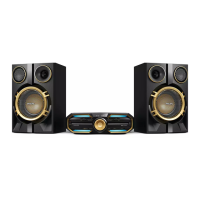
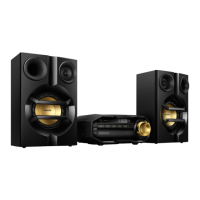
This document is a user manual for the Philips FX50 Mini Hi-Fi System, a comprehensive audio device designed to provide a rich sound experience through various media formats and connectivity options.
The Philips FX50 Mini Hi-Fi System allows users to enjoy audio from multiple sources, including discs, USB storage devices, Bluetooth-enabled devices, and other external audio devices. It also features AM and FM radio reception. To enhance the sound quality, the system offers several sound effects such as Max Sound for an instant power boost, Bass Boost for dynamic bass enhancement, and various EQ (equalizer) settings. The unit supports Compact Disc Digital Audio (CDDA) and MP3-CD playback.
Getting Started: The manual provides clear instructions for initial setup, including connecting antennas (FM and AM), speakers, and power. It also details how to prepare the remote control by inserting AAA batteries. The system can automatically install radio stations upon initial power connection, and users can also manually program up to 20 FM and 10 AM preset radio stations. The clock can be set to either 12-hour or 24-hour format. The unit can be turned on by pressing the power button, and it switches to the last selected source. It supports both normal standby and Eco Power standby modes, with the latter dimming the display panel and activating after 10 minutes of inactivity in standby mode.
Playback Options:
Sound Adjustment and Effects:
Other Features:
General Care:
Safety and Troubleshooting: The manual includes important safety instructions, such as avoiding exposure to rain or moisture, not blocking ventilation openings, and proper battery usage. A comprehensive troubleshooting section helps users diagnose and resolve common issues like no power, poor sound, remote control not working, disc not detected, USB device issues, poor radio reception, and Bluetooth connectivity problems. It advises users to contact Philips support if problems persist, ensuring they have the model and serial number readily available.
 General
| Bass reflex | Yes |
|---|---|
| Speaker type | 2-way |
| RMS rated power | 1200 W |
| Woofer diameter | 101 mm |
| Tweeter diameter | 50 mm |
| Number of speakers | 2 |
| Mid-range driver diameter | 203 mm |
| Type | Home audio mini system |
| Cassette deck | No |
| Product color | Black, Gold |
| Disc loading type | Tray |
| Number of optical discs | 1 discs |
| Bluetooth profiles | A2DP |
| Apple docking compatibility | Not supported |
| Headphone outputs | 1 |
| Headphone connectivity | 3.5 mm |
| Display type | LCD |
| Tuner type | Digital |
| Supported radio bands | FM, MW |
| Preset stations quantity | 40 |
| Playback modes | Fast backward, Fast forward, Next, Previous, Program, Random, Repeat, Repeat all, Repeat one, Shuffle |
| Disc types supported | CD, CD-R, CD-RW |
| Playback disc formats | CD audio |
| Audio formats supported | CD-A, MP3 |
| Power source | AC |
| Input voltage | 110-240 V |
 Weight and Dimensions
| Depth | 320 mm |
|---|---|
| Width | 467 mm |
| Height | 140 mm |
| Weight | 20730 g |
| Package depth | 374 mm |
| Package width | 578 mm |
| Package height | 740 mm |


 To Next Page