3
ENGLISH
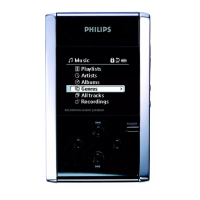
Organize and transfer music via DMM
a. Launch DMM on PC from Windows desktop or Start menu.
b. Use DMM to organize your music.
c.Transfer music files from your PC to your hdd.
Note:
0 DMM cannot rip MP3 / WMA files from CDs.You will need additional
software to do this.
0 hdd will play MP3 / WMA files only if they are transferred using DMM.
4
Safely disconnect hdd and enjoy music on the go
a. Exit DMM.
b. Disconnect hdd safely from your PC by clicking on the task bar to
avoid file error. (WINDOWS 98SE users: there is no icon. Simply disconnect
hdd after file transfer completes
.)
c. Press and hold 2; to switch on hdd if the hdd screen doesn’t automatically
appear. Use scroll controls to browse and press 2; to enjoy music!
5


 To Next Page