
 Need help?
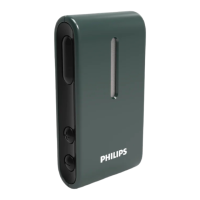
Do you have a question about the Philips HearLink AudioClip and is the answer not in the manual?
Uses AudioClip as a wireless headset for mobile phones.
Uses AudioClip as a remote microphone for hearing aids.
Explains various status indicator lights and their meanings.
Steps to pair hearing aids with the AudioClip.
Steps to pair the AudioClip with a mobile phone.
How to power on the AudioClip using the multi button.
How to power off the AudioClip using the multi button.
How to charge the AudioClip using the USB connector.
How to wear the AudioClip for optimal microphone performance.
How to set the AudioClip to phone mode.
Indicator when the AudioClip is connected to a mobile phone.
How the device indicates an incoming call.
How to answer a call using the multi button.
How to end a call using the multi button.
How to make a call using the mobile phone.
How to mute the hearing aid microphones.
How music streams from phone to hearing aids.
How to adjust the volume of streamed audio.
How speech is streamed to hearing aids in this mode.
Ensuring correct microphone placement for best performance.
How to switch between different microphone modes.
How to stop the remote microphone signal.
How to adjust the volume of the remote microphone signal.
How to mute hearing aid microphones from remote mic.
How AudioClip functions as a remote control when not streaming.
Volume, program change, and mute functions.
Keep small parts away from children to prevent choking.
Warning about using the device in explosive environments.
 General
| Brand | Philips |
|---|---|
| Model | HearLink AudioClip |
| Category | Hearing Aid |
| Language | English |


 To Next Page