C
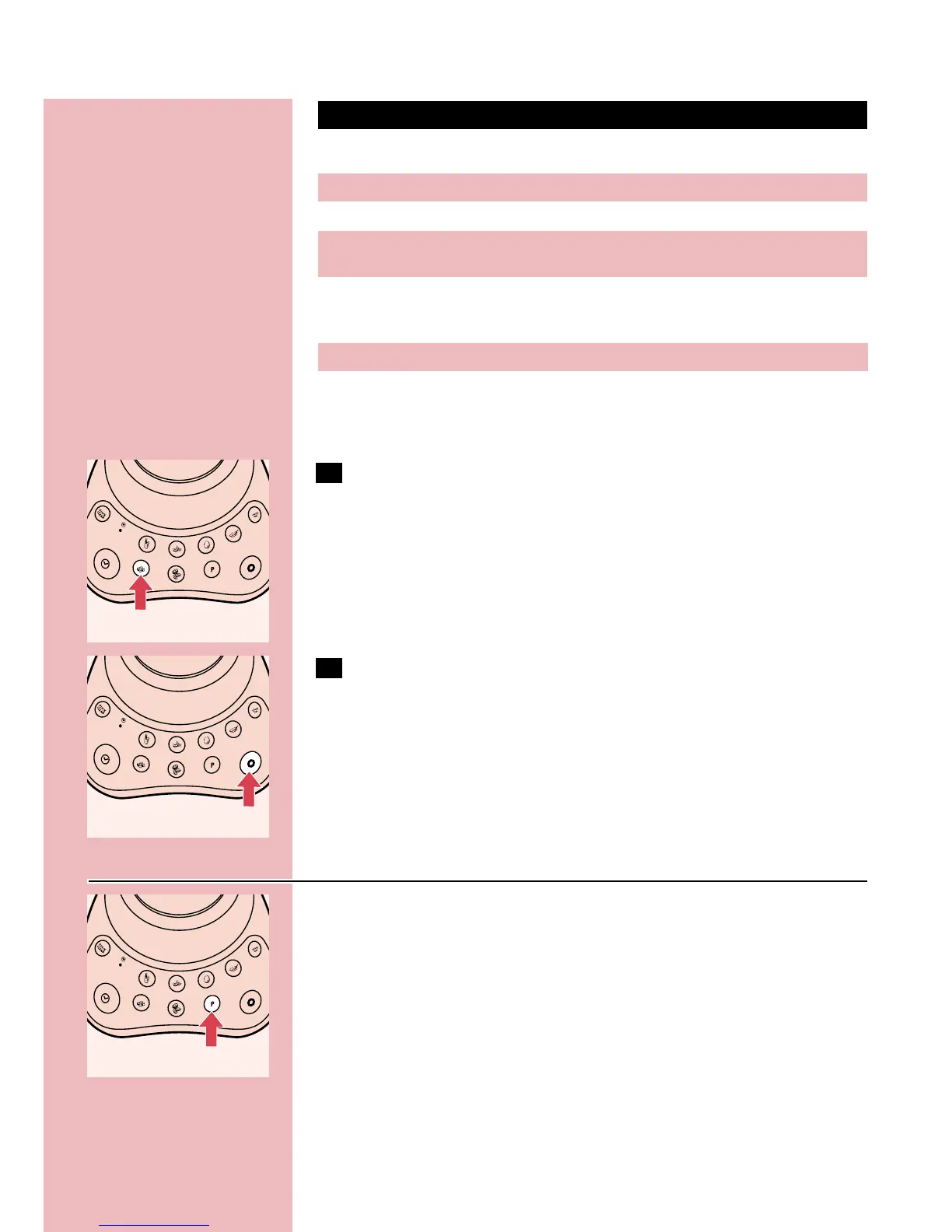
8 Select the required setting by pressing the appropriate button
and the appliance will switch on automatically.
If you are not sure which setting you should use, select the V setting,
which represents the highest processing speed.
C
9 To switch the appliance off, press the OFF button.
Never switch the appliance on or off by turning the jar.
Pulse setting
C
◗ If you are not satisfied with the result when blending solid
ingredients, switch the blender off and let it run briefly a number
of times by pressing the Pulse button.
When the Pulse button is pressed, the motor runs at maximum speed.
◗ You can also use the Pulse setting when the blender is already
switched on. If you press the Pulse button when blending at, for
example, the V setting, the appliance will start running at the
highest speed.As soon as you release the Pulse button, the
appliance will automatically continue running at the K setting.
ENGLISH 7
Recommended applications
Making chocolate milk and blending instant juices and cocktails with
alcohol
Blending soft fruits and milkshakes with soft fruits
Making mayonnaise
Blending soups, milkshakes with harder fruits (e.g. apples) and cocktails
with fresh fruits
Making different kinds of sauces (e.g. tomato sauce), pureeing hard
fruits, vegetables (e.g. carrots) and cooked beans and making baby
food
Crushing ice cubes
Chopping nuts (shelled), hard cheese, chocolate, dry bread, beef,
parsley and onions
Settings
J
K
L
~
V
Z
C



 To Next Page