23
Video setup
On [Video Setup Page], you can set the
following options:
[TV Type]
Change this setting if the video does not appear
correctly. By default, this setting matches the
most common setting for TVs in your country.
• [PAL] – For TV with PAL color system.
• [NTSC] – For TV with NTSC color
system.
• [Multi] – For TV that is compatible
with both PAL and NTSC.
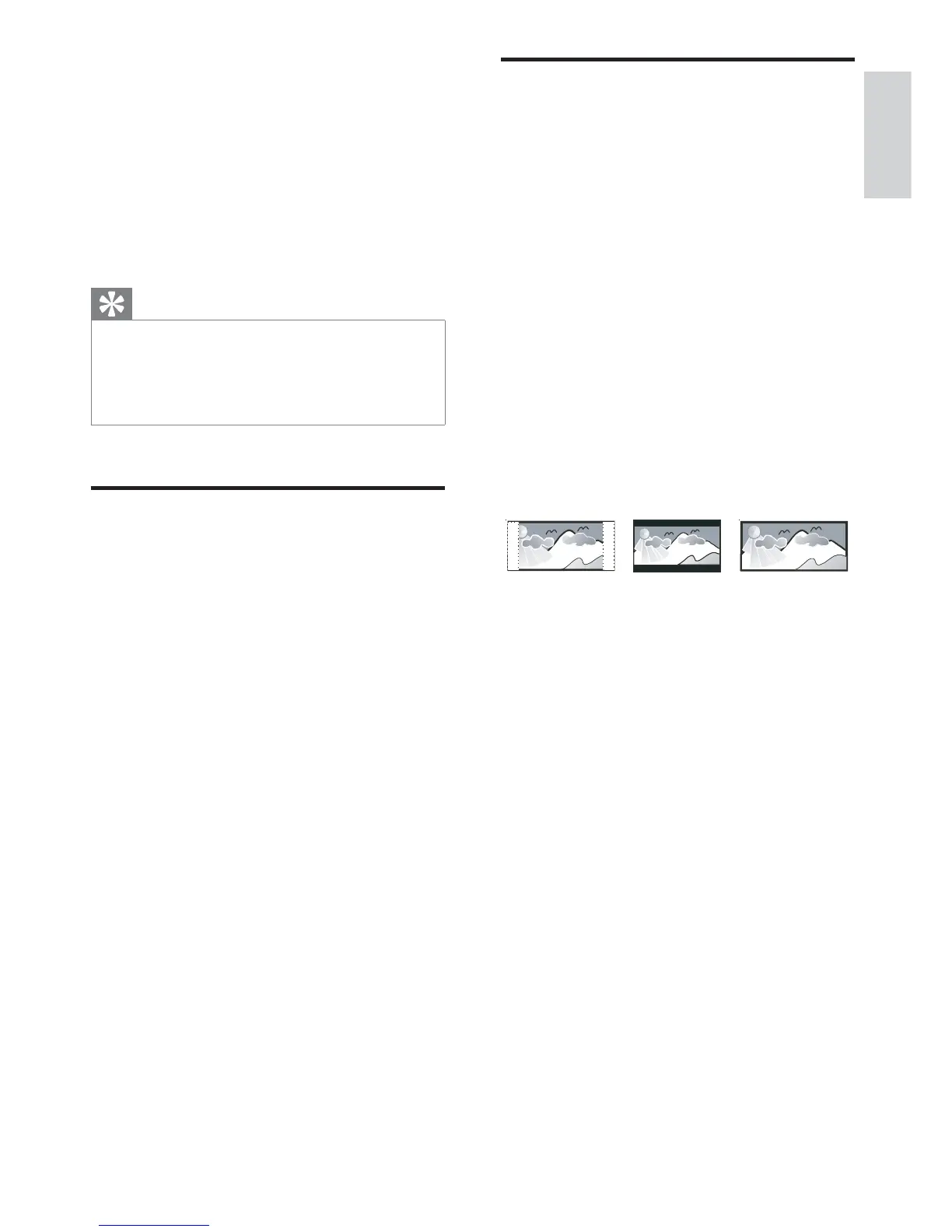
[TV Display]
The TV format determines the aspect ratio of
display according to the type of TV you have
connected.
• [4:3 Pan Scan] – For 4:3 screen TV:
full-height display with the trimmed
sides.
• [4:3 Letter Box] – For 4:3 screen TV:
wide-screen display with black bars on
the top and bottom of the screen.
• [16:9 Wide Screen] – For wide-
screen TV: display ratio 16:9.
[Progressive]
Turn on or off progressive scan mode.
[Picture Settings]
Select a predefi ned set of picture color settings
or customize your personal setting.
• [Standard] – original color setting.
• [Bright] – vibrant color setting.
• [Soft] – warm color setting.
• [Personal] – customize the color
setting. Adjust the level of brightness,
contrast, sharpness/tint and color
saturation.
4:3 Letter Box (LB)
4:3 Pan Scan (PS)
16:9 (Wide Screen)
• [15 mins], [30 mins], [45 mins], [60
mins] – select the count down time
before the apparatus switches to
standby.
• [Off] – disable sleep mode.
[DivX(R) VOD Code]
Display the DivX® registration code.
Tip
Enter this DivX registration code when you rent or •
purchase video from www.divx.com/vod. The DivX
videos rented or purchased through the DivX® VOD
(Video On Demand) service can be played only on the
device to which it is registered.
Audio setup
On [Audio Setup Page], you can set the
following options:
[HDMI Audio]
When you connect this apparatus and TV with
an HDMI cable, select the audio output setting
for this connection.
• [On] – the sound is output through
both your TV and this apparatus. If
the audio format on the disc is not
supported, it is downmixed to two-
channel sound (Linear-PCM).
• [Off] – disable audio output from the
TV. The sound is only output through
this apparatus.
[Night Mode]
Make loud sound level softer and soft sound
level louder so that you can watch the DVD
movies at a low volume, without disturbing
others.
• [Off] – enjoy surround sound with its
full dynamic range.
• [On] – enjoy quiet viewing at night
(DVDs only).
English
EN







 To Next Page