12 EN
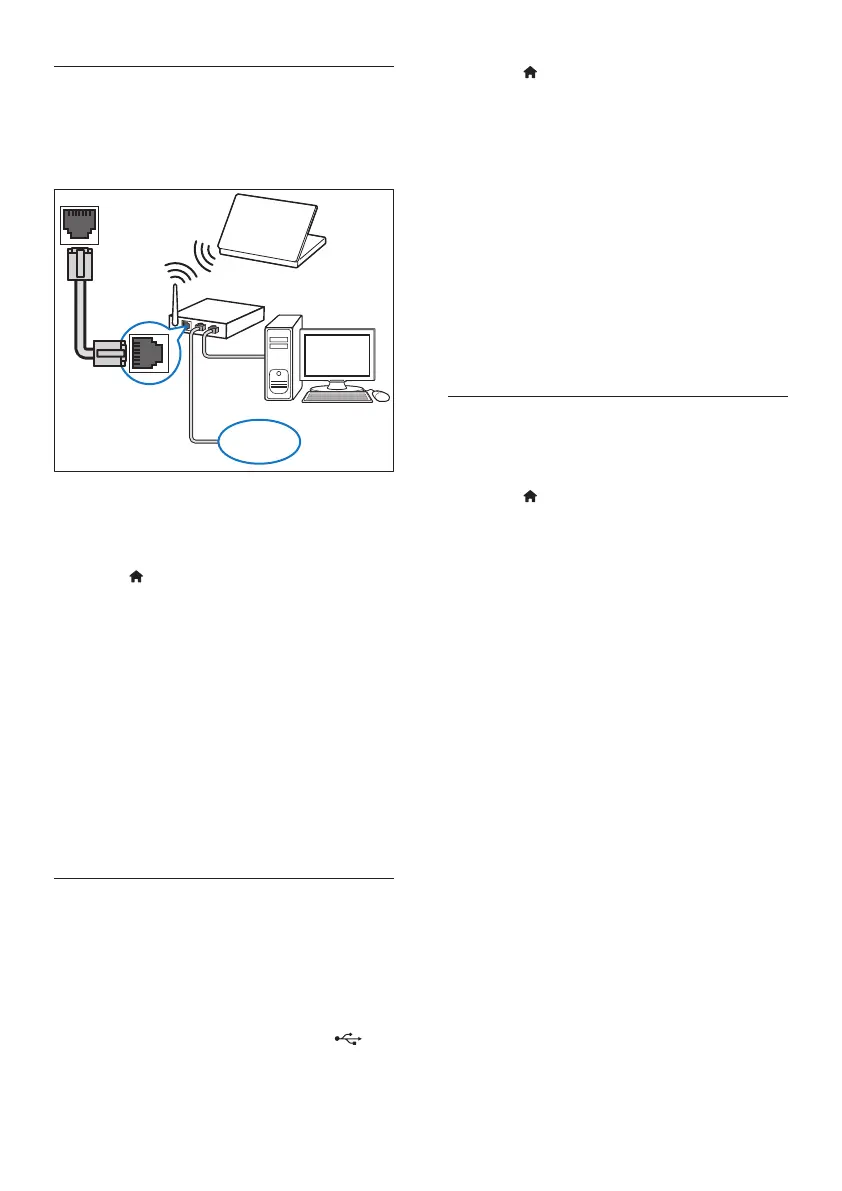
Set up the wired network
What you need
• A network cable (RJ45 straight cable).
• A network router (with DHCP enabled).
1 Using a network cable, connect the LAN
connector on your home theater to the
network router.
2 Press (Home).
3 Select [Setup], and then press OK.
4 Select [Network] > [Network
installation] > [Wired (Ethernet)].
5 Follow the onscreen instructions to
complete the setup.
• If connection fails, select [Retry], and
then press OK.
6 Select [Finish], and then press OK to exit.
• To view the network settings, select
[Setup] > [Network] > [View
network settings].
Set up the wireless network
What you need
• A network router (with DHCP enabled).
For best wireless performance, coverage,
and compatibility, use 802.11n router;
• Connect a Wi-Fi dongle (Model: Philips
WUB1110, sold separately) to the
connector on your home theater.
LAN
www
1 Press (Home).
2 Select [Setup], and then press OK.
3 Select [Network] > [Network
installation] > [Wireless (Wi-Fi)], and
then press OK.
4 Follow the onscreen instructions to select
and set up the wireless network.
• If connection fails, select [Retry], and
then press OK.
5 Select [Finish], and then press OK to exit.
• To view the network settings, select
[Setup] > [Network] > [View
wireless settings].
Personalize the network name
Name your home theater to easily identify it on
your home network.
1 Press (Home).
2 Select [Setup], and then press OK.
3 Select [Network] > [Name your
Product:].
4 Press the Alphanumeric buttons to enter
the name.
5 Select [Done], and then press OK to exit.



 To Next Page