19EN
3 Select a picture, and then press (Play) to
start the slideshow.
4 Press to stop slideshow.
5 Press again to stop music.
Note
•
Make sure that the picture and audio formats are
supported by your home theater (see 'File formats' on
page 28).
Radio
Listen to FM radio on your home theater, and
store up to 40 radio stations.
Note
•
AM and digital radio are not supported.
• If no stereo signal is detected, you are prompted to
install the radio stations again.
1 Connect the FM antenna to the FM
ANTENNA on your home theater.
• For the best reception, place the
antenna away from your TV or other
sources of radiation.
2 Press SOURCE repeatedly to switch to
radio source.
» If you have already installed the radio
stations, the last channel that you
listened to is played.
» If you have not installed any radio
stations, the message AUTO
INSTALL...PRESS PLAY appears on
the display panel. Press
(Play) to
install radio stations.
3 Use the remote control to listen or to
change radio stations.
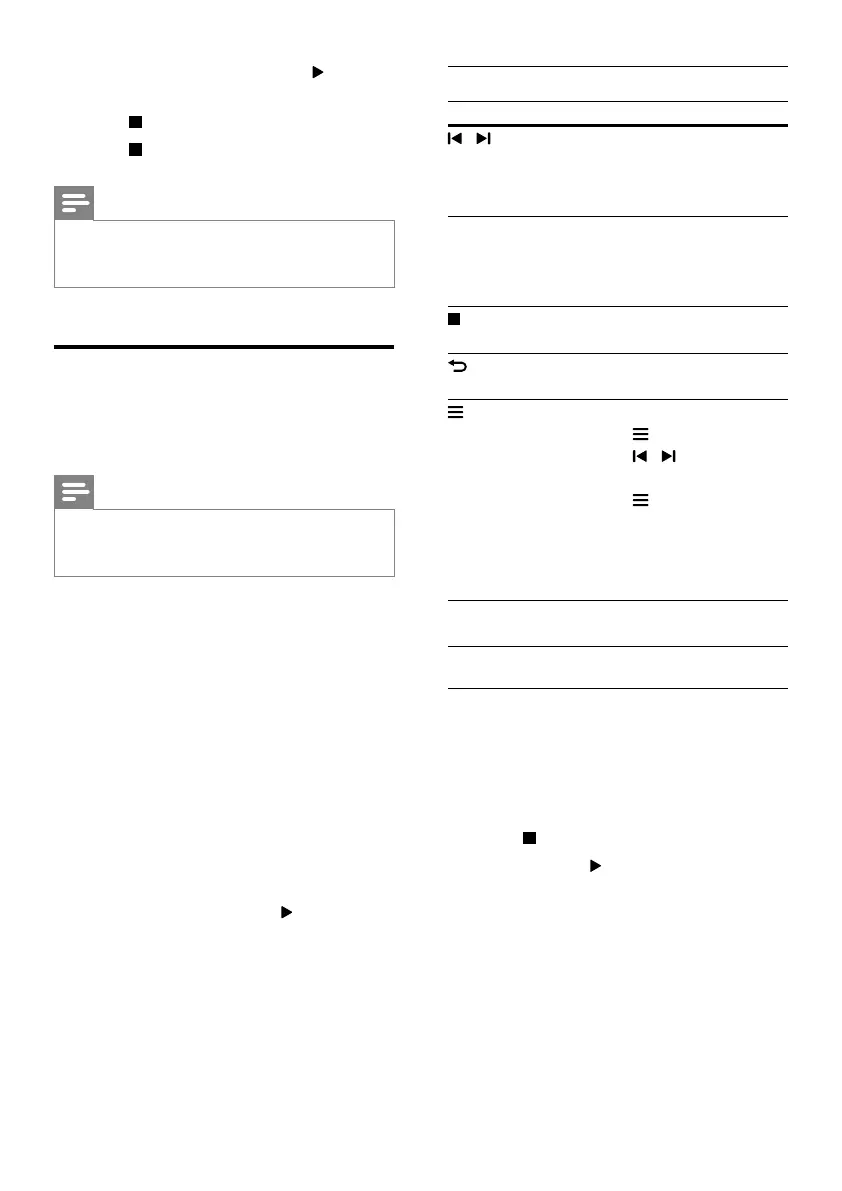
Play buttons
Button Action
/
or
Alphanumeric
buttons
Select a preset radio station.
Navigation
buttons
Left/Right: Search for a radio
station.
Up/Down: Fine tune a radio
frequency.
Press to stop the installation
of radio stations.
Press and hold to erase the
preset radio station.
Manual:
1) Press
.
2) Press
/ to select your
preset.
3) Press
again to store the
radio station.
Automatic: Press and hold for
three seconds to reinstall the
radio stations.
SUBTITLE /
AUDIO
Toggle between the stereo
and mono sounds.
Tuning grid
In some countries, you can toggle the FM tuning
grid between 50 kHz and 100 kHz.
1 Press SOURCE repeatedly to switch to
radio source.
2 Press .
3 Press and hold (Play) to toggle between
50 kHz or 100 kHz.




 To Next Page