Need help?
Do you have a question about the Philips HTS 3610 and is the answer not in the manual?
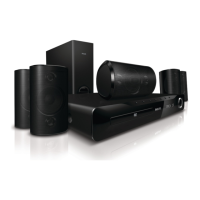
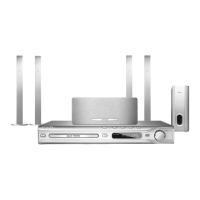
This document describes the Philips HTS 3610 Home Theatre System, a comprehensive entertainment unit designed to enhance your audio and visual experience. It integrates a DVD player, radio tuner, and surround sound capabilities, all controlled via a user-friendly interface and a dedicated remote.
The HTS 3610 serves as a central hub for your home entertainment. Its primary function is to play DVDs, offering a high-quality visual experience. The integrated radio tuner allows you to listen to your favorite FM and AM/MW stations, providing an auditory alternative to disc-based media. A key feature of this system is its ability to deliver an immersive surround sound experience, transforming standard audio into a multi-channel output that envelops the listener. This is achieved through a combination of front, rear, and center speakers, along with a dedicated subwoofer for deep bass. The system is designed for easy connection to your television, acting as an upgrade to your TV's built-in audio and video capabilities.
To play a DVD, you begin by pressing the "OPEN/CLOSE" button on the front of the DVD system to open the disc tray. Once open, you place your DVD with the label facing up in the tray. Pressing "OPEN/CLOSE" again will close the tray. The system will then typically display a DVD menu. You can navigate this menu using the "UP," "DOWN," "RIGHT," and "LEFT" arrow buttons on the remote control. To select an option from the menu, press the "PLAY" button. If you need to stop playback, press the "STOP" button. A convenient feature allows you to resume playback from where you left off by pressing "PLAY" after stopping. Alternatively, pressing "STOP" twice and then "PLAY" will restart the title from the beginning. For returning to the main DVD menu, the "DISC MENU" button is available.
The HTS 3610 includes an FM/AM/MW radio tuner. For initial setup or if you wish to reprogram stations, the system offers an "AUTO INSTALL" feature. To activate this, press the "TUNER" button on the front panel, then press and hold the "PLAY" button until "START" appears on the display. This will automatically scan and store available radio stations. Once the auto-installation is complete, you can easily switch between stored radio stations using the "NEXT" and "PREVIOUS" buttons on the remote.
A core feature of the HTS 3610 is its ability to enhance your audio with surround sound. You can switch between "Stereo" and "Multi-channel" sound modes by pressing the "SURR" button. Furthermore, the system offers preset digital sound effects tailored for different content types. By pressing the "SOUND" button, you can select from options like "Concert," "Drama," "Action," or "Sci-fi," each designed to optimize the audio for that specific genre, providing a more engaging listening experience.
The system is designed for straightforward setup. Speakers and the subwoofer need to be positioned strategically for optimal sound. The center speaker should be placed on or near the TV, the subwoofer on the floor, front speakers equidistant from the TV and angled towards the listener, and rear speakers facing the listener, equally spaced on the left and right. Connecting the speakers to the DVD system involves matching the colored plugs from the speakers to the corresponding colored sockets on the rear of the DVD system.
For television connection, the supplied black SCART cable is used to link the SCART socket on the rear of the DVD system to the SCART input socket on your TV. Finally, the power cable of the DVD system is plugged into an AC outlet.
To ensure good radio reception, the system includes antennas. The FM antenna connects to the FM socket, should be extended, and fixed to a wall. The AM/MW loop antenna needs to be unfolded, its claw fixed into a slot, and then the back tab pushed in to insert the wires into the slot.
The remote control is essential for operating the HTS 3610. To use it, you must first insert the provided batteries. This involves removing the battery compartment cover, inserting the batteries according to the positive and negative indicators, and then replacing the cover.
After connecting the system to your TV, you'll need to find the correct viewing channel. Turn on the TV and press "STANDBY-ON" on the DVD system's remote. Then, press "DISC" on the remote until "DISC" appears on the front panel display. On your TV's remote, press '0' and then repeatedly press the "Channel Down" button until you see the DVD background screen, indicating you've found the home theatre system's input. For some TVs, you might need to use the "AV" or "SELECT" buttons to cycle through inputs.
The document provides a "Troubleshooting" section to address common issues, which can be considered a form of user-level maintenance.
If the system has no power, the first step is to check if the AC power cord is properly connected. If it is, press the "STANDBY-ON" button on the front of the DVD system to ensure it's turned on.
If there's no picture on the TV, ensure the "DISC" button on the remote control has been pressed. Also, verify the connection to the TV and ensure all plugs are firmly in place.
For sound issues, adjust the volume. Check all audio connections and settings. Additionally, ensure the correct input source is selected by pressing the "SOURCE" button (e.g., "DISC" or "TUNER").
If the remote control isn't functioning, check if the batteries are loaded correctly or replace them with new ones. Ensure the correct source (e.g., "DISC" or "TUNER") is selected before pressing a function button. Reduce the distance between the remote control and the system, and point the remote directly towards the IR sensor on the main unit.
For more detailed information and advanced troubleshooting, the user is directed to consult the comprehensive user manual and the online support portal at www.philips.com/support. The document also includes a reminder to be responsible and respect copyrights.
 General
| Audio Output Power | 300 W |
|---|---|
| Number of Channels | 5.1 |
| DVD Playback | Yes |
| USB Direct Recording | Yes |
| HDMI Output | Yes |
| FM Tuner | Yes |
| Playback media | DVD, CD, MP3 |
| RMS rated power | 300 W |
| Radio | FM |
| Total Power Output | 300 W |
| USB Port | Yes |
| Digital Audio Input | Yes |
| Subwoofer | Yes |
| Remote Control | Yes |
| Audio system | Dolby Digital |
| Loudspeaker types | Satellite |
| Surround Sound Technology | Dolby Digital, DTS |

 To Next Page