Home
Philips
Monitor
L Series
Page 48
Philips L Series - Page 48
51 pages
Manual
Save Page as PDF
To Next Page
To Next Page
To Previous Page
To Previous Page
Loading...
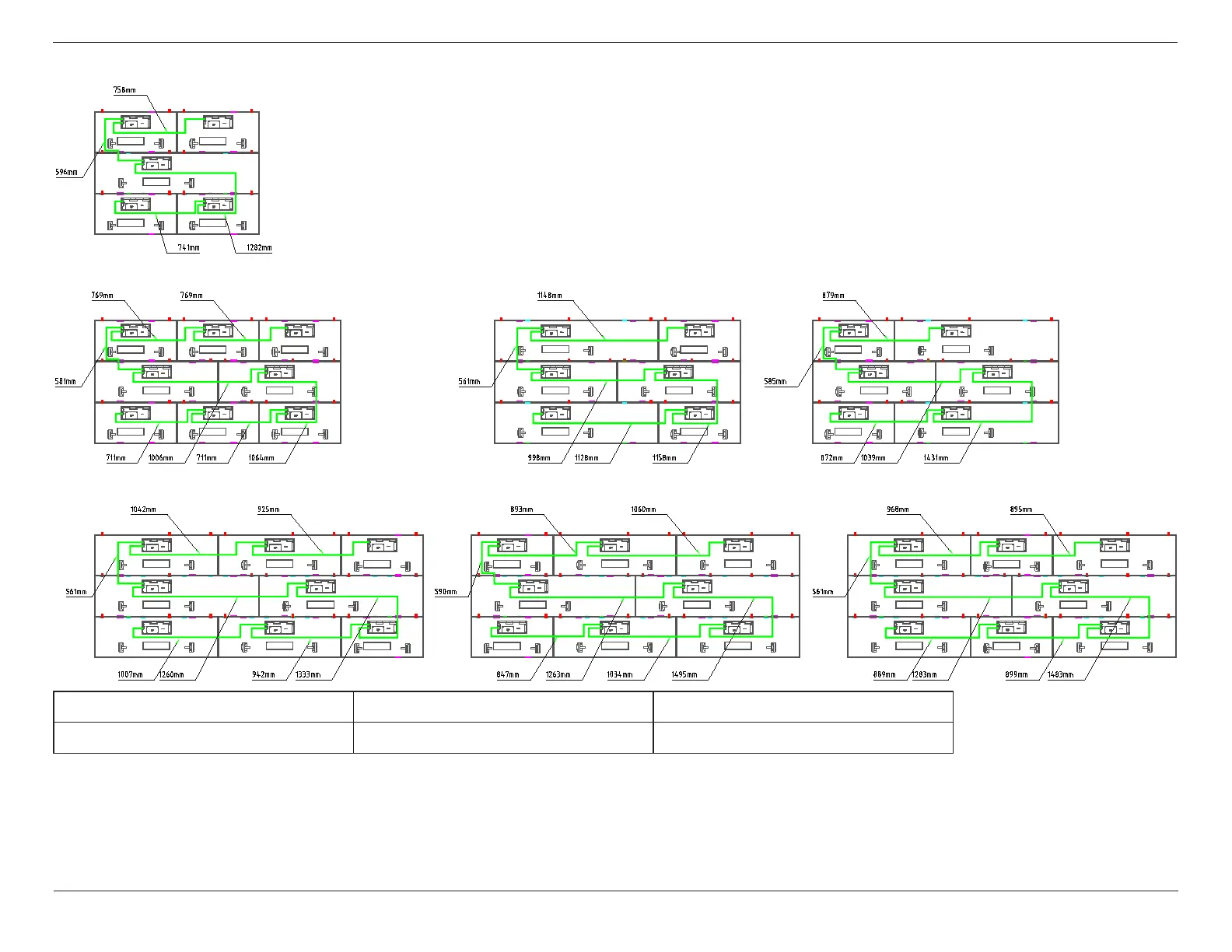
41BDL7324L
37
1 Meter
Ending Installation
1.5 Meter
Ending Installation
2 Meter
Ending Installation
22BDL7224L
31BDL7224L
41BDL7224L
LAN cable (RJ45, CA
T
-5) (1500mm)
LAN cable (RJ45, CA
T
-5) (1500mm)
LAN cable (RJ45, CA
T
-5) (1500mm)
47
49
Table of Contents
Main Page
Table of Contents
11
Preparations
12
Unpacking
12
Package Contents
12
Holding the Cabinet
13
Installation Notes
13
Product Overview
14
Front View
14
Rear View
14
Side View
14
Top View
14
Bottom View
14
Preparation
15
Testing the Cabinet
15
Removing the Opening
15
Installation
16
Connection
22
Connecting the Signal and Power Cables
22
Mounting Scheme
23
Installing the Modules
24
Dehumidification Function
26
Installing the Program
26
Firmware Upgrade and Verification
26
Configuring Dehumidification Settings
31
Activating Dehumidification Function
33
Cancelling Dehumidification Function
33
Notes
33
Using the LED Display Controller
34
Appendices
35
Appendix A. Warranty Statement
35
Appendix B. Troubleshooting
37
Appendix C. Dew Point VS. Relative Humidity
38
Appendix D. Optional Components/Accessories
39
Appendix E. Technical Specifications
42
Appendix F. Magnet Tension
44
Appendix G. Power/Data Cable Measure
45
Appendix H. Mounting Scheme
49
Related product manuals
Philips PL-L
2 pages
Philips L'OR Barista
84 pages
Philips 3000 L Series
494 pages
Philips L'OR Barista LM9012/62
180 pages
Philips CM8833
19 pages
Philips BDM4065
1 page
Philips T Series
72 pages
Philips E Series
78 pages
Philips Avalon FM20
260 pages
Philips Brilliance 329P9
39 pages
Philips Brilliance BDM4350
42 pages
Philips Brillance BDM4065UC
53 pages










 To Next Page