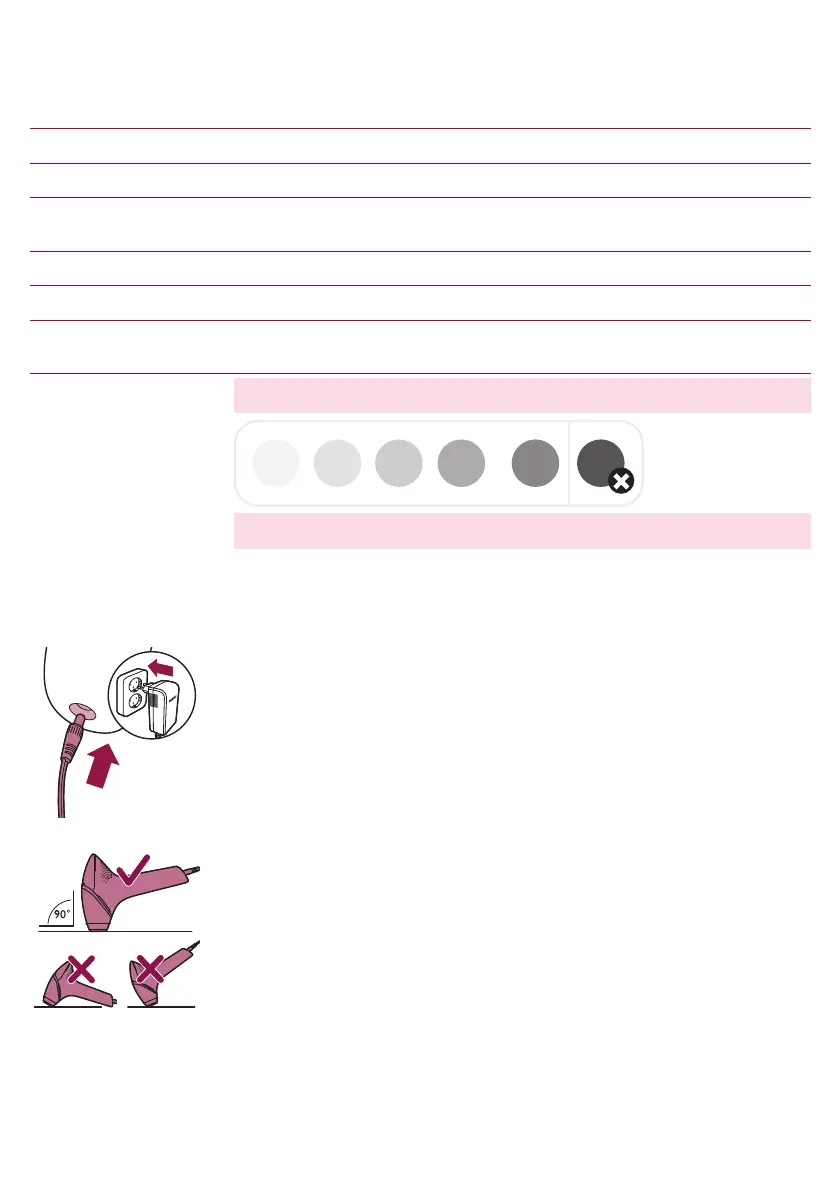
Skin type Skin tone Light intensity
setting
I White: you always sunburn, never tan. 4/5
II Beige: you easily sunburn, tan minimally. 4/5
III Light brown: you sunburn easily, tan slowlyto light
brown.
4/5
IV Mid brown: you rarely sunburn, tan easily. 3/4
V Dark brown: you rarely sunburn, tan very easily. 1/2/3
VI Brownish black or darker: you rarelyornever
sunburn, very dark tanning.
You cannot use the device
Note: To check if your skin type allows usage of the device, consult the skin
tone table with number 2 on the foldout page.
Note:Your skin may react differently on different days/occasions for a
number of reasons.
Handling the device
1 Before use, clean the attachment and the light exit window.
2 Put the small plug in the device and put the adapter in the wall socket.
3 Switch on the device and select the right light intensity for your skin tone.
For selecting the right skin tone, you can make use of the setting advice,
see chapter: 'Selecting the right light intensity'.
4 Place the device at a 90° angle on the skin so that the integrated safety
system is in contact with your skin.
The integrated safety system prevents unintentional flashingwithout skin
contact.
22
English






 To Next Page