20
There is a wide range of audio and video equipment that can be connected to your TV.
The following connection diagrams show you how to connect them.
Note:
EXT1 can handle CVBS and RGB; EXT2 CVBS, Y/C and RGB; EXT3 CVBS; DVI can handle VGA, SVGA, XGA
and 480p, 576p, 720p, 1080i and 1152i.
It is preferable to connect peripherals with RGB output to
EXT1 or EXT2 as RGB provides a better picture quality.
Note: If your recorder is provided with the EasyLink function, it should be connected to
EXT2 to benefit from the
EasyLink functionality.
Recorder (VCR-
DVD+RW)
Note: Do not place your recorder too close to the screen as some recorders may be susceptible to signals from the
display. Keep a minimum distance of 0,5 m from the screen.
Connect Peripheral Equipment
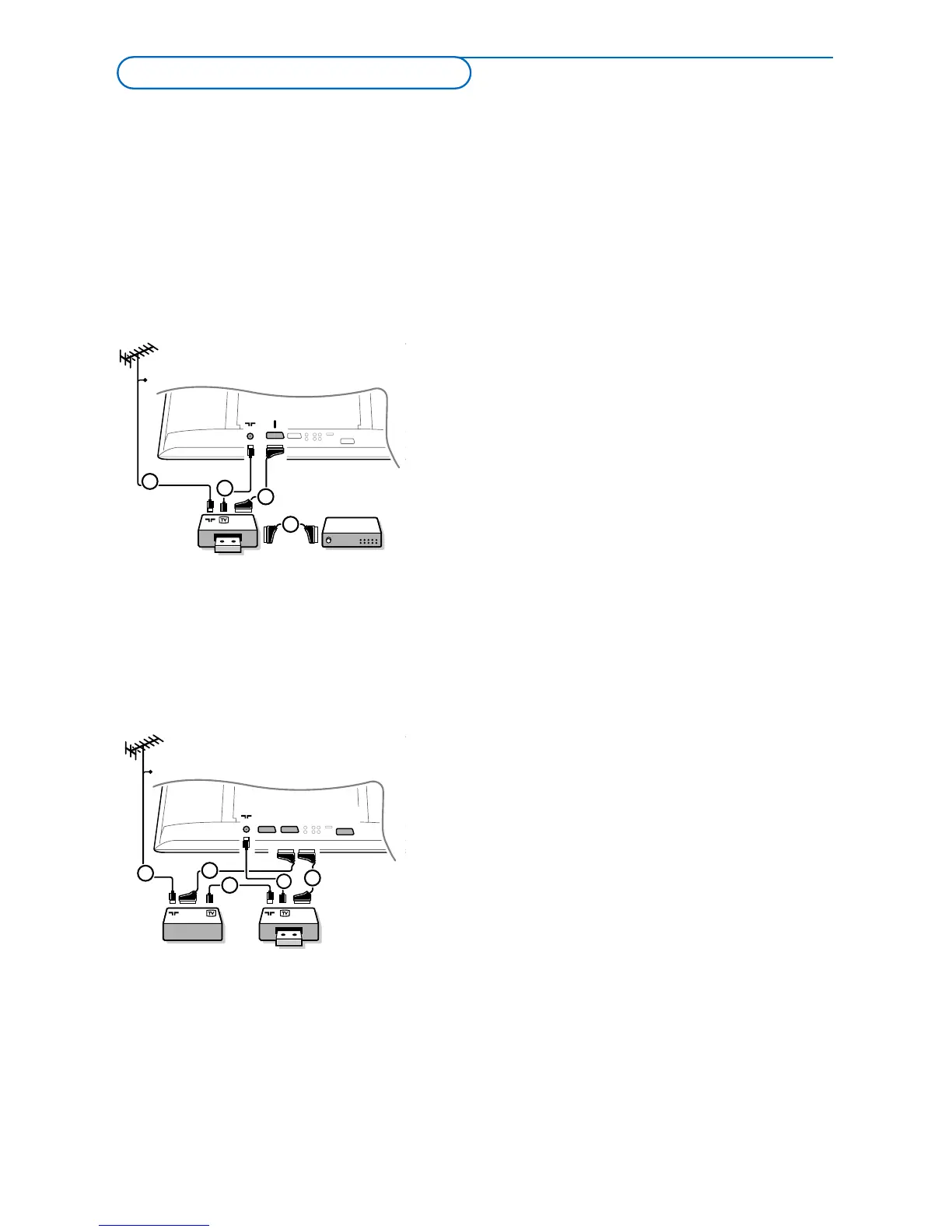
Connect the aerial cables 1, 2 and, to obtain the
optimum picture quality, eurocable 3 as shown.
If your recorder does not have a euroconnector, the
only possible connection is via the aerial cable.You will
therefore need to tune in your recorder’s test signal and
assign it programme number 0 or store the test signal
under a programme number between 90 and 99, see
Manual installation, p. 6.
See the handbook of your recorder.
Decoder and Recorder
Connect a eurocable 4 to your decoder and to the
special euroconnector of your recorder. See also the
recorder handbook. See Decoder, p. 10. You can also
connect your decoder directly to
EXT1 or 2 with a
eurocable.
Other equipment
(satellite receiver, decoder, DVD, games, etc.)
& Connect the aerial cables 1, 2 and 3 as shown
(only if your peripheral has TV aerial in-/output).
Connect your equipment with a eurocable 4 or 5 to
one of the euroconnectors
EXT1, 2 or 3 to obtain a
better picture quality.
é Look for the test signal of your peripheral in the same
way as you do for a recorder.
“ Make a selection in the Setup, Source menu, p. 10.







 To Next Page