17
English
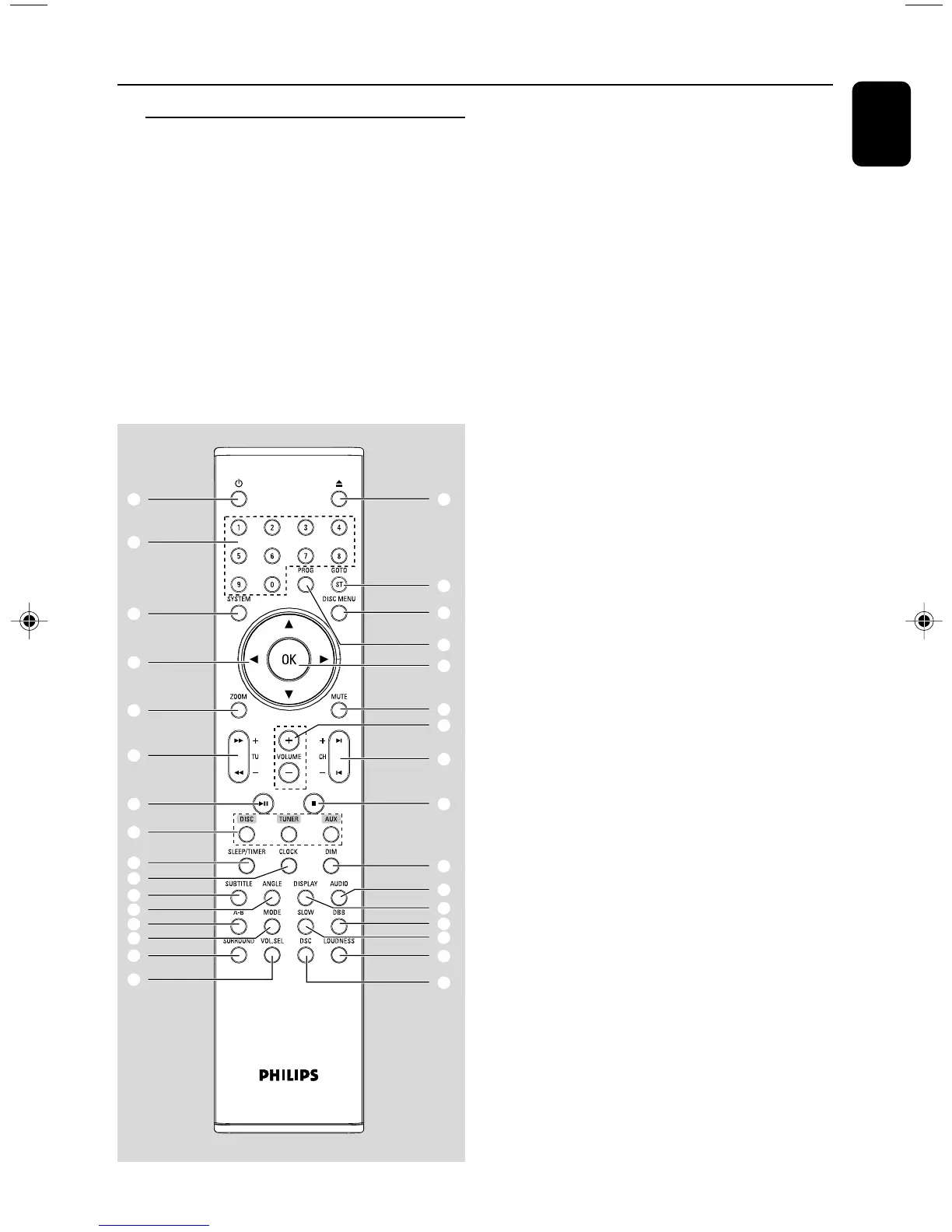
Remote control
1 B
– to switch the system on or to Eco power/normal
standby mode.
2 0
– opens or closes the disc compartment
3 Numeric Keypad (0-9)
– inputs a track/title/chapter number of the disc.
– inputs the number of a preset radio station.
Functional Overview
4 PROG
–DVD/VCD/CD: enters the program menu.
– MP3/WMA-CD: adds/deletes a programmed
track to/from the program list.
– Picture CD: during playback, to select a slide
show mode.
–Tuner: programs preset radio stations.
5 GOTO/ST
– Disc: fast searches in a disc by entering a time,
title, chapter or track.
– FM: sets stereo or mono sound mode.
6 SYSTEM (disc mode only)
– enters or exits the system menu.
7 DISC MENU (disc mode only)
–DVD/VCD: enters or exits the disc contents
menu.
– VCD2.0: switches the playback control mode on
or off .
– MP3/WMA: switches between Album and Filelist.
8 4 / 3 / 2 / 1
– selects an item in a menu.
–moves an enlarged picture up/down/left/right.
9 OK
– confirms a selection.
0 ZOOM
–DVD/VCD/Picture CD: enlarges or reduces a
picture or active image on the TV screen.
! MUTE
– disables or enables sound output.
2
5
7
9
!
$
^
)
•
¤
⁄
≥
≤
£
#
4
1
3
6
8
0
@
%
&
*
¡
∞
ª
º
§
™
(
pg 001-041_MCD708_37 2006.3.1, 16:1717



 To Next Page