18
English
6 Put the sticks into the basket.
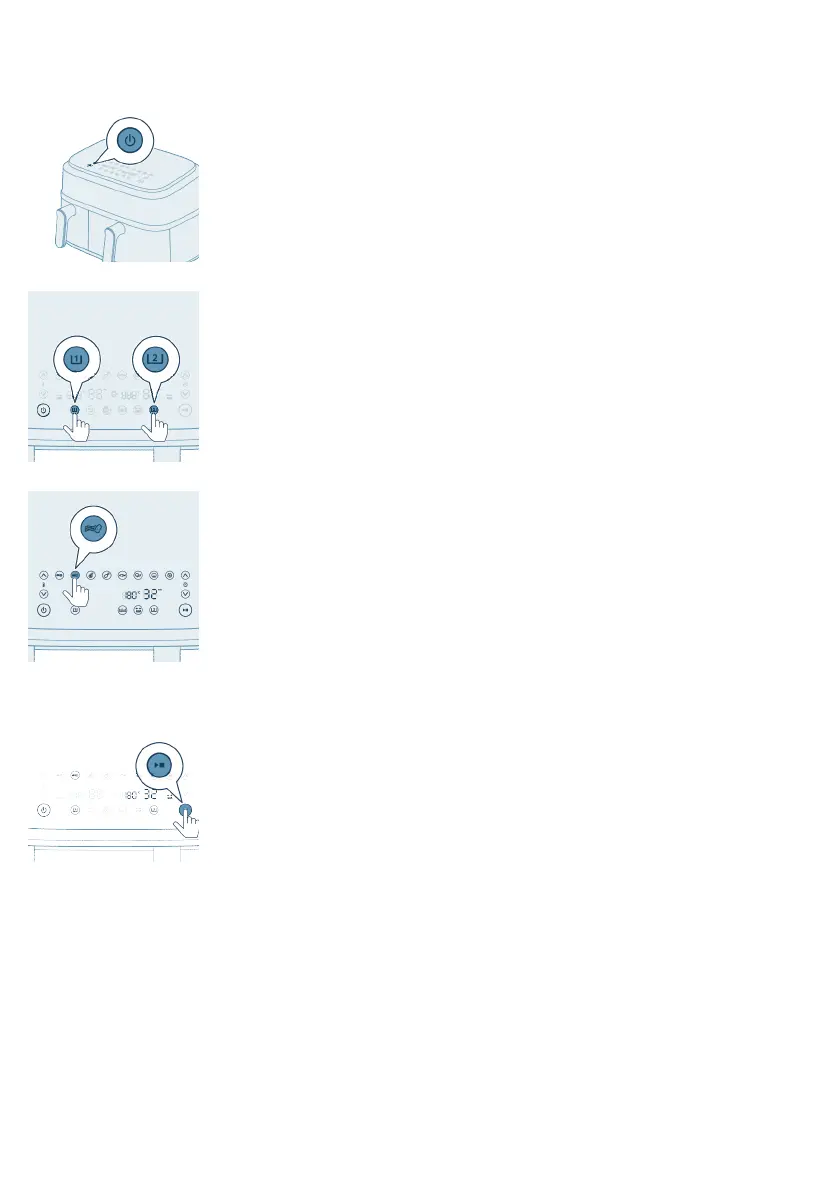
7 Press the power On/Off button to switch on the appliance.
8 Choose a pan.
9 Select the preset for “Homemade Fries.”
10 Start the cooking process by pressing the start/stop button.
11 Shake the pan twice when you hear the sound signal of the shaking
reminder.
Food table
The table below helps you select the basic settings for the types of food you
want to prepare.
Note
-
Keep in mind that these settings are suggestions. As ingredients differ in
origin, size, shape as well as brand, we cannot guarantee the best setting for
your ingredients.
-
When preparing larger amount of food (e.g. fries, prawns, drumsticks, frozen
snacks), shake, turn, or stir the ingredients in the pan 2 to 3 times in order to
achieve a consistent result.



 To Next Page