EN 11
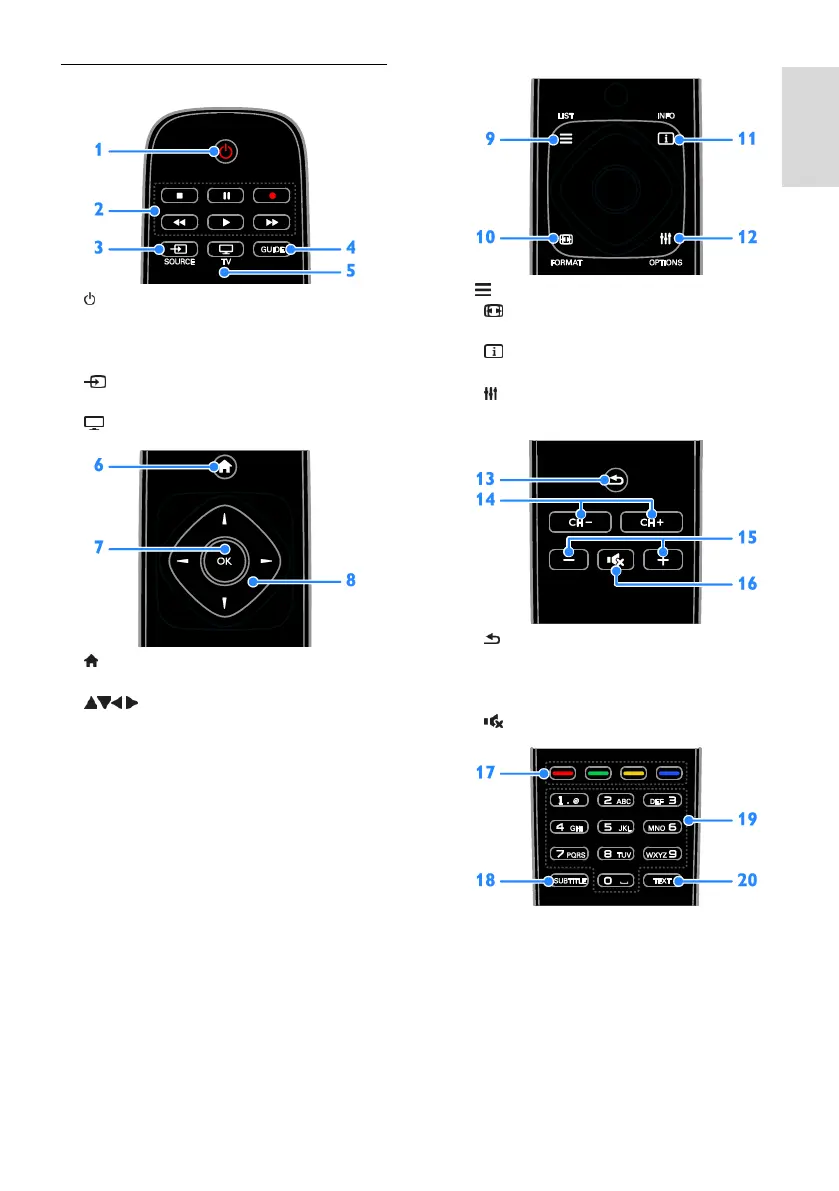
Remote control
1. (Standby): Switch the TV on or to
standby.
2. Play buttons: Control playback of
multimedia files.
3. SOURCE: Watch a connected device.
4. GUIDE: View programme guide.
5. TV: Watch TV.
6. (Home): Access the Home menu.
7. OK: Confirm an entry or selection.
8. (Navigation buttons): Navigate
through menus and select items.
9. LIST: Access the TV channel list.
10. FORMAT: Change the picture
format to suit the video source.
11. INFO: Display information about the
current activity.
12. OPTIONS: Access currently available
options, picture and sound menus.
13. (Back): Return to the previous menu
page or exit from a TV function.
14. CH +/-: Switch channels.
15. +/- (Volume): Adjust volume.
16. (Mute): Mute or restore audio.
17. Colour buttons: Select tasks or options.
The buttons function according to the
services offered by the service provider.
18. SUBTITLE: Switch subtitles on or off.
19. 0-9 (Numeric buttons): Select TV
channels or enter text.
20. TEXT: Enable or disable text.



 To Next Page