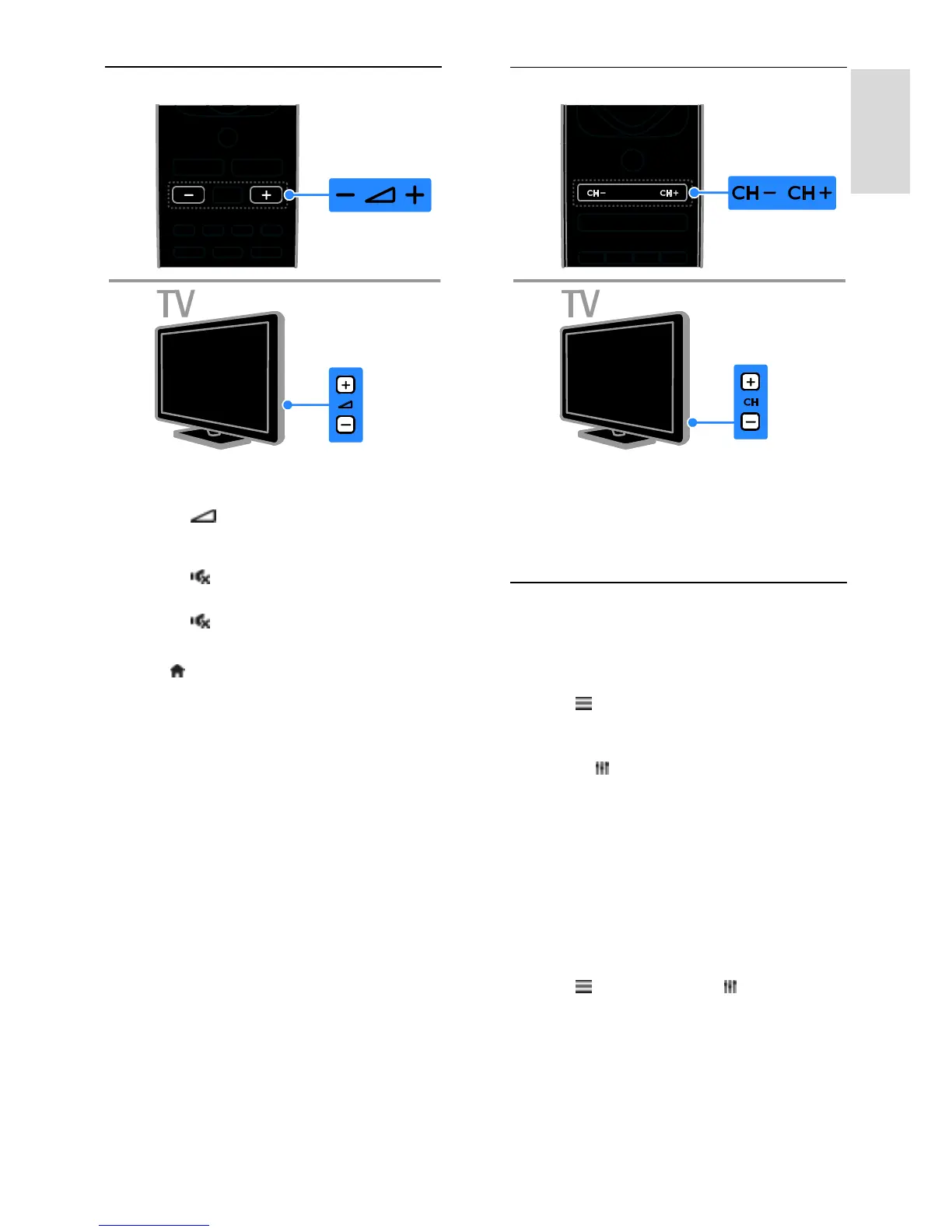
Adjust TV volume
Increase or decrease the TV volume
Press +/- on the remote control.
Press +/- on the TV.
Mute or restore the TV volume
Press on the remote control to
mute the volume.
Press again to restore the volume.
Adjust headphone volume
1. Press .
2. Select [Setup] > [TV settings] > [Sound]
> [Headphone volume], then press OK.
3. Select a level.
Switch TV channels
Press CH +/- on the remote control or
TV.
Press the Numeric buttons on the
remote control to enter a channel
number.
Manage favourite channels
You can view all channels or only a list of
your favourite channels.
Create a list of your favourite channels
1. Press LIST.
The channel list is displayed.
2. Select the channel to mark as favourite,
then press OPTIONS.
3. Select [Add/remove favourites], then
press OK.
The selected channel is marked with an
asterisk.
To remove a channel from the favourites list,
select [Add/remove favourites], then press
OK.
Display your list of favourite channels
1. Press LIST, then press OPTIONS.
2. Select [List] > [Favourites] to display
channels in the favourite list.
3. Press OK to confirm.







 To Next Page