EasyManua.ls Logo

Philips PM 5715 - Page 50

Philips PM 5715
Print Icon
To Next Page IconTo Next Page
To Previous Page IconTo Previous Page
Loading...
MAINS SWITCH
u
MAINS
TRANSFORMER
1.
Unsolder
the
green
wire at contact
13
of
transformer
2.
Remove 4
screws securing transformer
to rear
panel
3. Pull
out transformer and
unsolder remaining
connections
LAMP
IN MAINS SWITCH
1
. Cut lamp leads
2. Pull
out
lamp
3.
Remove push-button
4. Install
a new lamp. Ensure
that
the
lamp
protrudes
about
3mm
from front
panel.
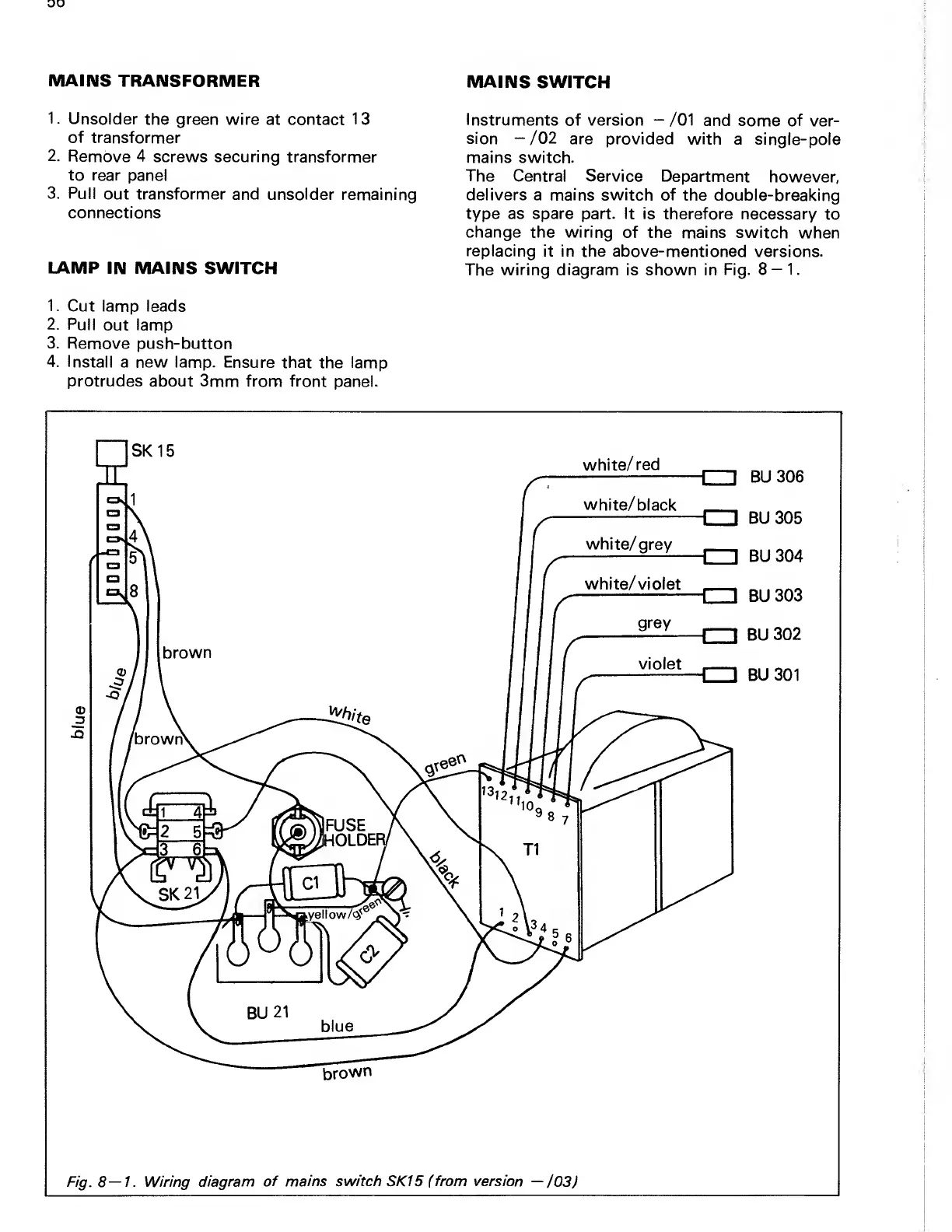
Instruments
of version
/01
and some of
ver-
sion
-/02
are provided with
a single-pole
mains switch.
The
Central Service
Department
however,
delivers a mains switch of
the double-breaking
type as spare part. It is
therefore necessary
to
change the wiring
of the mains switch
when
replacing
it in the above-mentioned
versions.
The
wiring diagram
is shown in
Fig. 8
1.

Related product manuals