EasyManua.ls Logo

Philips PM 6670 - 3. Operating Instructions; Power, Display, and Basic Controls; Hold Off Function (PM6671); Front Panel Controls and Measurement Modes

Philips PM 6670
21 pages
Print Icon
To Next Page IconTo Next Page
To Previous Page IconTo Previous Page
Loading...
10
3.
Operating
Instructions
PM
6671
high
resolution
timer/counter
120MHz
PHILIPS
TRIGGER
LEVEL
SENSITIVITY
O
MHi
O
GHi
-
Z
5V
O O
gate
MIN
POWER
CHECK
RESET
DISPL
HOLO
OOOO-
I
ON
M
ST
BY
MEASURING
TIME
PULSE
WIDTH
A
COUNT
A
MANUAL
TIME
INT
L-
SINCLE
A-B
AVERAGE
A-B
'
96s
PUSH
TO
READ
PERIOD
A
RPM
A
REMOTE
ATT
SLOPE
SOhHi
COM
SLOPE
ATT
kIO
FILTER
v<a
A
"L.
*10
PHASE
A-B
'
IN
DEGREES
RATIO
A/B
MAX
260V_,
KOKI
51
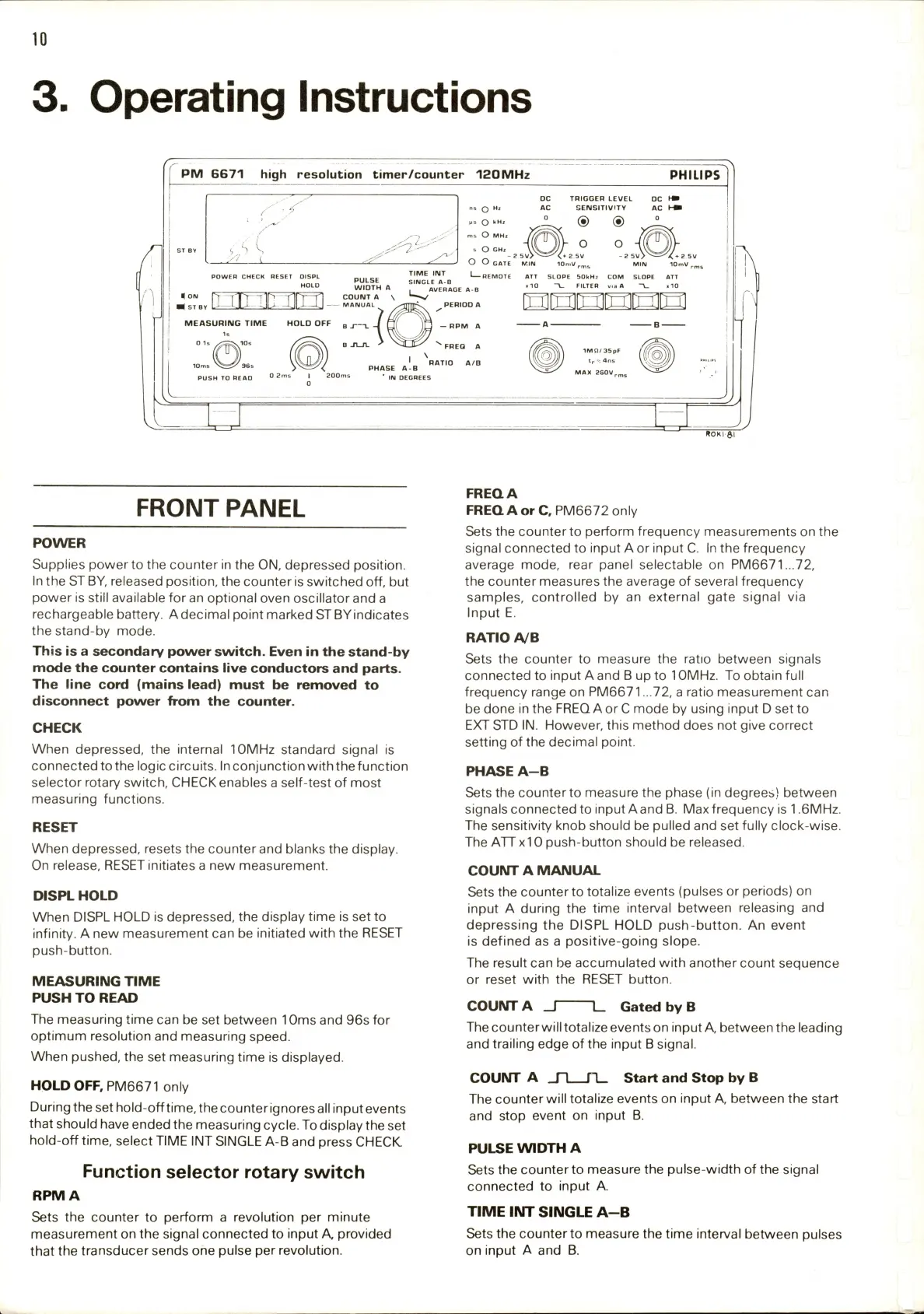
FRONT
PANEL
POWER
Supplies
power
to
the
counter
in
the
ON,
depressed
position.
In
the
ST
BY,
released
position,
the
counter
is
switched
off,
but
power
is
still
available
for
an
optional
oven
oscillator
and
a
rechargeable
battery.
A
decimal
point
marked
STBYindicates
the
stand-by
mode.
This
is
a
secondary
power
switch.
Even
in
the
stand-by
mode
the
counter
contains
live
conductors
and
parts.
The
line
cord
(mains
lead)
must
be
removed
to
disconnect
power
from
the
counter.
CHECK
When
depressed,
the
internal
10MHz
standard
signal
is
connected
to
the
logic
circuits.
In
conjunction
with
the
function
selector
rotary
switch,
CHECK
enables
a
self-test
of
most
measuring
functions.
RESET
When
depressed,
resets
the
counter
and
blanks
the
display.
On
release,
RESET
initiates
a
new
measurement.
DISPL
HOLD
When
DISPL
HOLD
is
depressed,
the
display
time
is
set
to
infinity.
A
new
measurement
can
be
initiated
with
the
RESET
push-button.
MEASURING
TIME
PUSH
TO
READ
The
measuring
time
can
be
set
between
10ms
and
96s
for
optimum
resolution
and
measuring
speed.
When
pushed,
the
set
measuring
time
is
displayed.
HOLD
OFF,
PM6671
only
During
the
set
hold-off
time,
the
counter
ignores
all
input
events
that
should
have
ended
the
measuring
cycle.
To
display
the
set
hold-off
time,
select
TIME
INT
SINGLE
A-B
and
press
CHECK.
Function
selector
rotary
switch
RPM
A
Sets
the
counter
to
perform
a
revolution
per
minute
measurement
on
the
signal
connected
to
input
A,
provided
that
the
transducer
sends
one
pulse
per
revolution.
FREQA
FREQ
A
or
C,
PM6672
only
Sets
the
counter
to
perform
frequency
measurements
on
the
signal
connected
to
input
A
or
input
C.
In
the
frequency
average
mode,
rear
panel
selectable
on
PM6671...72,
the
counter
measures
the
average
of
several
frequency
samples,
controlled
by
an
external
gate
signal
via
Input
E.
RATIO
A/B
Sets
the
counter
to
measure
the
ratio
between
signals
connected
to
input
A
and
B
up
to
10MHz.
To
obtain
full
frequency
range
on
PM6671
...72,
a
ratio
measurement
can
be
done
in
the
FREQ
A
or
C
mode
by
using
input
D
set
to
EXT
STD
IN.
However,
this
method
does
not
give
correct
setting
of
the
decimal
point.
PHASE
A-B
Sets
the
counter
to
measure
the
phase
(in
degrees)
between
signals
connected
to
input
Aand
B.
Max
frequency
is
1.6MHz.
The
sensitivity
knob
should
be
pulled
and
set
fully
clock-wise.
The
ATTxlO
push-button
should
be
released.
COUNT
A
MANUAL
Sets
the
counterto
totalize
events
(pulses
or
periods)
on
input
A
during
the
time
interval
between
releasing
and
depressing
the
DISPL
HOLD
push-button.
An
event
is
defined
as
a
positive-going
slope.
The
result
can
be
accumulated
with
another
count
sequence
or
reset
with
the
RESET
button.
COUNT
A
_|
1_
Gated
by
B
The
counter
will
totalize
events
on
input
A,
between
the
leading
and
trailing
edge
of
the
input
B
signal.
COUNT
A
n
n
Start
and
Stop
by
B
The
counter
will
totalize
events
on
input
A,
between
the
start
and
stop
event
on
input
B.
PULSE
WIDTH
A
Sets
the
counter
to
measure
the
pulse-width
of
the
signal
connected
to
input
A.
TIME
INT
SINGLE
A-B
Sets
the
counterto
measure
the
time
interval
between
pulses
on
input
A
and
B.

Related product manuals