EasyManua.ls Logo

Philips pm2521 - Page 50

Philips pm2521
152 pages
Print Icon
To Next Page IconTo Next Page
To Previous Page IconTo Previous Page
Loading...
49
Selection
of
the
trigger
level
Select
the
+
or
trigger
level
by
depressing
pushbutton
+/—.
Remark:
Signals
which
are
higher
or
lower
than
the
circuit
zero
of
the
PM
2521
(0
terminal)
can
be
triggered
with
the
+
or
trigger
level
respectively.
In
+
trigger
level
mode
the
PM
2521
triggers
on
positive
crossings
of
the
trigger
level.
In
trigger
level
mode
the
PM
2521
triggers
on
negative
crossings
of
the
trigger
level.
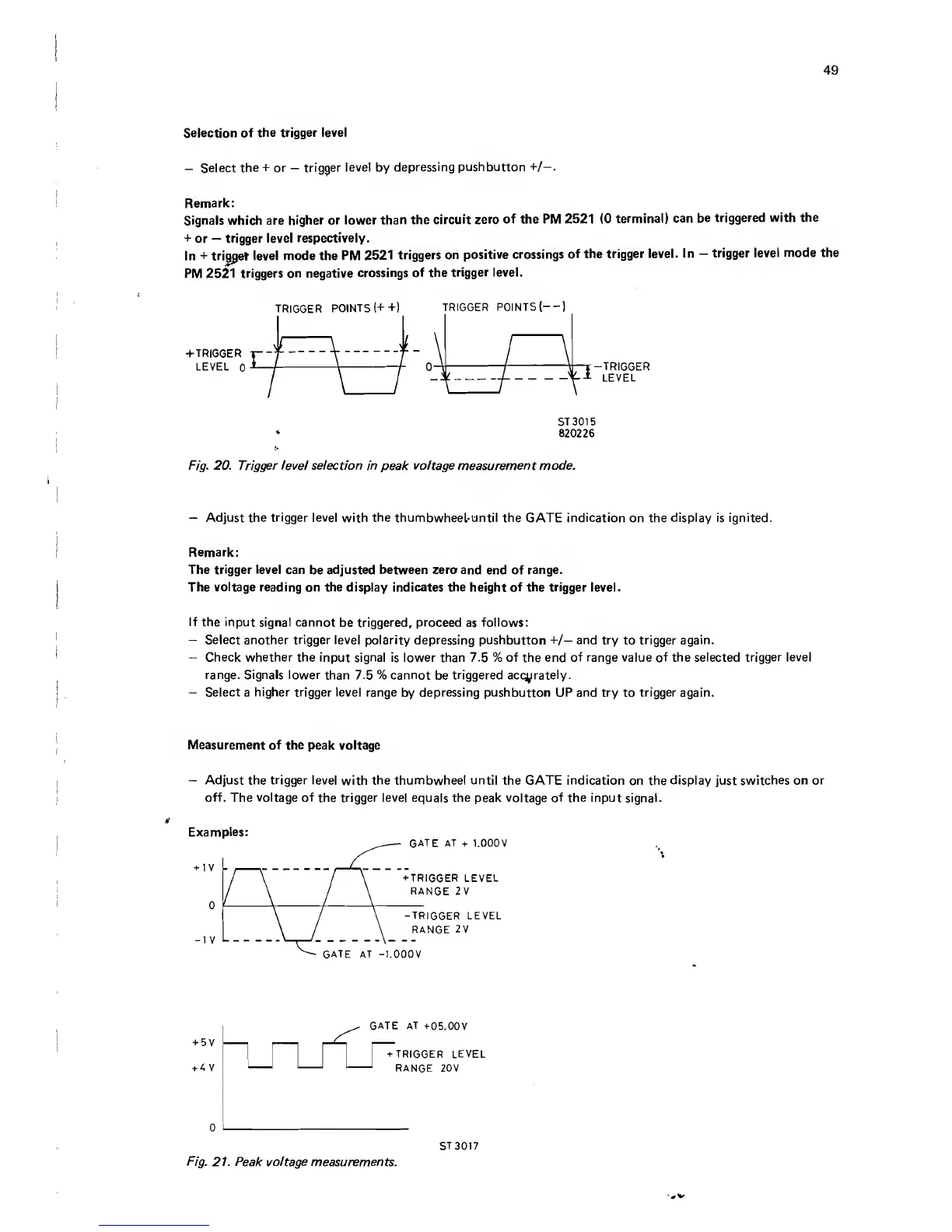
TRIGGER
POINTS
(++)
TRIGGER
POINTS
(--)
-T-TRIGGER
-*•
LEVEL
ST
3015
820226
Fig.
20.
Trigger
level
selection
in
peak
voltage
measurement
mode.
Adjust
the
trigger
level
with
the
thumbwheel-until
the
GATE
indication
on
the
display
is
ignited.
Remark:
The
trigger
level
can
be
adjusted
between
zero
and
end
of
range.
The
voltage
reading
on
the
display
indicates
the
height
of
the
trigger
level.
If
the
input
signal
cannot
be
triggered,
proceed
as
follows:
Select
another
trigger
level
polarity
depressing
pushbutton
+/—
and
try
to
trigger
again.
Check
whether
the
input
signal
is
lower
than
7.5
%
of
the
end
of
range
value
of
the
selected
trigger
level
range.
Signals
lower
than
7.5
%
cannot
be
triggered
accurately.
Select
a
higher
trigger
level
range
by
depressing
pushbutton
UP
and
try
to
trigger
again.
Measurement
of
the
peak
voltage
Adjust
the
trigger
level
with
the
thumbwheel
until
the
GATE
indication
on
the
display
just
switches
on
or
off.
The
voltage
of
the
trigger
level
equals
the
peak
voltage
of
the
input
signal.
Examples:
v

Other manuals for Philips pm2521

Related product manuals