Need help?
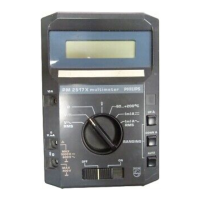
Do you have a question about the Philips PM2517X and is the answer not in the manual?
Explains the Delta Modulation ADC principle and its components.
Covers the digital control, display driver, and logic circuits.
Explains the Analog-to-Digital Converter operation.
Covers the digital control, display driver, and logic circuits.
Explains the central control logic and timing within the instrument.
Lists adjustment procedures, elements, and measurement points for calibration.
Addresses issues related to the instrument's power supply.
Troubleshooting steps for power supply problems and incorrect power.
Addresses issues related to the instrument's display.
Troubleshooting for cases where no LEDs are illuminated.
Addresses issues related to the Analog-to-Digital Converter.
Troubleshooting for a constant zero display, possibly due to ADC input issues.
Troubleshooting for a constant zero display indicating overrange.
Troubleshooting for display not zeroing with a shorted ADC input.
Troubleshooting when instrument adjustment is impossible due to stable display.
Troubleshooting for an unstable display output.
Troubleshooting when the ADC exhibits non-linear behavior.
Addresses issues related to the Voltage Attenuator.
Troubleshooting display zero adjustment issues in the V: attenuator.
Troubleshooting inability to adjust the 1V range of the attenuator.
Troubleshooting inability to adjust 10V and 100V ranges of the attenuator.
Troubleshooting non-linear behavior in V:- ranges.
Addresses issues related to the instrument's ranging functions.
Troubleshooting when manual ranging fails to operate.
Troubleshooting when the auto-ranging function is inactive.
Troubleshooting incorrect ranging and decimal point display.
Addresses issues specific to V- ranges including attenuation and AC/DC conversion.
Troubleshooting a constant 0000 display in V- ranges.
Troubleshooting display zero issues with VQ/O short circuit in V- function.
Troubleshooting when adjustments cannot be performed.
Troubleshooting incorrect measured values in V- ranges.
Addresses issues related to the Amperage ranges.
Troubleshooting constant 0000 display in the 10A range.
Troubleshooting inability to adjust the 10A range.
Troubleshooting inability to adjust the 100mA range.
Troubleshooting deviations in measured values across ranges.
Troubleshooting non-linear behavior in the 10mA range.
Addresses issues related to the Amperage ranges (likely AC).
Troubleshooting constant 0000 display in the 10A range.
Troubleshooting inability to adjust the 10A range.
Troubleshooting constant zero display in the 100mA range.
Troubleshooting inability to adjust the 100mA range.
 General
| Brand | Philips |
|---|---|
| Model | PM2517X |
| Category | Multimeter |
| Language | English |


 To Next Page