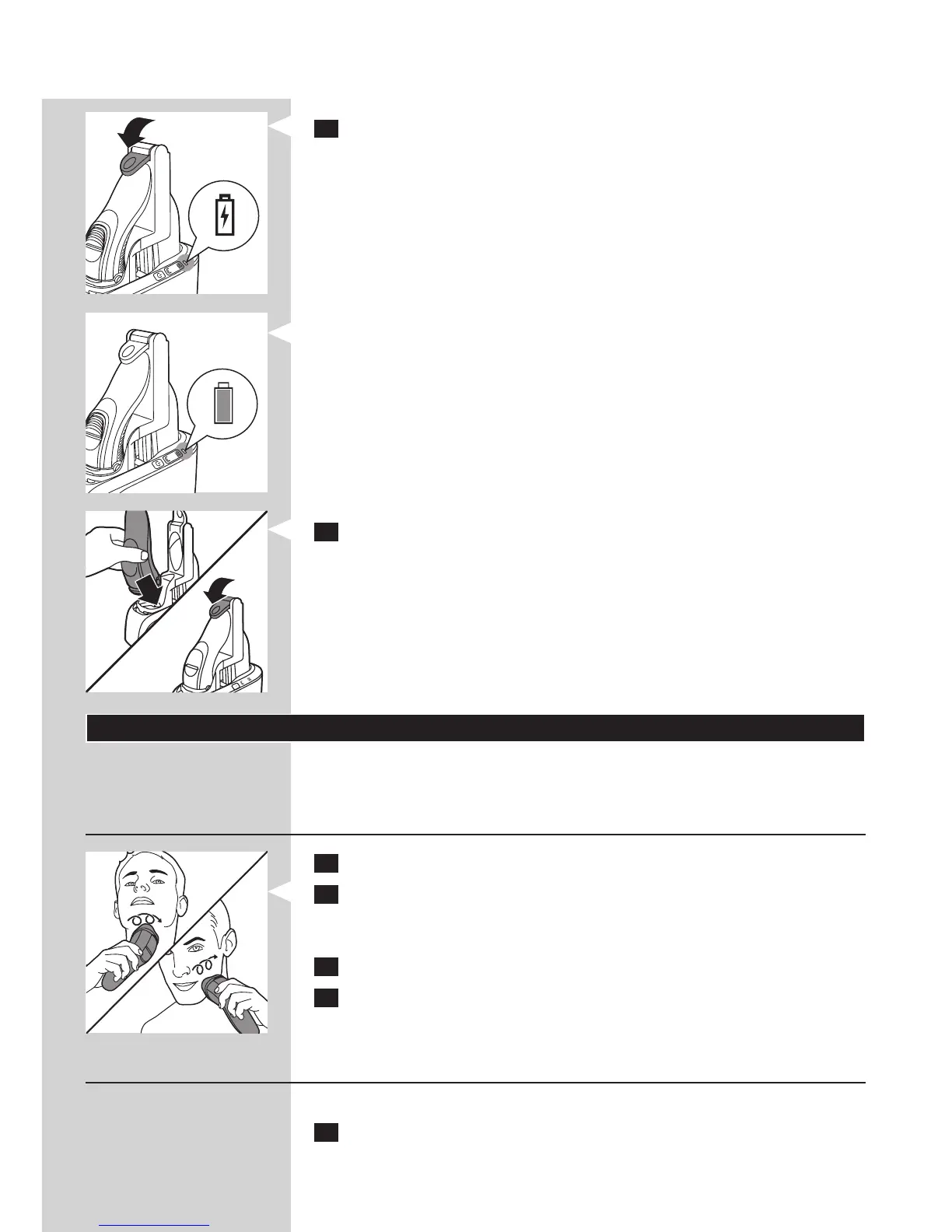
4 Push down the locking lever completely to lock the shaver into place.
, The battery symbol on the Jet Clean System ashes to indicate that
the shaver is being charged.
Note: When the Jet Clean System is performing the cleaning program, the
battery symbol is out.
, When the battery is fully charged, the battery symbol on the Jet
Clean System lights up continuously.
Note: After approx. 30 minutes, the battery symbol goes out to save energy.
5 To remove the shaver from the Jet Clean System, move the locking
lever upwards until it does not go any further and remove the shaver.
Using the shaver
Note: You can also use the appliance directly from the mains. Simply connect
the shaver to the mains.
Shaving
1 Press the on/off button once to switch on the shaver.
2 Move the shaving heads over your skin. Make circular movements.
- Your skin may need 2 or 3 weeks to get accustomed to the Philips
shaving system.
3 Press the on/off button once to switch off the shaver.
4 Clean the shaver (see chapter ‘Cleaning and maintenance’).
Trimming
You can use the trimmer to groom your sideburns and moustache.
1 Press the on/off button once to switch on the shaver.
ENGLISH10


 To Next Page